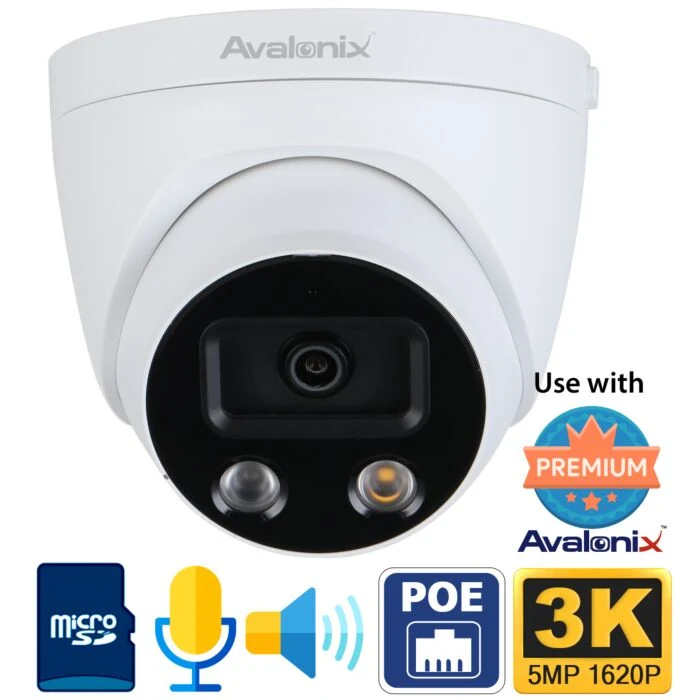
People Counting Camera - Avalonix 5MP PoE turret camera with enter and exit counting, report search by date, and foot traffic tracking for stores, laundromats, offices, and business entrances.
Two-Way Audio and Deterrence - Built-in microphone, built-in speaker, spotlight, voice alerts, and loudspeaker functions help the camera act as both a security camera and an active deterrence device.
5MP Wide View - Uses a 2.8mm fixed lens with a 98 degree horizontal angle of view, 5MP video, 1080P up to 60fps, True WDR, and starlight imaging for useful detail in changing light.
IR or White Light Night Coverage - Includes one Super IR LED and one white light LED, with up to 164ft illumination depending on mode, scene, and installation conditions.
No Monthly Subscription - Use with an Avalonix NVR, microSD storage up to 256GB, browser viewing, and phone app alerts without a required monthly subscription.
5% off cameras/recorders; 10% over $2,000 in equipment
?
Ends in 999 days · 23 hours
Discount calculated in shopping cart.
Base product only; accessories extra.
Choose accessories
Choose quantities for each item. Set a quantity to 0 to remove it.
Optional Mounts
Junction Box for Dome Cameras
Junction Box for Dome Cameras
SKU: JB137
4.8 Inch Dome Camera Junction Box - White aluminum junction box for select dome camera models with matching mounting holes.
Cable Protection - Helps conceal and protect the camera pigtail from outdoor exposure and tampering when installed correctly.
Conduit Ready - G1/2 inch conduit thread size for installations where conduit needs to enter the junction box.
Mounting Options - Can mount directly to a wall or be used with a compatible mini pole mount bracket when supported by the installation.
Size And Load Rating - Measures 4.80 x 1.35 inches and supports up to 2.2 lb according to the product specs.
Compatibility Note - Review the camera description before ordering, since this is not a universal dome camera junction box.
Wall Mount Arm Bracket - For installing compatible turret and dome cameras on walls where ceiling mounting is not practical.
Clean Camera Installation - Arm style design positions the camera away from the wall and gives room to conceal pigtail connectors.
White Aluminum Construction - Solid aluminum body with a white finish to match many camera housings.
Outdoor Or Indoor Use - Suitable for exterior walls, garage walls, fence posts, columns, and similar mounting surfaces.
Compatibility Note - Intended for select compatible camera models. Check the camera page before ordering.
Mini Pole Mount Bracket - Pole mount adapter for select smaller security cameras when used with a compatible junction box.
Select Junction Box Compatibility - Pre-drilled plate connects with compatible junction boxes for certain fixed camera installations.
Mast Mounting Range - Designed for masts at least 3.15 inches in diameter, with rear straps supporting up to 5.91 inch mast diameter.
White Aluminum Build - Weather resistant aluminum plate for supported professional outdoor or indoor installs.
Alternate Use - Can also mount select cameras carried by CCTV Camera World directly to rafters when COMPATIBILITY is supported.
Key Specs - 4.94 x 4.49 x 0.79 inches, 6.6 lb load rating, 0.6 lb weight, -40F to 140F operating range.
128GB microSD Card - Storage card for compatible IP cameras that support microSD edge recording.
Camera Storage Add-On - Useful for supported cameras with internal card slots and motion activated local recording.
Video Data Support - Listed with fast read and write speed for video data.
Brand May Vary - Supplied as Samsung or SanDisk according to the product page.
Installation May Vary - Some PTZ and dome cameras require factory card installation to preserve weather protection.
256GB microSD Card - Storage card for compatible IP cameras that support microSD edge recording.
Camera Storage Add-On - Useful for supported cameras with internal card slots and motion activated local recording.
Video Data Support - Listed with fast read and write speed for video data.
Brand May Vary - Supplied as Samsung or SanDisk according to the product page.
Installation May Vary - Some PTZ and dome cameras require factory card installation to preserve weather protection.
30W PoE Injector - Adds PoE power to one compatible IP camera, access point, VoIP phone, or network device.
Single Device Power - Practical when one PoE device needs power but the router or network switch does not provide PoE.
802.3Af/At Support - Compliant with standard PoE and PoE+ devices that accept 802.3af or 802.3at input.
10/100Mbps Data - Supports 10/100Mbps network connections for compatible devices.
Camera Installation Use - Connect the powered device to the PoE side and connect the data side back to a router, switch, or recorder network.
Distance Note - Intended for standard Ethernet cable runs up to 300ft when installed with proper cable and compatible equipment.
6ft Cat5E Patch Cable - Pre-made network cable for short indoor network connections, IP cameras, PoE camera systems, and other RJ45 devices.
RJ45 Ends Installed - Factory-terminated connectors save time compared with cutting and crimping your own cable.
Booted Connectors - Booted RJ45 tips help protect the connector latch from accidental damage or disconnection.
24Awg Cca Wire - Listed as 24AWG copper-clad aluminum wire.
White Jacket - White cable for clean indoor wiring paths, racks, cabinets, and short patch runs.
Protected Use - Best used indoors or inside conduit where the cable is protected from water.
25ft Cat5E Patch Cable - Pre-made network cable for IP cameras, IP systems, and general RJ45 network connections.
RJ45 Ends Installed - Ready-to-use cable avoids the need to crimp connectors in the field.
Booted Connectors - Connector boots help protect the latch and support a more secure connection.
24Awg Cca Wire - Listed as 24AWG copper-clad aluminum wire.
White Jacket - White cable works well for clean indoor cable routing and short network runs.
Protected Use - Intended for indoor use or conduit-protected runs where the cable is not exposed to water.
50ft Cat5E Network Cable - Pre-made cable for IP cameras, camera systems, and general RJ45 network connections.
RJ45 Tips Installed - Comes with RJ45 connectors already attached, reducing field crimping work.
Booted Connectors - Booted ends help prevent accidental disconnection and protect the connector tab.
24Awg Cca Wire - Listed as 24AWG copper-clad aluminum wire.
White Jacket - White cable for indoor installations, equipment rooms, and protected network runs.
Protected Use - Use indoors or in conduit where the cable is protected from water.
100ft Cat5E Patch Cable - Pre-made white network cable for IP camera, NVR, and general network connections.
Booted RJ45 Connectors - Factory-installed RJ45 ends help avoid field crimping and reduce accidental unplugging.
Indoor Or Protected Runs - Good for indoor use or conduit runs where the cable is protected from water.
24Awg Cca Wire - Economy patch cable for standard network and camera system wiring needs.
150ft Cat5E Patch Cable - Pre-made white network cable for IP cameras, NVRs, and general network connections.
Factory RJ45 Ends - RJ45 connectors are already installed, which saves time compared with crimping ends in the field.
Booted Connector Design - Booted RJ45 ends help protect the latch and reduce accidental unplugging.
Indoor Or Protected Runs - Suitable for indoor use or conduit runs where the cable is protected from water.
24Awg Cca Wire - Economy cable option for standard camera system and network wiring.
150ft Solid Copper Cat5E Cable - Pre-made white network cable for longer IP camera, NVR, and network patch runs.
350Mhz Rated Wire - Solid bare copper CAT5e construction supports reliable data and video signal quality.
Booted RJ45 Connectors - Factory-installed RJ45 ends reduce field crimping work and help prevent accidental disconnects.
Gigabit Ready When Supported - Can be used in Gigabit network applications with compatible network cards and switches.
Indoor Or Protected Installs - Best for indoor use or conduit runs where the cable is protected from water.
Includes One Cable - Includes one 150ft CAT5e cable with RJ45 connectors already attached.
Want a reliable way to measure foot traffic at your business? This Avalonix Premium Series 5MP turret camera includes people counting analytics that track enters and exits as customers pass through a rule you draw on the scene. It is a practical fit for convenience stores, laundromats, offices, and similar locations where knowing traffic patterns helps with staffing, scheduling, and verifying peak hours.
Unlike basic motion counts, people counting is designed to measure how many people cross a defined entry path, then store that data so you can pull reports by day, month, or year.
How People Counting Works
In our demo, setup is done directly in the camera menu. The key requirement is having a microSD card installed so the camera can store data and generate reports.
Insert a microSD card in the camera.
Go to Settings, then Event, then People Counting.
Draw your counting rule on the scene and set the parameters.
As people walk through, the camera updates enter and exit counts on screen.
Go to Report and search by date range to pull daily, monthly, or yearly totals.
Watch it in action: People Counting Demo (Wall or Side Mount)
This short demo shows the rule setup path, live enter and exit counts updating on the video, and how to pull reports by date. It also demonstrates the camera staying focused on the foreground counting area, even with distracting background objects in view.
Video transcript: People counting camera demo
[00:02] Do you wonder how much foot traffic your business gets?
Whether you operate a convenience store, a laundromat, or an office, knowing how many people are entering and exiting can provide useful insight into daily activity.
[00:15] This is an Avalonix Premium Series 5 megapixel turret camera with built-in people counting analytics.
You can use this camera to get a clear picture of how much foot traffic your business sees throughout the day.
[00:24] Setting up people counting is very easy.
First, make sure you have a microSD card installed inside the camera.
Then go to Settings, select Event, and choose People Counting.
Draw your counting rule on the scene and set the parameters. Once this is done, the camera is ready to count.
[00:42] As people walk through the rule, the camera automatically detects them and updates the counts.
[00:55] Once data has been collected, you can go to the Report section and search by date.
Here you can see one day of test data showing the total number of enters and exits.
You can pull reports for daily, monthly, or yearly foot traffic totals.
[01:05] In this demo, the camera is pulled up on a Mac using the viewing software.
The camera is connected directly over the network, and as people walk by, the live count is displayed on the video.
[01:16] You can see the enter count update in real time as someone crosses the rule.
When a person exits and walks back out, the exit count updates as well.
[01:26] In this setup, there are objects visible in the background.
The purpose of this test is to show that the camera focuses on analyzing the foreground and excludes unrelated background objects.
Many cameras on the market struggle with this, which can lead to inaccurate counts.
[01:55] This level of people counting performance is part of the Avalonix Premium Series available from CCTV Camera World.
You can find this people counting camera at cctvcameraworld.com for your business.
What We Saw in Testing
In our test footage, you can see the enter and exit numbers change live as people cross the counting rule. For example, the enter count updates immediately as someone passes through, and the exit count updates when they walk back out.
We also intentionally included background objects to see if the analytics would get confused. The camera stayed locked on the defined foreground path and did not count irrelevant background activity, which is a common issue with less capable people counting setups.
Mounting notes (ceiling, wall, and side profile counting)
Many people counting cameras assume overhead mounting for best results. In our testing for the new people counting video, we were able to mount from the side and still capture enter and exit counts from a side-profile view. Real-world accuracy always depends on doorway width, camera height, angle, and how cleanly the rule is drawn, but the side-mount result is useful when overhead mounting is not possible.
Audio and Active Deterrence Demos
Beyond people counting, this camera is also designed for proactive security. It includes built-in two-way audio and active deterrence features so you can speak through the camera, trigger voice alerts, and use light and sound to discourage unwanted behavior near entrances and service areas.
Watch it in action
Hear It for Yourself: Speaker Volume and Audio Demo
If you're wondering how loud the siren and speaker are on this camera, or how well two-way audio works from 30 feet away, check out our hands-on demo below. This test includes real decibel readings, distance tests, and a walk-through of how the camera connects to an NVR using a single PoE cable.
Key Features
People counting analytics: Enter and exit foot traffic counts
Reports by day, month, or year
Easy rule setup in the camera menu
Built-in microphone
Built-in speaker for two-way audio
Active deterrence spotlight and loudspeaker
Video analytics: includes people counting plus rule-based alerts
IP67 weather proof
12VDC, PoE, or ePoE
Wall or ceiling mount
FAQ
Do I need an NVR to use people counting?
No. In our demo we used a microSD card in the camera so it could store data and generate reports. An NVR is useful when you want centralized recording across multiple cameras.
Can this camera count both enters and exits?
Yes. When the people counting rule is configured, the camera tracks enter and exit counts as people cross the defined rule.
Where should I mount a people counting camera?
Overhead mounting is common, but it depends on the space. In our testing for the people counting demo, side mounting still produced usable results when the rule was drawn correctly and the scene was clean.
How do I pull people counting reports?
Go to the Report section and search by date range. The camera can show totals for daily, monthly, or yearly periods.
Is this still a full security camera?
Yes. It is designed for security use with two-way audio and active deterrence features, plus analytics like people counting.
Technical Features and Supported Functions
5MP IP Camera with Starlight Video
H.265 and H.264 Video encoding
H.265+ provides up to 70% in bandwidth savings over H.264
Triple Stream Video Encoding (one Main Stream and two Sub Streams)
Selectable resolutions
5MP 20fps, 2K 30fps, 1080P 60fps
2.8mm Fixed Lens (98° Wide Angle View)
Selectable Color Night Vision or IR Night Vision
Super IR LED provides up to 165ft of night vision
White Light LED provides up to 165ft of color night vision
Theft Deterrence
BrightSpotlight and Loudspeaker to alert intruders
Color vision at night with white light LED on
True WDR
Built-in Microphone - audio pick-up range 25ft radius
Built-in Speaker for Theft Deterrence sound files that can be customized
Two Way audio function to allow conversation with person at camera
No the camera does not record people counting as an event such as motion. You can not pair people counting detection with recording video on the camera's microSD or as motion event on the NVR. It is only for statistical analysis to pull reports over time.
Answer by: CCTV Camera World on Jun 23, 2026, 11:36 AM
Does this camera have audio detection?
Question by: Frank on Mar 13, 2026, 10:21 AM
Yes. Our professional Avalonix IP cameras support audio detection, and this setting can be managed through the camera’s built-in web interface.
To access these options, the user would open a web browser such as Chrome or Firefox on a Mac or PC that is connected to the same local network as the camera. After logging into the camera through the browser, they can go into the settings menu and turn audio detection on or off as needed.
In simple terms, audio detection lets the camera listen for sound changes in the area and respond when noise reaches a level you set. Through the web interface, the user can enable the feature, adjust how sensitive it is, set the threshold for what should count as an audio event, and choose what the camera should do when sound is detected. For example, the camera can be set to trigger recording or capture a snapshot when an audio event occurs.
Answer by: CCTV Camera World on Mar 13, 2026, 11:12 AM