


Panoramic Security Cameras
See More with Fewer Cameras
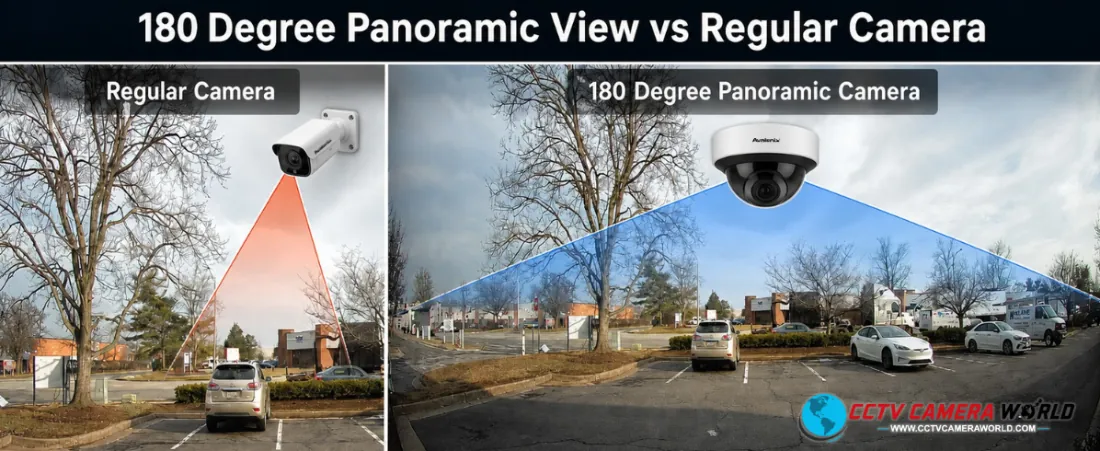
Panoramic security cameras help cover large areas with fewer devices while maintaining broad visibility. Whether you need a 180° wall-mounted view or full 360° ceiling coverage, they provide ultra-wide angle monitoring that helps reduce blind spots.
Unlike traditional fixed cameras, panoramic models use either a fisheye lens or multiple stitched sensors to create a broad field of view. The result is better situational awareness, simpler installations, and, in many cases, a lower total system cost.
Shop Panoramic Security Cameras
Browse our selection of panoramic PoE cameras below, including fisheye cameras, multi-sensor cameras, and wide-angle models for indoor and outdoor surveillance.
Choose a model based on the area you need to cover, whether you want a 180-degree wall-mounted view, full 360-degree ceiling coverage, or a multi-sensor camera that provides more detail across a wider scene.
-
 180 Degree Panoramic Camera, Outdoor PoE, Color Night Vision, 2-Way Audio, AvaEyeSKU: AEPANO4K$487.99 $629.99 23% off
 -
180 Degree Panoramic PoE Turret Camera with Audio and Active DeterrenceSKU: SC1804KT$360.00 $449.99 20% off
-
-
4K Panoramic Camera, Outdoor PoE, 180 Degree View, Color Night Vision, 2-Way AudioSKU: 4KADPANOT$459.99 $699.99 34% off
What Are Panoramic Security Cameras?
Panoramic security cameras provide wide-area coverage from a single device by using either a fisheye lens or multiple stitched sensors. They are commonly used in warehouses, retail stores, offices, parking lots, and other spaces where broad coverage matters more than a narrow field of view.
Types of Panoramic Security Cameras
There are two main types of panoramic security cameras: fisheye cameras and multi-sensor panoramic cameras. Both provide wide coverage, but they work differently and are better suited for different applications.
| Type | Key Characteristics | Best Use Case |
|---|---|---|
| Fisheye Cameras | Single ultra-wide lens; available in 180° and 360° views; requires dewarping for corrected viewing | Indoor rooms, lobbies, and compact spaces |
| Multi-Sensor Panoramic Cameras | Multiple lenses or sensors stitched into one wide view; little to no distortion; clearer details across the scene | Outdoor areas, large open spaces, corridors, and intersections |
Fisheye vs Multi-Sensor Panoramic Cameras
Understanding the key differences between fisheye and multi-sensor panoramic cameras is important when choosing the right camera for your security camera system.
| Feature | Fisheye Cameras | Multi-Sensor Panoramic Cameras |
|---|---|---|
| Lens Type | Single ultra-wide lens | Multiple lenses and sensors |
| Field of View | 180° or 360° from one lens | Wide stitched view |
| Image Distortion | Yes, but corrected with dewarping | Little to none |
| Image Clarity | Best for overview; less detail at distance | Better detail across the full scene |
| Best Use | Indoor and smaller areas | Outdoor and larger areas |
| Setup Requirements | Compatible NVR, VMS, or client software for dewarped viewing | Usually displays without dewarping |
How Panoramic Cameras Work
Panoramic cameras achieve wide coverage using two different approaches:
Fisheye Optics
A single curved ultra-wide lens captures a circular or hemispherical image. Compatible software or an NVR then dewarps that image into usable viewing modes.
Multi-Sensor Stitching
Multiple sensors capture different angles at the same time. Those images are then stitched together into a single panoramic view, helping maintain better detail across the full scene.
Advantages of Panoramic Cameras
Because one panoramic camera can replace several fixed cameras, these models are especially useful in large, open layouts.
- Cover large areas with a single camera
- Reduce installation time and cabling
- Lower overall system cost with strategic placement
- Help reduce blind spots in open environments
- Simplify camera management
Common Use Cases
Panoramic cameras are ideal for:
- Warehouses and distribution centers
- Retail stores and showrooms
- Office lobbies and open workspaces
- Parking lots and garages
- Schools and campuses
- Restaurants and hospitality spaces
- Corridors, intersections, and building corners
Anywhere you need broad coverage without installing multiple cameras, panoramic solutions can make sense.
Installation Considerations
Before choosing a panoramic camera, consider the following:
Mounting Position
- Ceiling-mounted fisheye cameras are best for 360° coverage
- Wall-mounted panoramic cameras are better for 180° views
Coverage vs Detail
- Wider coverage usually reduces pixel density
- Multi-sensor cameras maintain better detail across distance
Lighting Conditions
- Large coverage areas need enough light to maintain usable detail
- Higher mounting positions can improve coverage, but may reduce finer details
Recorder Compatibility
- Fisheye cameras need compatible dewarping support for corrected viewing
- Multi-sensor cameras typically display without dewarping
How to Choose the Right Panoramic Camera
Use this quick decision table:
| If you need... | Choose a... |
|---|---|
| 360° ceiling-mounted indoor coverage | Fisheye camera |
| Cost-effective wide indoor overview | Fisheye camera |
| Large outdoor coverage | Multi-sensor panoramic camera |
| Better detail at distance | Multi-sensor panoramic camera |
| Minimal distortion without dewarping | Multi-sensor panoramic camera |
Frequently Asked Questions about Panoramic Security Cameras
Do panoramic cameras replace multiple cameras?
In many cases, yes. A single panoramic camera can sometimes replace 2 to 4 fixed-lens cameras, depending on the scene, mounting height, and the amount of detail required.
What is the difference between 180° and 360° cameras?
180° cameras are typically wall-mounted and cover one direction with front-facing detail, while 360° cameras are typically ceiling-mounted and cover all directions for general area visibility.
Do fisheye cameras distort the image?
Yes. Fisheye cameras capture a naturally curved image, but compatible software or an NVR can dewarp that image into more usable viewing modes.
Do I need a special NVR for panoramic cameras?
If you want corrected fisheye views, you need a compatible NVR, VMS, or client software that supports dewarping. Multi-sensor panoramic cameras display without needing dewarping.
Are panoramic cameras good for outdoor use?
Yes, especially multi-sensor panoramic cameras, which are better suited for large outdoor areas where good detail and broad coverage are both important.