

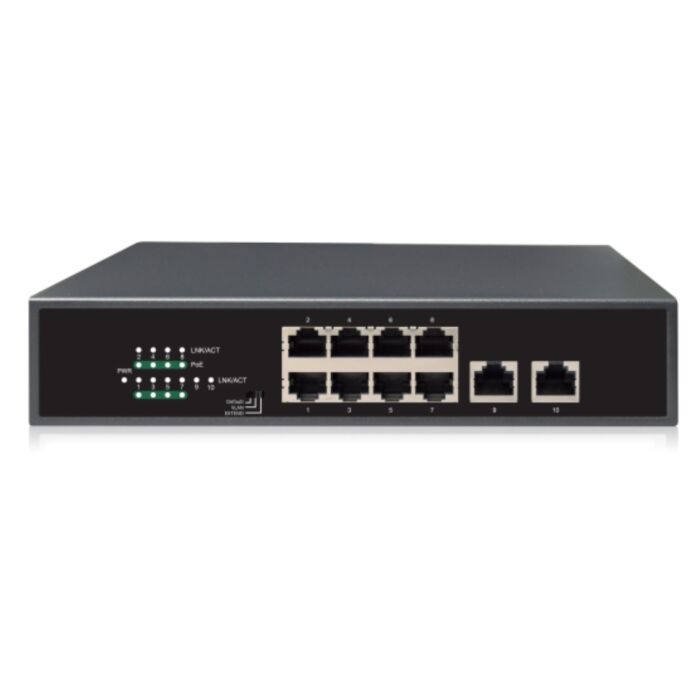

8 Port Gigabit PoE Switch
Special Price
$110.00
Regular Price
$249.99
56% off
Overview
8 Port Gigabit PoE Switch - Powers up to 8 compatible PoE cameras or PoE network devices with gigabit PoE ports.
120W PoE Budget - Provides 120W total PoE power for supported 802.3af/at devices.
Dual Gigabit Uplinks - Includes 2 gigabit RJ45 uplink ports for connection to an NVR, router, computer, or main network switch.
Extended PoE Function - Supports extended PoE operation for supported long camera runs up to 250 meters when used with compatible devices and proper cabling.
Unmanaged Switch - Simple plug-and-play network switch with no managed web interface required for normal use.
Camera System Use - Useful for small to medium IP camera installations where power and data need to be centralized through one switch.
When you’re putting together a new security camera system setup, one thing that makes life easier is a solid PoE switch. This 8-Port Gigabit PoE Switch powers and connects up to eight cameras with just a single Ethernet cable for each one. No separate power bricks or outlets near the cameras are needed. Plug your PoE cameras into the switch, hook it up to your NVR and router, and you’re ready to go. It’s a straightforward way to build a IP PoE security camera system without messing around with complicated setup screens as is usually the case for managed switches.
Reliable Power for IP Cameras
Each of the eight PoE ports can supply up to 30 watts of power, which is plenty for most outdoor bullet or dome cameras, and even a few smaller PTZ models. The switch has a total power budget of 120 watts, so it can handle several cameras running at once without any drops. For small business systems or home camera systems that need reliability more than fancy management features, this one hits the mark.
There’s also an Extended PoE mode built in. That comes in handy when you’ve got cameras sitting far from the network room—say, out by a gate or driveway. It works great with low-wattage cameras that use under 10 watts of power, letting you push runs up to 250 meters (820 ft) without using a PoE extender. It’s a simple way to get more reach out of your existing cable without adding extra hardware.
Dual Uplink Ports for Smooth Networking
Two dedicated Gigabit uplink ports make it easy to tie the switch into your network. One can go straight to your NVR for recording, and the other can link to your router or another switch if you’re adding more cameras later. The Gigabit bandwidth keeps video streams moving smoothly, even with multiple 4K cameras on the same network.
Built Tough and Easy to Use
There’s no software to install and nothing to configure. Plug it in, connect your cables, and you’re done. The metal housing has a cooling fan, so it may make some noise but it stays cool. You can place it on a desk, mount it to a wall, or tuck it inside a cabinet- it’s designed for flexibility. Whether you’re wiring a warehouse, school, or small office, this switch is made to run steady day in and day out.
Features
- 8 x Gigabit (10/100/1000 Mbps) PoE+ ports
- Each port delivers up to 30W of power for PoE (802.3af) and PoE+ (802.3at) devices
- Total PoE power budget: 120W
- 2 x Gigabit uplink ports for connection to NVR or router
- Auto-sensing ports for easy plug-and-play installation
- Fanless metal housing for silent operation and heat dissipation
- IEEE 802.3x flow control and store-and-forward switching
- Supports up to 100 meters (328 ft) PoE transmission over CAT5e/CAT6 cable
- Ideal for powering 4K IP security cameras
- Compact size suitable for desktop or wall-mount use
Specifications
| Ports | 8x 1000Mbps PoE ports (RJ45)+ 2x 1000Mbps ports (RJ45) |
| Standards | IEEE802.3, IEEE802.3u, IEEE802.3az, IEEE802.3x, IEEE802.3af, IEEE802.3at |
| Switching Capacity | 20 Gbps |
| Forwarding Performance | 14.88 Mpps |
| Packet Buffer | 2 M bit |
| MAC Address Table | 2K |
| PoE Standard | 802.3af/at (Both PoE and PoE+) |
| PoE Power | Total: 120 W; Max per port: 30 W |
| Working Modes |
Default (Normal): all ports communicate VLAN (Secure): downlink ports communicate only with uplinks EXTEND (Surveillance): transmission distance up to 250 meters (820ft) also downlink ports can communicate only with uplink ports. |
| MTBF | Greater than 50,000 hours |
| Indicator LEDs | PWR: |
| PoE: Off: No PoE power supply Steady on: PoE power supply is normal Flashing: PoE power supply is abnormal |
|
| LINK/ACT: Off: No link Steady: Linked at 10/1000Mbps Flashing: Transmitting data |
|
| Speed: Off: Linked at 10/100Mbps On: Linked at 1000Mbps |
|
| Cooling Fans | 1 |
| Power Supply | AC 100 to 240 V, 50/60 Hz |
| Operating Temperature | 32°F to 113°F |
| Operating Humidity | 10% to 90% non-condensing |
| Storage Humidity | 5% to 90% non-condensing |
| Dimensions (W x D x H) | 220 mm x 150 mm x 44 mm (8.7 in x 5.9 in x 1.7 in) |
| Weight | 2.8 lbs |
| Brand | CCTVCameraWorld |
|---|---|
| Series | AvaEye |
| Warranty | 1 Year |
| Return Policy | Accessories are non-returnable, non-refundable. |
Write Your Own Review
Product Questions
Can an AvaEye PoE switch run a PoE camera over 300 ft without an extender? The camera I want to use is PoE+ and consumes 13 Watts when the night time infrared LEDs are on.
Question by: Ed on May 18, 2026, 11:32 AM
Yes, this AvaEye PoE switch can be used for camera runs over 300 ft without a separate PoE extender when Extended PoE mode is enabled and the installation uses good quality solid copper Cat5e or Cat6 cable.
A 13 watt PoE+ camera is a reasonable load for this type of setup, even when the infrared LEDs are on at night, as long as the total PoE budget of the switch is not exceeded. The bigger factors are cable quality, distance, camera power draw, and whether Extended PoE mode is supported and enabled on the switch.
For best results, use solid copper cable, avoid CCA cable, and test the camera before final installation. Extended PoE mode may reduce network speed on that port, but that is usually fine for security cameras. Higher power devices, PTZ cameras, heaters, poor cable, or very long runs may still require a PoE extender, fiber, or a different network design.
A 13 watt PoE+ camera is a reasonable load for this type of setup, even when the infrared LEDs are on at night, as long as the total PoE budget of the switch is not exceeded. The bigger factors are cable quality, distance, camera power draw, and whether Extended PoE mode is supported and enabled on the switch.
For best results, use solid copper cable, avoid CCA cable, and test the camera before final installation. Extended PoE mode may reduce network speed on that port, but that is usually fine for security cameras. Higher power devices, PTZ cameras, heaters, poor cable, or very long runs may still require a PoE extender, fiber, or a different network design.
Answer by: CCTV Camera World on May 18, 2026, 12:47 PM
Related Products
Check items to add to the cart or
-
 High Power 24 Port PoE+ Plus SwitchSpecial Price $350.00 Regular Price $499.99 30% off
 -
-