

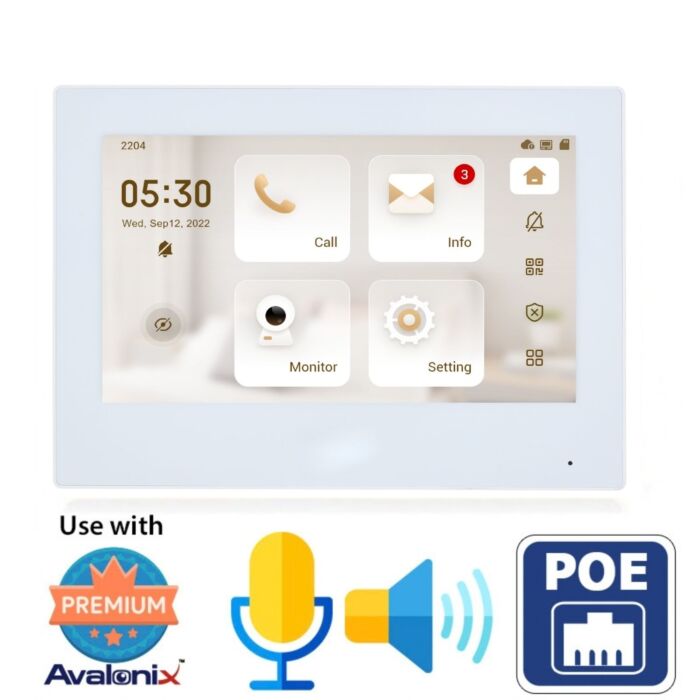

7 Inch PoE WiFi Video Intercom Monitor with Two-Way Audio, White - Avalonix ICT7
$290.00
Overview
7-Inch Video Intercom Monitor - White indoor touchscreen monitor with a 1024 × 600 capacitive display for answering video intercom calls at homes and businesses.
See, Talk and Unlock - Built-in microphone and speaker provide two-way audio with a compatible video intercom door station, with on-screen control for releasing a connected electric door strike.
PoE or WiFi Connection - Connect by Ethernet using standard PoE for power and network data over one cable, or use 2.4GHz WiFi with 12VDC power.
Works with the Avalonix IC1080POE - Use the ICT7 as a dedicated indoor answering station with the compatible Avalonix video intercom at an entrance, reception area, storefront, office, home, or loading area.
View Compatible IP Cameras - ONVIF support lets the ICT7 display compatible network security cameras in addition to the video intercom door station.
Expandable Intercom System - Supports multiple indoor monitors for installations that need an answering station in more than one room or area.
Alarm Integration - Six alarm inputs and one alarm output support additional wired alarm and doorbell functions when properly configured.
No Required Monthly Fee - Use the ICT7 as part of a local Avalonix video intercom system without a required monthly subscription.
The Avalonix ICT7 is a white 7-inch indoor touchscreen monitor for IP video intercom systems in homes and businesses. Mount it inside an office, storefront, reception area, warehouse, home, or other property where someone needs a dedicated screen to answer a door call, see the visitor, speak with them, and unlock a controlled entrance.
Pair the ICT7 with the Avalonix IC1080POE video intercom to create a dedicated indoor answering station instead of relying only on a mobile phone. When a visitor calls from the compatible outdoor intercom, the ICT7 provides live video and two-way audio from its 7-inch touchscreen. After verifying the visitor, the user can send the unlock command to the intercom controlling the connected electric door strike.
The ICT7 connects to the network using standard PoE or 2.4GHz WiFi. A wired PoE installation carries network data and power over one Ethernet cable, making it a clean choice for permanent wall-mounted installations. When WiFi is used for the network connection, the monitor requires 12VDC power.
See How the Avalonix Video Intercom System Works
Watch this overview to see how an Avalonix indoor monitor works with a compatible IP video intercom for visitor calls, live video, two-way audio, and entrance control. The current ICT7 provides the indoor touchscreen interface for this type of installation.

Dedicated Indoor Video Intercom Screen
A smartphone is convenient when you are away, but a dedicated indoor monitor gives people inside the building a fixed place to answer the entrance. The ICT7 works well at reception desks, front offices, homes, shipping areas, secure interior entrances, and other locations where employees or residents regularly need to communicate with visitors.
The 7-inch TFT capacitive touchscreen has a 1024 × 600 resolution and provides direct access to intercom, monitoring, and door-control functions. A built-in microphone and speaker handle two-way conversations without an external microphone, handset, or speaker.
See the Visitor, Talk and Unlock the Door
When the ICT7 is paired with a compatible Avalonix video intercom such as the IC1080POE, a visitor can press the call button at the entrance to reach the indoor monitor. The person inside can view the visitor, answer the call, carry on a two-way conversation, and release the compatible electric door strike through the intercom system.
The door lock or electric strike connects to the compatible door station, not directly to the ICT7. The indoor monitor sends the unlock command across the network to the intercom, which operates the connected door hardware.
PoE or WiFi Installation
For a wired installation, connect the ICT7 to a standard PoE switch using CAT5e or CAT6 cable. Standard PoE carries both network communication and electrical power over the Ethernet connection, eliminating the need for a separate power outlet next to the monitor.
The ICT7 also supports 2.4GHz 802.11b/g/n WiFi. WiFi eliminates the Ethernet data connection but does not eliminate the need for power. When using WiFi, power the monitor from a compatible 12VDC 1A source.
Monitor Compatible ONVIF IP Cameras
The ICT7 is more than an answering screen for the front door. It supports ONVIF and can display video from compatible IP security cameras connected to the network. This lets someone at the indoor monitor check another camera around the property without going to an NVR or computer.
ONVIF provides standardized communication between compatible network video products, but available functions depend on the camera and configuration. Learn more in our guide to ONVIF security cameras.
Multiple Indoor Monitors
The ICT7 supports installations that need more than one indoor answering station. Manufacturer specifications list support for up to 9 extensions in a villa configuration and 4 in an apartment configuration. A WiFi intercom configuration supports one main monitor and two extension monitors.
This gives a home or business the option to place intercom screens in different areas instead of requiring everyone to answer from the same location.
Wired Alarm and Doorbell Inputs
Six alarm inputs and one alarm output provide connections for compatible wired sensors and alarm functions. A wired doorbell button can also use one of the alarm input ports. These connections make the ICT7 useful for installations that combine video intercom communication with additional entrance or alarm functions.
H.265 and H.264 Video Support
The ICT7 decodes both H.265 and H.264 video. Support for both compression formats gives the monitor flexibility when displaying video from compatible intercom stations and network cameras.
Local Intercom Operation Without a Required Monthly Fee
The Avalonix ICT7 works as part of a locally installed video intercom system and does not require a monthly subscription for normal indoor intercom operation. A compatible intercom system can also provide mobile access when it is properly connected to the network and Internet.
For setup information related to IP video intercoms, see our professional video intercom setup guide.
ICT7 Features
- 7-inch TFT capacitive touchscreen
- 1024 × 600 screen resolution
- White indoor housing
- Built-in microphone
- Built-in speaker
- Two-way audio
- Echo suppression
- H.265 and H.264 video decoding
- ONVIF support for compatible IP camera monitoring
- RTSP, RTP, SIP and network protocol support
- 10/100 Mbps Ethernet port
- 2.4GHz WiFi, IEEE 802.11b/g/n
- Standard PoE power
- 12VDC 1A power input
- 6 wired alarm inputs
- 1 alarm output
- Wired doorbell input support through an alarm input
- Surface wall-mount installation
- Multiple indoor monitor support
- Compatible with the Avalonix IC1080POE video intercom
- No required monthly subscription for local intercom operation
What's Included?
- (1) Avalonix ICT7 7-inch IP and WiFi indoor video intercom monitor, white
- (1) Surface-mount wall bracket
- (1) Alarm connection ribbon cable
Technical Specifications
| Product Type | IP and WiFi indoor video intercom monitor |
| Series | Avalonix |
| Model | ICT7 |
| Color | White |
| Display | 7-inch TFT capacitive touchscreen |
| Screen Resolution | 1024 × 600 |
| Video Decoding | H.265, H.264 |
| Audio Input | Built-in microphone |
| Audio Output | Built-in speaker |
| Audio Mode | Two-way audio |
| Audio Compression | G.711a, G.711u, PCM |
| Audio Enhancement | Echo suppression |
| Interoperability | ONVIF, SDK |
| Network Protocols | RTSP, RTP, SIP, DNS, SSH |
| Ethernet | 1 × 10/100 Mbps Ethernet port |
| WiFi | 2.4GHz IEEE 802.11b/g/n |
| WiFi Security | WPA/WPA2, WPA-PSK/WPA2-PSK |
| Alarm Inputs | 6 |
| Alarm Outputs | 1 |
| Doorbell Input | Yes, using an alarm input port |
| MicroSD / TF Card | Up to 64GB, reserved for software |
| Extension Support | Villa: up to 9; Apartment: up to 4; WiFi intercom: 1 main monitor plus 2 extension monitors |
| Power | 12VDC 1A or standard PoE |
| PoE Input | 36–57V, 0.35A |
| Power Consumption | ≤2W standby, ≤6W operating |
| Installation | Surface wall mount |
| Housing Material | PC + ABS |
| Operating Temperature | 14°F to 131°F (-10°C to +55°C) |
| Operating Humidity | 10%–95% RH, non-condensing |
| Dimensions | 7.50 × 5.30 × 1.00 inches (189.6 × 134.6 × 26.0 mm) |
| Net Weight | 0.74 lb (0.34 kg) |
| Certifications | CE, FCC |
Frequently Asked Questions
What is the Avalonix ICT7 used for?
The ICT7 is a 7-inch indoor touchscreen for a compatible IP video intercom system. It gives a homeowner, receptionist, employee, or other authorized user a dedicated screen for answering entrance calls, viewing the visitor, speaking with them, and sending an unlock command to the compatible door station.
Does the ICT7 work with the Avalonix IC1080POE video intercom?
Yes. The ICT7 works as the indoor answering monitor for the compatible Avalonix IC1080POE video intercom. The two devices communicate over the network for visitor calls, live video, two-way audio, and door-unlock control.
Does the ICT7 support PoE and WiFi?
Yes. For a wired installation, standard PoE carries network data and power over one Ethernet cable. The ICT7 also connects to a 2.4GHz WiFi network. When WiFi is used instead of Ethernet, the monitor still requires 12VDC power.
Can the ICT7 display other IP security cameras?
Yes. The ICT7 supports ONVIF and can display video from compatible ONVIF IP cameras connected to the network. Camera compatibility and available functions depend on the camera and network configuration.
Can the ICT7 unlock an electric door strike?
Yes, when it is paired with a compatible video intercom door station that controls the electric strike. The ICT7 sends the unlock command over the network to the door station, which operates the connected door hardware.
Can I install more than one ICT7 indoor monitor?
Yes. The ICT7 supports multi-monitor installations. Published limits include up to 9 extensions for a villa configuration, up to 4 for an apartment configuration, and one main monitor with two extension monitors in a WiFi intercom configuration.
Does the ICT7 require Internet access?
No. Local communication between a compatible door station and the ICT7 works over the local network. Internet access is required when the intercom system is configured for remote mobile app access outside the local network.
Does the ICT7 require a monthly subscription?
No. The ICT7 does not require a monthly subscription for local video intercom operation with a compatible Avalonix system.
| Camera Type | IP |
|---|---|
| Video Encoding | H.264 |
| Resolution | 720P |
| Audio | Built-in Mic & Speaker |
| SD Card Slot | Yes |
| Power Input | PoE |
| Operating Temperature | +14deg;F to +131°F |
| Dimensions | 7.50 × 5.30 × 1.00" |
| Weather Proof | Indoor Use |
| Camera Color | White |
| Warranty | 1 Year |
| Brand | CCTVCameraWorld |
| Series | Avalonix |
| Return Policy | 30 Days Return Policy |
Write Your Own Review
Product Questions
Does this camera have audio detection?
Question by: Frank on Mar 13, 2026, 10:21 AM
Yes. Our professional Avalonix IP cameras support audio detection, and this setting can be managed through the camera’s built-in web interface.
To access these options, the user would open a web browser such as Chrome or Firefox on a Mac or PC that is connected to the same local network as the camera. After logging into the camera through the browser, they can go into the settings menu and turn audio detection on or off as needed.
In simple terms, audio detection lets the camera listen for sound changes in the area and respond when noise reaches a level you set. Through the web interface, the user can enable the feature, adjust how sensitive it is, set the threshold for what should count as an audio event, and choose what the camera should do when sound is detected. For example, the camera can be set to trigger recording or capture a snapshot when an audio event occurs.
To access these options, the user would open a web browser such as Chrome or Firefox on a Mac or PC that is connected to the same local network as the camera. After logging into the camera through the browser, they can go into the settings menu and turn audio detection on or off as needed.
In simple terms, audio detection lets the camera listen for sound changes in the area and respond when noise reaches a level you set. Through the web interface, the user can enable the feature, adjust how sensitive it is, set the threshold for what should count as an audio event, and choose what the camera should do when sound is detected. For example, the camera can be set to trigger recording or capture a snapshot when an audio event occurs.
Answer by: CCTV Camera World on Mar 13, 2026, 11:12 AM