

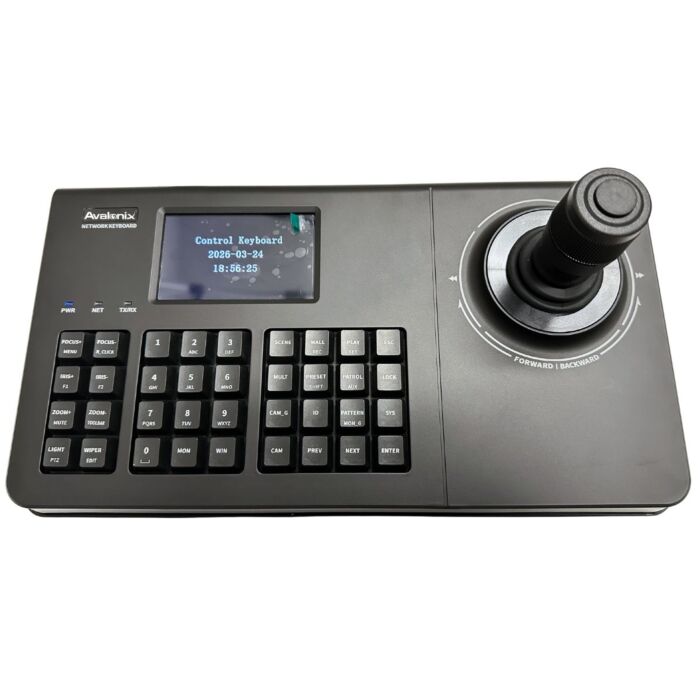

ONVIF PTZ Joystick Controller for PTZ Cameras, AvaEye KB110E
$499.99
Overview
PTZ Joystick Controller - Network-based keyboard controller for smoother hands-on pan, tilt, zoom, and focus control.
Ava Eye System Fit - Best suited for AvaEye PTZ cameras and NVR systems. Third-party ONVIF camera compatibility depends on the camera.
Ethernet Connection - RJ45 network connection allows the controller to work on a compatible local network.
4D Joystick Control - Physical joystick and buttons make PTZ movement easier than using a mouse or on-screen controls.
Built-In Screen - 4-inch screen helps with menu navigation and system status.
Legacy Interfaces - RS232 and RS485 support select legacy integrations when properly configured.
Local System Use - Can be used on a local camera network without internet when the controller, cameras, recorder, and switch are configured together.
Ndaa Compliant - Listed as NDAA compliant in the product description.

The AvaEye KB110E is an ONVIF PTZ joystick controller for compatible PTZ cameras, NVR systems, and third-party ONVIF cameras. Instead of trying to control a pan-tilt-zoom camera with a mouse, this PTZ keyboard gives the operator a physical 4D joystick, dedicated buttons, RJ45 Ethernet connectivity, and a built-in 4-inch screen for smoother hands-on camera control.
A dedicated PTZ controller is useful when cameras are actively monitored in real time. The joystick makes it easier to pan, tilt, zoom, and fine tune the view when following a person, vehicle, gate, loading dock, parking lot, warehouse aisle, or building entrance. For occasional camera movement, software controls may be enough. For live monitoring, a physical PTZ joystick gives the operator better control.
Important: The KB110E is best suited for AvaEye cameras and systems. It may also work with third-party ONVIF PTZ cameras, but compatibility depends on the camera model, firmware, recorder, network settings, and user permissions.
The video below shows the KB110E PTZ joystick controller being used in a standalone AvaEye PTZ camera system with an AvaEye PTZ camera, AvaEye NVR, PoE switch, and local monitor. It demonstrates how the joystick can send pan, tilt, and zoom commands over the local network while the NVR records the camera. Internet access is not required for the standalone setup shown in the video, as long as the PTZ camera, NVR, PoE switch, and joystick controller are configured on the same local network. Internet is only needed if you want remote viewing or off-site access through the app.
Common Use Cases for a PTZ Keyboard Controller
- Security desks monitoring parking lots, gates, and building perimeters
- Warehouses and distribution centers where cameras are actively watched
- Schools, offices, and campuses that need quick camera movement
- Retail stores where staff may need to adjust a camera view quickly
- Control rooms with multiple PTZ cameras or video wall displays
PTZ Camera Control in Real-World Commercial Environments
Actively tracking vehicles and zooming in for detail using a PTZ camera and joystick controller
In places like parking lots, warehouses, and retail centers, operators often need to move the camera and zoom in at the same time. A PTZ keyboard is much easier for that than using a mouse. It gives the operator better control when following a vehicle, checking a gate, watching a loading area, or zooming in to capture details.
Key Features
- ✔ 4D joystick for pan, tilt, zoom, and focus control
- ✔ Built-in 4-inch screen for status and menu navigation
- ✔ RJ45 Ethernet connection for IP-based control
- ✔ Multi-user permissions and keyboard lock support
- ✔ Works with compatible NVR systems, PTZ cameras, and video wall setups
- ✔ Compact desktop design for a security desk or monitoring station
Why Use a PTZ Keyboard Instead of a Mouse
You can control a PTZ camera through software, but a mouse is not always the best tool for the job. A PTZ joystick controller gives you smoother movement and better speed control. That matters when someone is actively watching cameras and needs to follow a person, vehicle, or event as it happens.
Using the joystick for smooth, real-time PTZ camera control on an NVR system
With the KB110E, the operator can move the camera, zoom in, and fine tune the view without constantly switching between on-screen controls. For a camera that is only adjusted once in a while, a mouse may be fine. For live monitoring, a physical controller is usually a better experience.
4D Joystick for Real-Time Camera Control
The built-in joystick gives the operator direct control of the PTZ camera. It can be used for slow adjustments when you need a steady view, or faster movement when you need to reposition the camera quickly. That makes it useful for locations where response time matters.
Built-In Display and Physical Controls
The 4-inch screen gives quick access to status information and menu options. The physical buttons also make the controller easier to use at a desk because basic operation does not depend only on a browser, mouse, or software dashboard.
Installation and System Integration
The KB110E is made for desktop use in control rooms, security offices, front desks, and monitoring stations. It is compact enough to sit next to an NVR, monitor, or workstation without taking over the whole desk.
It connects to the network using RJ45 Ethernet and can be used as part of compatible IP camera systems and NVR systems. For best results, install the controller on the same network as your AvaEye cameras and recorder.
RS232 and RS485 ports are also included for select legacy or hybrid setups.
Rear panel connections for integrating the PTZ controller with your NVR and network
ONVIF Compatibility and Third-Party Camera Support
The KB110E supports ONVIF-based PTZ control, which may allow it to work with certain third-party IP cameras and systems outside of AvaEye.
In our testing, this controller has worked with select systems from brands such as GW Security, Axis, Hikvision, Surevision, LTS, Dahua, Amcrest, Lorex, and Uniview. That can make it useful for mixed-brand systems or existing installations where you want joystick control without replacing everything.
That said, ONVIF compatibility is not the same as a guarantee that every feature will work on every camera. Firmware, camera model, recorder model, network setup, and user permissions can all matter. If you plan to use this controller with non-AvaEye equipment, we recommend contacting us first so we can help check compatibility.
Web-Based Setup and Network Configuration
The KB110E also has a web-based interface for network setup and device configuration. You can log in over the network to adjust settings, manage device connections, and configure compatible cameras.
This is helpful when setting up the controller in a larger system because you are not limited to only the onboard display. Network settings and connected devices can be managed from a browser on the same network.
Who This PTZ Controller Is For
This PTZ keyboard controller is for customers who actively control their cameras, not just customers who leave every camera on a fixed view. It is a good fit for businesses, schools, warehouses, parking lots, and commercial properties where someone may need to move cameras throughout the day.
If you only move a PTZ camera once in a while, software controls may be enough. If you want smoother real-time control, a dedicated PTZ controller like the KB110E is the better tool.
Specifications
| General | |
| Screen Size | 4 inches |
| Joystick | Four-dimensional joystick |
| Max Power Consumption | < 5W |
| Product Dimensions (W x H x D) | 13.58 x 7.47 x 5.05 inches |
| Weight | 2.64 lbs |
| Operating Temperature | 14°F to 131°F |
| Operating Humidity | 10% to 90% RH, non-condensing |
| Interfaces | |
| Serial Port | 1 x RS232 (DB9, reserved) 2 x RS485 (half-duplex, reserved) |
| Console | 1 x Console / RS485 shared interface (RJ45) |
| USB | 2 x USB (reserved) |
| Network Interface | 1 x RJ45, 10/100/1000 Mbps adaptive |
| Power | DC 12V |
| Reset | 1 x Reset button |
Frequently Asked Questions
Does this PTZ controller work with any IP camera?
The KB110E can work with ONVIF IP cameras that support PTZ control, but the actual result depends on the camera's firmware and how well that camera supports ONVIF commands. We have tested it with a variety of brands including GW Security, Axis, Hikvision, Dahua, Amcrest, Lorex, Uniview, and Surevision. If you are trying to use it with a specific camera model, please contact us before ordering so we can help confirm compatibility.
Why use a PTZ keyboard instead of controlling the camera with a mouse?
A mouse is fine for occasional adjustments, but it is not ideal when you are actively following movement. The joystick gives you smoother pan, tilt, and zoom control, which makes a difference when tracking a person, vehicle, gate, loading area, or parking lot in real time.
Do I need special software to use this controller?
No special desktop software is needed for basic use. The controller has physical buttons, a joystick, and a built-in screen. It also has a web interface for network setup and adding compatible devices.
Can this controller move more than one PTZ camera?
Yes. It is made for systems with more than one PTZ camera. You can switch between compatible cameras and control them from the same keyboard, which is useful at a security desk or monitoring station.
Where is a PTZ keyboard controller usually used?
We usually see PTZ keyboards used in places where someone is watching cameras live. That includes security offices, front desks, warehouses, schools, retail stores, parking lots, and control rooms.
Is the KB110E difficult to install?
For most compatible IP camera systems, setup is straightforward. The controller connects by Ethernet and should be placed on the same network as the cameras and recorder. The main thing is making sure the camera supports ONVIF PTZ control functions.
Can I use this PTZ joystick controller without internet?
Yes. The KB110E can be used in a local standalone AvaEye PTZ camera system without internet access. The PTZ camera, AvaEye NVR, PoE switch, and joystick controller need to be configured on the same local network. The NVR can record the camera while the joystick sends PTZ control commands locally. Internet is only needed if you want remote viewing or off-site access through the app.
| Brand | CCTVCameraWorld |
|---|---|
| Series | AvaEye |
| Warranty | 1 Year |
| Return Policy | 30 Days Return Policy |
Write Your Own Review