

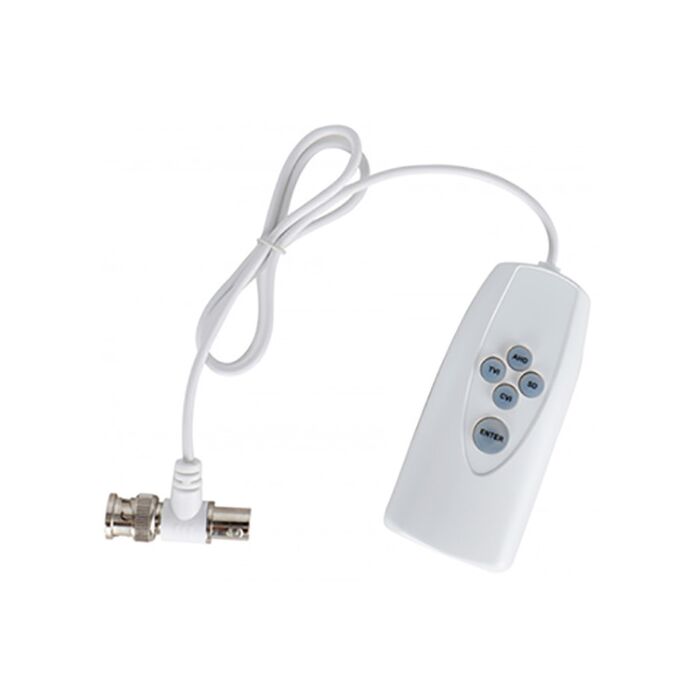

UTC Controller HD
$44.00
Overview
Utc Signal Controller - Compact inline controller for compatible 4-in-1 HD analog cameras with UTC-switchable video chips.
AHD TVI CVI CVBS Switching - Lets a supported camera change output modes to match the DVR signal type.
Coax Inline Connection - Connects at the BNC video line between the camera side and DVR side while video passes through during setup.
Useful For Upgrades - Helps when a newer HD analog camera needs to be changed for an older recorder or different coax video format.
Compatibility Required - Intended for compatible cameras purchased from CCTV Camera World that support UTC switching.
Small Service Tool - Useful for installers troubleshooting no-video issues on supported 4-in-1 analog camera installs.
The UTC401 is a compact UTC controller for 4-in-1 HD analog security cameras that lets you change the video signal mode over the coax cable without opening the camera or using a built-in joystick. It is designed for compatible cameras purchased from CCTV Camera World that use a UTC-switchable video chip.
If you're trying to use a newer HD analog camera with an older DVR and not getting video, this controller is often the missing piece. It can switch a supported camera between AHD, TVI, CVI, and CVBS so you can match the camera's output to the DVR's supported signal type. This makes it especially useful when upgrading cameras on an existing coax system, troubleshooting a no-video issue, or converting a camera to standard definition CVBS for use with an older analog recorder.
The UTC401 connects inline at the BNC video connection. One side connects to the camera side of the coax run, and the other connects to the DVR input or nearby BNC line. Video continues to pass through the controller while you make changes, making setup simple during installation, testing, or troubleshooting.
Video guides
The original video below shows how to switch between signal types on a compatible 4-in-1 camera. We have also included a newer video that demonstrates real-world use with an older DVR and compatible motorized zoom camera.
Original signal switching walkthrough:

New guide: Using HD cameras with older DVRs and UTC controller:
This is a practical tool for installers and DIY users working with 4-in-1 cameras, older security DVRs, and existing analog security camera systems.
Why people buy this UTC controller
- Switch a compatible camera between AHD, TVI, CVI, and CVBS
- Make certain HD cameras work with older DVRs that require CVBS
- Change video mode on cameras without a joystick or built-in toggle
- Troubleshoot no-signal issues caused by mismatched formats
- Useful tool for installers, testing, and service work
Important compatibility notes
The UTC401 is intended for use with compatible CCTV Camera World / Premium Series 4-in-1 cameras that have a UTC-switchable chip. If a camera does not support UTC mode switching, this controller will not change the signal type.
This controller is designed for use with 1080P HD analog cameras. It may not work properly with higher resolution cameras such as 4MP, 5MP, or 4K analog models, even if they are labeled as 4-in-1. For best results, use this controller with supported 1080P cameras.
If you are unsure whether your camera is compatible, contact us before ordering and we can help verify it for you.
If you need a compatible camera, check out our 1080P dual voltage dome camera or browse our full selection of analog security cameras.
How it is commonly used
A common scenario is installing a newer HD camera on an older DVR and seeing no image. This usually happens because the camera is set to AHD, TVI, or CVI while the DVR only supports CVBS. The UTC401 allows you to switch the camera to CVBS so the DVR can display it properly.
It is also useful when working with cameras that do not have an external mode switch. Instead of opening the camera or navigating internal menus, you can change the signal type directly through the coax line.
Physical details
- Inline BNC controller with male and female connectors
- Approximately 22-inch cable length
- Requires 2 AAA batteries (not included)
- Supports up to 1080P cameras
What's included?
- (1) UTC401 4-in-1 switch UTC controller
FAQ
What does the UTC401 do?
It allows you to change the video signal mode of a compatible 4-in-1 HD analog camera over the coax cable, switching between AHD, TVI, CVI, and CVBS without needing a joystick on the camera.
Why does my camera say no signal on my DVR?
This usually happens when the camera and DVR are using different video signal formats. For example, many newer cameras default to AHD, TVI, or CVI, while older DVRs only support CVBS (standard definition).
When the signal types do not match, the DVR cannot display the image and shows "no signal." Using a UTC controller like the UTC401 allows you to switch the camera to the correct format so it works with your DVR.
Can this make an HD camera work with an older DVR?
Yes. If your DVR only supports CVBS, you can switch a compatible camera to CVBS so it will display properly on older systems.
Will this work with any analog camera?
No. The camera must be a compatible 4-in-1 camera with a UTC-switchable chip. Cameras without this feature will not respond to the controller.
Does it support 4MP or 4K cameras?
No. This controller is designed for 1080P cameras and may not function correctly with higher resolution models.
Should the UTC controller be connected at the camera side or DVR side?
A UTC (Up the Coax) controller should normally be connected on the DVR side, or anywhere along the coaxial cable run between the DVR and the camera. It is most commonly connected directly to the BNC video port on the recorder.
How long do you have to press the mode change buttons?
We suggest holding the mode change button until you see the camera video disappear and the DVR changes to the intended signal type. This may take up to 10 seconds, so be sure to press firmly and keep holding until the change completes.
Where does the controller connect?
It connects inline at the BNC video connection, between the camera and DVR or along the coax cable during setup.
Does it come with batteries?
No. It requires 2 AAA batteries which are not included.
| Brand | CCTVCameraWorld |
|---|---|
| Series | AvaEye |
| Warranty | None for accessories |
| Return Policy | Accessories are non-returnable, non-refundable. |
Write Your Own Review