
AvaEye 32 Channel 16MP AI NVR, 4 Hard Drive Bays, POS Support
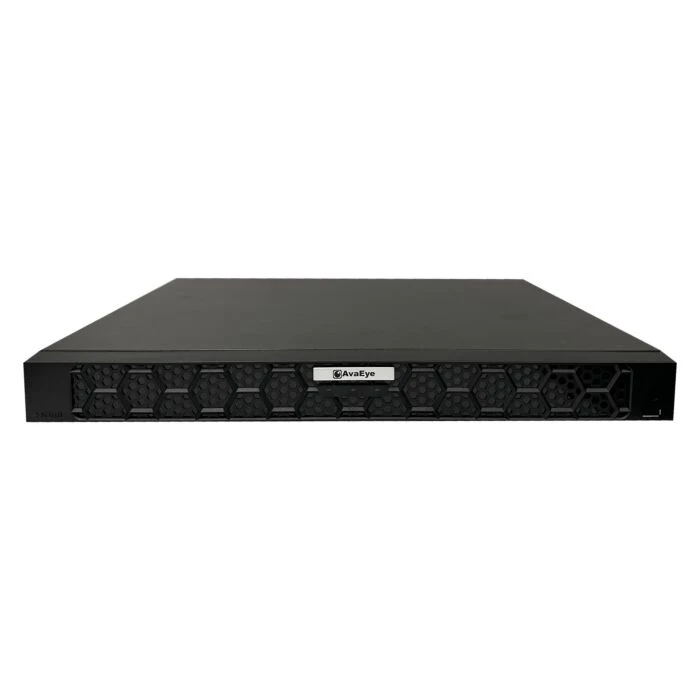
Product overview
32-Channel IP Camera Recording - Record up to 32 compatible IP security cameras for home or business, from entrances and driveways to checkout areas, offices, and warehouses.
Up to 16MP Recording - Supports compatible cameras at resolutions up to 16MP, with 4K HDMI monitor viewing and an independent VGA output up to 1080p.
Four Hard Drive Bays - Four SATA ports support compatible surveillance drives up to 20TB each, for up to 80TB of installed capacity.
Person and Vehicle Detection - Choose recorder-side SIP for virtual-line crossing and area intrusion analysis, or UMD for people and vehicle motion analysis. These recorder-side modes do not run simultaneously, and analysis capacity depends on camera resolution.
Camera-Side UMD Integration - Receives supported motion events from compatible AvaEye cameras that specifically support UMD, with the camera performing the analysis.
Cash-Register Video Review - POS integration pairs compatible cash-register transaction details with checkout camera video so you can review the sale and matching footage together.
AAC Audio Recording - Records AAC audio alongside video from compatible audio-equipped AvaEye cameras.
Local and Remote Viewing - Operate the recorder using a monitor and USB mouse. Use SCI View mobile and desktop software to watch live video and review recordings after remote access is configured.
External PoE Switch Setup - Connect cameras through external PoE switches or suitable network and power equipment. The recorder has two Gigabit Ethernet ports and no built-in PoE camera ports.
Support for Your Installation - CCTV Camera World provides knowledgeable support to help home users, business owners, and installers choose equipment and get started with setup and operation.
NDAA Compliant - AvaEye series network video recorder with a 1 year limited warranty.

32 Channel IP Camera Recording with Four Hard Drive Bays
The AvaEye NVR432PAI brings video from up to 32 compatible IP security cameras together in one recorder. Use it to monitor entrances, driveways, checkout areas, offices, warehouses, and other areas around your home or business. Support for cameras up to 16MP and four internal hard drive bays gives you room to build a system around the coverage and recording history you need.
Cameras connect through external PoE switches or suitable network and power equipment. Add compatible surveillance hard drives, connect a monitor for local viewing, and configure SCI View for access from your phone or computer. This model has no built-in PoE camera ports.
Whether you are buying your first camera system, building a more advanced home installation, managing a business, or installing equipment for a customer, CCTV Camera World provides knowledgeable support to help you choose equipment and work through setup and operation.
Connect Cameras Where You Need Coverage
The NVR432PAI supports up to 32 compatible IP cameras. Choose from our IP security cameras and connect them through one or more PoE switches or another suitable network and power setup.
External switches give you flexibility in how you wire the property. For example, a group of cameras around a garage, office, or storage area can connect to a nearby PoE switch, with their video carried over the network to the recorder. You do not need to run every camera cable directly to the NVR.
The recorder has two Gigabit Ethernet ports for network connections. These ports do not supply camera power. Choose switches with enough PoE power for the connected cameras and enough network capacity to carry their video.
Compatible cameras connect using supported ONVIF Profiles S, G, and T or RTSP. Basic video recording and advanced camera functions have separate compatibility requirements, so check support for any smart events you plan to use.
Record High-Resolution Cameras up to 16MP
The NVR accepts video from compatible IP cameras at resolutions up to 16MP. This gives you flexibility to use different supported camera resolutions throughout the property rather than choosing the same camera for every location.
The recorder supports Ultra 265, H.265, and H.264 video formats. Keep the combined camera bitrates within the NVR's incoming bandwidth when selecting camera resolutions and recording settings.
Incoming bandwidth is up to 320 Mbps with recorder-side smart analysis turned off, or up to 160 Mbps with it turned on. Outgoing bandwidth is up to 160 Mbps.
Four Hard Drive Bays for the Recording History You Need
Storage capacity is an important part of choosing a recorder. The NVR432PAI has four SATA ports supporting compatible drives up to 20TB each, for up to 80TB of total installed capacity. This provides room to increase storage as your camera system or recording requirements grow.
Add compatible surveillance hard drives for local video recording.
Choose storage based on the number of cameras, video resolution, bitrate, recording schedule, and how long you want to keep footage. Browse our security recorder hard drives for compatible storage options.
RAID 1 and RAID 5 are supported with suitable drive configurations. RAID uses part of the installed capacity for redundancy, so usable recording space is lower than the total installed capacity. It provides protection against certain drive failures but does not replace a separate backup of important video.
Watch Entrances and Boundaries with Smart Intrusion Prevention
Smart Intrusion Prevention (SIP) analyzes supported video for a person or vehicle crossing a virtual line or entering a defined intrusion area. Draw the line or area in the camera view to monitor a driveway entrance, gate, doorway, or another boundary around the property.
For example, use a virtual line across a driveway entrance to identify people or vehicles crossing that point. Use an intrusion area to monitor entry into a selected part of the scene.
When the recorder performs SIP analysis, it supports up to 4 channels at 2MP, 2 channels at 4MP, or 1 channel at 4K.
Focus on People and Vehicle Motion with UMD
Ultra Motion Detection (UMD) analyzes movement by people or vehicles within a selected area. Use it to focus on that activity around a parking area, entrance, yard, or other part of the camera view.
SIP watches a defined line or intrusion area. UMD focuses on people and vehicle movement within the selected area. Choose the recorder-side mode that matches what you want to monitor.
Recorder-side UMD supports up to 8 channels at 2MP, 4 channels at 4MP, or 2 channels at 4K. Recorder-side SIP and UMD do not operate simultaneously. These analysis limits are separate from the NVR's 32 IP camera channels.
Camera-Side UMD with Compatible AvaEye Cameras
A compatible AvaEye camera that specifically supports UMD performs its own people and vehicle motion analysis and sends supported events to the NVR. This uses the camera's analysis capability instead of having the recorder perform that analysis.
Camera-side UMD integration requires a compatible AvaEye camera that supports UMD. Configure both the camera and recorder for event integration. The recorder-side UMD limits above apply when the NVR performs the analysis; they do not specify camera-side UMD capacity.
Match Cash-Register Transactions with Checkout Video
Point-of-sale (POS) integration pairs cash-register transaction details with the corresponding checkout camera video. Review the sale information and matching footage together when you need to understand what happened at the register.
For a store or another business with a checkout counter, this adds context to recorded video. Instead of reviewing footage alone, you have the associated transaction details available when checking a sale or investigating a checkout question.
POS integration requires a compatible cash-register setup and configuration. The cash register is separate from the NVR.
Record Audio from Compatible AvaEye Cameras
With a compatible audio-equipped AvaEye camera, the NVR can record AAC audio alongside video. Sound can add useful context when reviewing an event at an entrance, checkout counter, or other monitored area. Choose a camera with a built-in microphone or compatible audio input if you need recorded sound.
View Cameras on a Monitor or Through SCI View
Connect a monitor to the HDMI output for local viewing at up to 4K (3840 x 2160 at 30Hz). An independent VGA output supports a second display at up to 1920 x 1080.
Local Interface: On-screen HDMI Graphical User Interface controlled by USB mouse.
Recording resolution and monitor output describe different capabilities. The NVR records compatible camera video at up to 16MP, while the HDMI monitor output displays video at up to 4K. The number of streams displayed or decoded at once depends on their resolution and the recorder settings. Synchronous local playback supports up to 16 channels.
Use SCI View mobile and desktop software to watch live video and review recordings remotely after connecting the recorder to your network and configuring remote access. Check cameras around your home, review activity at a business, or access footage while away from the recorder.
Audio, Alarm Connections, and NDAA Compliance
The NVR432PAI includes one RCA audio input, one RCA audio output, 16 alarm inputs, and four alarm outputs for compatible connected equipment.
This AvaEye series recorder is NDAA Compliant and includes a 1 year limited warranty. It serves home users, small and large businesses, and installers who need flexible IP camera recording with local storage and supported smart analysis.
Technical Specifications
| Recorder and Video | |
|---|---|
| Brand | CCTV Camera World |
| Series | AvaEye |
| Model / SKU / MPN | NVR432PAI |
| Product Type | Network video recorder (NVR) |
| IP Camera Channels | 32 |
| Maximum Recording Resolution | Up to 16MP with compatible cameras |
| Video Formats | Ultra 265, H.265, H.264 |
| Incoming Bandwidth | Up to 320 Mbps with recorder-side smart analysis off; up to 160 Mbps with it on |
| Outgoing Bandwidth | Up to 160 Mbps |
| Synchronous Local Playback | Up to 16 channels |
| Display and Connections | |
| HDMI Output | 1, up to 4K (3840 x 2160 at 30Hz) |
| VGA Output | 1, up to 1920 x 1080; independent of HDMI |
| Network Ports | 2 RJ45 Gigabit Ethernet (10/100/1000 Mbps) |
| Built-In PoE Camera Ports | None; use external PoE switches or suitable camera power equipment |
| Camera Protocols | ONVIF Profiles S, G, and T; RTSP, with compatible cameras |
| Audio Input / Output | 1 RCA input / 1 RCA output |
| Alarm Input / Output | 16 inputs / 4 outputs |
| Local Interface | On-screen HDMI Graphical User Interface controlled by USB mouse |
| Mobile and Desktop Software | SCI View |
| Storage and Smart Analysis | |
| Drive Interfaces | 4 SATA ports |
| Maximum Supported Drive Capacity | Up to 20TB per SATA port with compatible drives |
| Maximum Supported Total Storage | Up to 80TB installed capacity across four compatible drives; usable capacity is lower with RAID |
| RAID Modes | RAID 1 and RAID 5 |
| Recorder-Side SIP | Person and vehicle virtual-line crossing or area intrusion analysis; up to 4 channels at 2MP, 2 channels at 4MP, or 1 channel at 4K |
| Recorder-Side UMD | People and vehicle motion analysis in a selected area; up to 8 channels at 2MP, 4 channels at 4MP, or 2 channels at 4K |
| Recorder-Side AI Mode | SIP or UMD; the two recorder-side modes do not operate simultaneously |
| Camera-Side UMD | Only with compatible AvaEye cameras that support UMD; analysis is performed by the camera |
| AAC Audio Recording | With compatible audio-equipped AvaEye cameras |
| Point-of-Sale (POS) Integration | Pairs compatible cash-register transaction details with checkout camera video |
| Physical and Compliance | |
| Power Input | 12 VDC, 5 A |
| Dimensions (W x D x H) | 17.3 x 13.5 x 1.9 in (440 x 344 x 48 mm) |
| Operating Temperature | 14°F to 122°F (-10°C to 50°C) |
| NDAA Status | NDAA Compliant |
| Warranty | 1 year limited warranty |
Frequently Asked Questions
It supports up to 32 compatible IP security cameras. Cameras connect through external PoE switches or another suitable network and power setup.
No. The NVR has no built-in PoE camera ports. Use external PoE switches or suitable camera power equipment. Its two Gigabit Ethernet ports provide network connections, not camera power.
It supports compatible cameras using ONVIF Profiles S, G, and T or RTSP. Check compatibility for video recording and any advanced events you want to use. Camera-side UMD requires compatible AvaEye cameras that specifically support UMD.
Smart Intrusion Prevention (SIP) analyzes people or vehicles crossing a virtual line or entering a defined intrusion area. Ultra Motion Detection (UMD) analyzes people or vehicle movement within a selected area. Select one recorder-side mode; the NVR does not run recorder-side SIP and UMD simultaneously.
SIP supports up to 4 channels at 2MP, 2 channels at 4MP, or 1 channel at 4K. UMD supports up to 8 channels at 2MP, 4 channels at 4MP, or 2 channels at 4K. These limits apply to recorder-side analysis and are separate from the NVR's 32 IP camera channels.
No. Camera-side UMD integration requires a compatible AvaEye camera that specifically supports UMD. The camera performs the analysis and sends supported events to the NVR. Both devices require configuration for event integration.
Point-of-sale integration pairs compatible cash-register transaction details with the corresponding checkout camera video. Review the sale information and matching footage together when checking what happened at the register. A compatible cash-register setup and configuration are required.
No. The recorder accepts compatible camera video at up to 16MP. HDMI monitor output supports up to 4K at 30Hz, and the independent VGA output supports up to 1080p. Simultaneous display and decoding capacity depend on stream resolutions and recorder settings.
Yes. It can record AAC audio alongside video from compatible audio-equipped AvaEye cameras.
Yes. SCI View mobile and desktop software provides remote live viewing and recorded playback after the recorder is connected to a suitable network and remote access is configured.
Yes. It fits home installations, small and large businesses, and installer projects that need up to 32 compatible IP cameras. CCTV Camera World provides knowledgeable support to help with equipment selection, setup, and operation.
| Return Policy | 30 Days Return Policy |
|---|---|
| Brand | CCTVCameraWorld |
| Series | AvaEye |
Product Questions
If you connect third party non AvaEye cameras over ONVIF, the system will record video normally, but advanced AI events will not be triggered unless the camera itself provides that metadata in a supported format.
AvaEye also offers select AI capable NVR models that can perform certain AI functions directly on a limited number of channels. These models can apply specific AI analytics even when using some third party cameras, though channel limits and feature availability vary by model.
Basic functions such as live view, recording, and playback typically work without issue as long as the camera is ONVIF compliant. However, advanced features do not transfer between brands. Functions such as two way audio, multi sensor panoramic stitching, camera side smart analytics, and advanced event tagging often require recorders from the same brand. When using third party cameras over ONVIF, those features may be unavailable.
For cameras that do not support ONVIF, AvaEye NVRs also allow manual RTSP stream configuration for both the main and sub stream, which can provide basic video recording compatibility.
- Starlight 4K Motorized Zoom PoE Bullet IP Camera with Audio Support, 164ft Night Vision, AvaEyeSpecial Price $499.99 Regular Price $624.00 20% off
- 4K PoE Turret Dome IP Camera with Mic, 100ft Night Vision, Light Hunter, AvaEyeSpecial Price $359.99 Regular Price $449.99 20% off
- Outdoor 4K PoE Bullet Camera, AvaEyeSpecial Price $229.99 Regular Price $299.99 23% off
- 4K Two-way Audio AI Smart Camera, Bullet Style, Active Deterrence, AvaEyeSpecial Price $308.00 Regular Price $349.99 12% off
- 4K Starlight Turret Dome PoE Security Camera with Motorized Zoom and Mic, AvaEyeSpecial Price $499.99 Regular Price $624.00 20% off
- 64 Channel 4K Network Video Recorder, RAID, 8 SATA HDD, AvaEyeSpecial Price $1,699.99 Regular Price $2,142.84 21% off
- 180 Degree Panoramic Camera, Outdoor PoE, Color Night Vision, 2-Way Audio, AvaEyeSpecial Price $487.99 Regular Price $629.99 23% off
- AvaEye 4K Auto Tracking PTZ Camera, 25X Zoom, 656ft IR, NDAASpecial Price $1,779.99 Regular Price $2,299.99 23% off


