

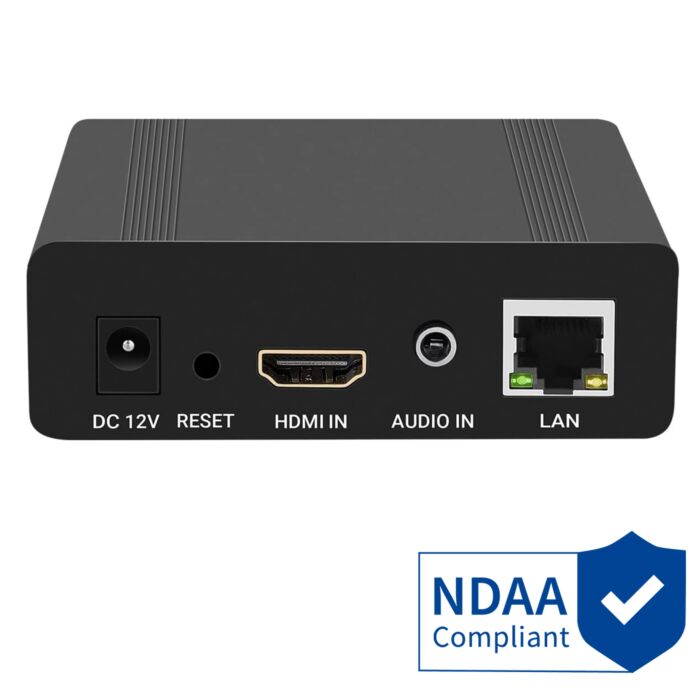

HDMI to IP Encoder, ONVIF Compatible, NDAA Compliant
Special Price
$249.99
Regular Price
$329.99
24% off
Overview
HDMI To IP Encoder - Converts a compatible HDMI video source into an IP video stream for viewing, recording, or online streaming.
Onvif Compatible - Can send encoded video to compatible ONVIF NVRs or recorders when configured on the same network.
Wide Protocol Support - Supports RTSP, RTMP, HLS, UDP, FLV, HTTP, and ONVIF streams for flexible network video use.
Live Streaming Ready - Can stream compatible HDMI video and audio to supported platforms like YouTube Live, Facebook Live, Twitch, and Livestream.
1080P HDMI Input - Supports HDMI input resolutions including 1080P, 1080i, 720P, 576i, and 480i with up to 1080P 60Hz output.
Standard Audio Support - Encodes audio from the HDMI signal using supported formats including AAC, MP3, AC3, and G.711A.
Convenient Web Interface - This encoder has a web interface that allows the user to configure and watch it from a web browser.
NDAA Compliant - Suitable for projects that require NDAA compliant video equipment.
1080P HDMI to IP Encoder for NVR Recording and Live Streaming
The AvaEye HDMIP HDMI to IP Encoder converts a 1080P HDMI video source into a network video stream. It is useful when you need to take the HDMI output from a computer, drone, DVR, NVR, video processor, camera system, or other compatible HDMI device and make that video available over a local network.
Once configured, the encoded stream can be viewed from compatible software, added to a compatible ONVIF NVR for recording, or used for live streaming to supported platforms such as YouTube Live. The encoder supports common network video protocols including RTSP, RTMP, HLS, HTTP, UDP, FLV, and ONVIF, making it flexible for security, business, training, and monitoring applications.
This model has been tested with our NVR recorders and with third-party NVRs such as Digital Watchdog and Uniview as an ONVIF-compliant video sending device. As with any ONVIF or RTSP device, setup depends on proper network settings, compatible recorder support, and correct stream configuration.
Please note that HDMI encoding is not instant. All encoders introduce some amount of delay. In typical network conditions, latency may be around 1 to 2 seconds, and the best-case specification is approximately 500ms. If your application requires zero-latency or real-time production switching, this type of encoder is not the right choice.
Where This HDMI to IP Encoder Makes Sense
This HDMI to IP encoder is a good fit when you have a 1080P HDMI video source that you want to bring onto a network. Instead of only viewing that HDMI output on a local monitor, the encoder turns it into an IP video stream that can be viewed, recorded, or sent to a compatible streaming platform.
It is commonly used to record the HDMI output from a computer, DVR, NVR, video processor, or other 1080P HDMI device to a compatible NVR. We have tested this encoder with our NVR recorders, and it has also been tested with third-party NVRs such as Digital Watchdog and Uniview as an ONVIF-compliant video sending device.
Best Uses for This Encoder
- Recording an HDMI source to an NVR - Useful when you want a compatible NVR to record an HDMI output as if it were a network video source.
- Turning HDMI video into an IP stream - Encode the HDMI output from a PC, DVR, NVR, video processor, camera system, or other 1080P HDMI source.
- Viewing HDMI video over a local network - Use RTSP or compatible viewing software to see the encoded video from a computer on the same network.
- Streaming to YouTube Live - Send compatible HDMI video and audio to YouTube Live or other RTMP-based streaming services after proper setup.
- Security and business monitoring - A practical option for security rooms, training setups, schools, churches, labs, small businesses, and other applications where an HDMI signal needs to be captured as network video.
- Easy ONVIF setup with compatible NVRs - Most compatible NVRs can recognize the encoder as an ONVIF video device after it is connected to the network and assigned the correct IP settings. We have tested it with our NVRs and with third-party NVRs such as Digital Watchdog and Uniview.
When This Is Not the Right Device
- Not for 4K HDMI encoding - This model is designed for 1080P HDMI video sources.
- Not for zero-latency video - All HDMI encoding adds some delay. It is not recommended for applications that require instant real-time video.
- Not an HDMI extender - This does not simply extend HDMI over a cable. It encodes HDMI into a network stream.
- Not a USB capture card - It is a standalone network encoder with a web interface, not a USB input device for a computer.
Possible Use Scenarios

To make it easier for our users to get the most out of our HDMI to IP video encoder (HDMIP) we've made the following tutorial videos. The first video is an overview of how to use the video encoder to take a 1080P video input and capture it on a NVR recorder. In this tutorial we show how to capture the NVR's own video output and record it as a video channel over the network using the ONVIF video standard. We provide an overview of the basic settings needed to use the HDMIP encoder from start to finish.
In the second video below we show this video encoder can be used to capture a HDMI video signal and streamed directly to the back of our PoE NVR. Standalone PoE NVRs have plug and play PoE ports that are engineered for use specifically with our PoE cameras. The plug and play operation on the cameras does not require the user to posses any networking knowledge. However, when adding ONVIF devices such as this video encoder, you have to login to the encoder and set it to an IP address in the subnet 10.1.1.X for it to be detected by the PoE NVR. We show the whole process from beginning to end. In the video we show how to capture the video output from a computer for recording to an NVR.
You can even use this video encoder to stream video directly to YouTube Live. As long as you have both video and audio on the HDMI signal, it can be pushed to YouTube. We explain the process in the video below
Features
- HDMI to IP Stream Encoder
- Stream an HDMI output to your favorite streaming services like YouTube Live, Facebook Live, Twitch, or Livestream
- Record HDMI output from a PC or other device to an NVR
- HDMI Input Resolution: Full HD 1080P, 1080i, 720P, 480i
- 1080P Stream Output Resolution
- Supports RTSP, RTMP, HLS and ONVIF streams
- 12V 1A Power Supply Included
- Indoor use only
- NDAA Compliant
What's included?
- (1) HDMI to IP Encoder
- (1) 12V 1A Power Adapter
Specifications
| Video and Audio Input | 1x HDMI ( 1.4) HDCP | ||||||||||||||||||||||||||||||||||
| Input Resolution | 1080p, 1080i, 720p, 576i, 480i | ||||||||||||||||||||||||||||||||||
| Encoding | H.264/AVC Baseline/Main/High Profile | ||||||||||||||||||||||||||||||||||
| Output Resolution | Max. 1080P 60Hz | ||||||||||||||||||||||||||||||||||
| Data Rate | 0.2Mbps - 32 Mbps | ||||||||||||||||||||||||||||||||||
| Rate Control | CBR/VBR | ||||||||||||||||||||||||||||||||||
| Video Enhancement | De-interlacing, Image Enhancement, Noise Reduction, Sharpening | ||||||||||||||||||||||||||||||||||
| Latency Time | 500ms best case scenario | ||||||||||||||||||||||||||||||||||
| OSD | 4x Image or text, or 1 scrolling text | ||||||||||||||||||||||||||||||||||
| Audio Encoding | AAC/AAC+/MP3/MP2/AC3/G.711A | ||||||||||||||||||||||||||||||||||
| Sampling Rate | 44100/48000Hz 24 bit | ||||||||||||||||||||||||||||||||||
| Audio Bit-rate | 32K/48K/64K/96K/128K/160K/192K/384K | ||||||||||||||||||||||||||||||||||
| Network Interface | Ethernet 100 Base-T | ||||||||||||||||||||||||||||||||||
| Protocols | HTTP/RTSP/RTMP/HLS/FLV/UDP/ONVIF | ||||||||||||||||||||||||||||||||||
| NTP | Supported | ||||||||||||||||||||||||||||||||||
| Dimensions | 10.8 x 9.5 x 3 cm | ||||||||||||||||||||||||||||||||||
| Net Weight | 8 oz | ||||||||||||||||||||||||||||||||||
| Operating Temperature | 32°F - 113°F | ||||||||||||||||||||||||||||||||||
| Power | 12V DC 1 A - 5W Max | ||||||||||||||||||||||||||||||||||
HDMI to IP Encoder FAQs
Can this HDMI to IP encoder record to an NVR?
Yes. This HDMI to IP encoder can send the encoded video stream to a compatible ONVIF NVR or network video recorder. It has been tested with our NVR recorders and with third-party NVRs such as Digital Watchdog and Uniview as an ONVIF-compliant video sending device. As with any ONVIF device, the encoder and recorder must be configured correctly on the network.
Can I use this encoder to stream to YouTube Live?
Yes. The encoder can be used for YouTube Live when the HDMI source provides compatible video and audio, and the stream is configured properly. It supports RTMP, which is commonly used for streaming to platforms such as YouTube Live. Some users may prefer using streaming software for more control over the final stream settings.
Does this HDMI encoder support ONVIF?
Yes. This encoder supports ONVIF and can be added to compatible NVRs as a network video source. We have tested it with our NVRs, and it has also been tested with third-party NVRs including Digital Watchdog and Uniview. Compatibility still depends on the recorder model, firmware, network settings, username and password, and selected stream settings.
Does this encoder support RTSP?
Yes. The encoder supports RTSP, which allows the HDMI video source to be viewed over a local network using compatible software or added to some recorders that support RTSP streams. RTSP setup usually requires the correct stream URL, IP address, username, and password.
Does this HDMI to IP encoder support 4K HDMI?
No. This model is designed for 1080P HDMI sources. It supports input resolutions such as 1080p, 1080i, 720p, 576i, and 480i, with a maximum encoded output of 1080P. It should not be purchased for 4K HDMI encoding.
How much delay does the HDMI to IP encoder have?
All HDMI to IP encoders add some delay because the video has to be processed, compressed, and sent over the network. The best-case latency specification is around 500ms. This is not a zero-latency device.
Can I use this encoder with a PoE NVR?
Yes, it can be used with compatible PoE NVRs. The encoder is powered by its included 12V DC power adapter, not by PoE, but it can still be added to a compatible PoE NVR as an ONVIF video device. The main requirement is that the encoder is assigned the correct IP address for the NVR network so the recorder can find and add the stream.
Is this an HDMI extender or an HDMI encoder?
This is an HDMI encoder. An HDMI extender is normally used to extend an HDMI signal from one point to another. This product takes a 1080P HDMI input and converts it into a network video stream that can be viewed, recorded, or sent to a supported streaming platform.
Does this HDMI to IP encoder include audio?
Yes. The encoder supports HDMI video and audio input. If the HDMI source is sending audio, the encoder can include that audio in the stream using supported audio formats. Audio availability also depends on the HDMI source, stream settings, viewing software, recorder, or streaming platform being used.
Is this encoder for indoor or outdoor use?
This HDMI to IP encoder is for indoor use only. It should be installed in a dry, protected location with access to network cabling, HDMI input, and the included 12V DC power adapter.
| Brand | CCTVCameraWorld |
|---|---|
| Series | AvaEye |
| Warranty | None for accessories |
| Return Policy | Accessories are non-returnable, non-refundable. |
Write Your Own Review
Product Questions
Related Products
Check items to add to the cart or