

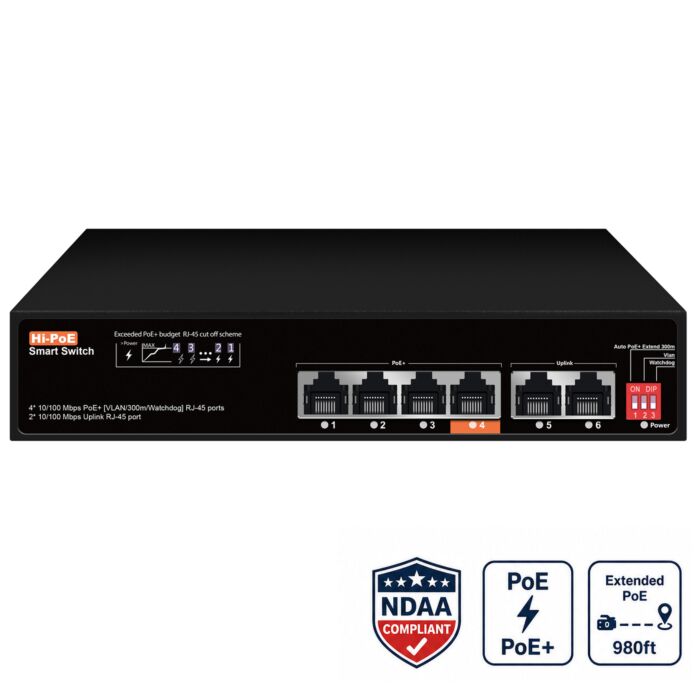

4 Port PoE Switch
Special Price
$54.00
Regular Price
$99.99
In stock
SKU
4POEU
Quick Highlights
- 4 Port PoE+ switch for IP security cameras
- 65W PoE budget with up to 30W on ports 1-3
- Hi-PoE port: Port 4 supports up to 60W for compatible devices
- 2 uplink ports for NVR or network connection
- Extend Mode for supported long camera runs up to 300 meters
- PoE Watchdog for automatic camera recovery
- Unmanaged switch, no cloud account required
- Desktop or wall mount
4 Port PoE Switch for Security Cameras with 65W Power Budget
This 4 port PoE switch is a compact unmanaged network switch made for small IP security camera systems, NVR expansion, and camera locations where you need both power and data over one Ethernet cable. It provides 4 PoE camera ports, 2 uplink ports, a 65W total PoE power budget, and support for standard PoE and PoE+ devices.
It is a practical choice for homes, offices, retail stores, small warehouses, garages, detached buildings, and small business security camera systems where a full-size PoE switch is not needed. Connect your PoE cameras to the switch, then connect one of the uplink ports back to your NVR, router, or main network switch.
Unlike a basic low-power desktop switch, this model includes useful camera-focused features such as Extend mode for long cable runs, VLAN/port isolation, and PoE Watchdog for camera recovery. It is also unmanaged, so there is no cloud controller, subscription, or remote cloud account required to make the switch work.
4 Port PoE Switch Video Overview
Watch our video overview to see how a 4 port PoE switch can power IP cameras, connect back to an NVR, and simplify small camera installations by sending power and data over one network cable.

Highlights
- Best for: Small PoE security camera systems, NVR expansion, detached camera groups, and long cable runs
- PoE ports: 4 x 100Mbps PoE ports for IP cameras and compatible PoE devices
- PoE budget: 65W total PoE power budget
- Standard PoE ports: Ports 1-3 support up to 30W per port
- Hi-PoE port: Port 4 supports up to 60W for compatible higher-draw devices
- Uplink ports: 2 x 100Mbps RJ45 uplink ports
- Working modes: Extend mode, VLAN/port isolation, and PoE Watchdog
- Long run support: Up to 984ft (300 meters) in Extend mode for supported camera runs
- Switch type: Unmanaged PoE switch with no cloud management account required
- Mounting: Desktop or wall mount installation
Why Choose This 4 Port PoE Switch?
A 4 port PoE switch is a good fit when you only need to power a few cameras and do not want the size or cost of a larger 8 port or 16 port switch. It is useful for small camera systems, a few cameras installed away from the recorder, or a camera group in one part of a building.
For example, you can use it to power cameras at a garage, office entrance, small warehouse area, loading door, barn, gate location, or detached building. If you need more ports, you can also browse our full selection of PoE switches.
This switch works with many common IP cameras, including bullet cameras, turret cameras, dome cameras, motorized zoom cameras, select PTZ cameras, wireless access points, and other compatible PoE devices.
65W PoE Budget with One 60W Hi-PoE Port
This switch provides a 65W total PoE power budget. Ports 1-3 support standard 802.3af/at PoE power up to 30W per port, while port 4 supports up to 60W for compatible higher-draw PoE devices.
That gives you flexibility for small camera layouts. Standard fixed lens cameras can use the regular PoE ports, while a compatible higher-draw device, such as a select PTZ camera, wireless access point, or video intercom, can be connected to the 60W Hi-PoE port.
As with any PoE switch, the total connected load should stay within the switch's 65W PoE budget. Most fixed lens PoE security cameras use far less than 30W, so this model is usually a good match for small camera systems using several standard cameras and one higher-power device.
Use It to Add PoE Ports to an NVR or Camera Network
This 4 port PoE switch can be used when your NVR does not have enough built-in PoE ports, when you want to add a few cameras to an existing network, or when you need to place a small camera group away from the recorder. Connect the cameras to the PoE ports, then connect an uplink port back to the NVR, router, or main switch.
If you are planning a small security camera system, this is often cleaner than running separate power adapters for every camera. For a full system layout guide, read our article on how to set up PoE IP cameras.
Unmanaged PoE Switch with No Cloud Management Account
This is an unmanaged PoE switch, which means it does not need a cloud controller, software dashboard, subscription, or remote management account to operate. For most camera systems, that is a benefit. You plug in the switch, connect your cameras, connect the uplink, and the switch passes traffic locally.
Because it is not cloud-managed, there is no manufacturer cloud switch account to secure. You should still use strong passwords on your cameras, NVR, router, and remote viewing setup, but the switch itself does not depend on a cloud management server.
Extend Mode for Long Camera Cable Runs
Extend mode is useful when a camera needs to be installed farther away than the normal 328ft Ethernet distance limit. In normal network mode, Ethernet is designed around a 100 meter, or 328ft, cable distance. This switch can extend supported PoE runs by lowering the extended port speed to 10Mbps, which allows the switch to send power and data farther over the cable.
That lower speed is still enough for many security camera installations. Most IP cameras do not need anywhere close to 10Mbps for a single video stream, especially when using H.264 or H.265 compression. The tradeoff is simple: Extend mode gives up port speed in exchange for longer cable distance.
In our own testing, we were able to run an AvaEye PTZ camera that draws about 25W at roughly 650ft using solid copper Cat5e cable without adding a separate PoE extender. The camera stayed powered and usable for live video, pan, tilt, zoom, and normal camera operation. For fixed lens PoE cameras with lower power draw, supported runs can go even farther when the cable quality is good and Extend mode is used correctly.
This can help with cameras at gates, detached garages, barns, long hallways, parking areas, fence lines, loading docks, and property edges. For more detail, read our real-world long-distance PoE test here: Run a PTZ Camera Over 300 Feet, No Extender Needed.
Dos and Don'ts for Long PoE Runs
- Do use solid copper Cat5e or Cat6 cable for long PoE runs, especially with PTZ cameras or higher power cameras.
- Do use Extend mode when the cable run is longer than the normal 328ft Ethernet limit.
- Do test the camera before final mounting, especially on long runs to gates, barns, detached buildings, or parking areas.
- Do keep higher draw devices, such as select PTZ cameras, on the 60W Hi-PoE port when needed.
- Don't expect full 100Mbps speed on the extended port. Extend mode lowers the data rate to help the signal go farther.
- Don't use CCA cable for long PoE runs or for PTZ cameras. It can cause voltage drop, camera dropouts, and power problems.
- Don't assume every camera will reach the maximum distance. Camera power draw, cable quality, connectors, and environment all matter.
If the cable run is still too long, or if you need to split one run to more than one camera, this switch can also be used with PoE extenders. For a simple one-to-one extension, use our PoE extender. If you need to extend and split one PoE run to two cameras, use our 1 to 2 PoE extender.
VLAN Mode and PoE Watchdog
The built-in DIP switch functions add useful camera-network features without making the switch complicated. VLAN/port isolation mode separates the camera ports from each other while still allowing them to communicate through the uplink ports. This helps reduce unnecessary camera-to-camera traffic.
PoE Watchdog, also called port self-healing, helps recover a camera that stops responding. If a connected camera becomes unresponsive, the switch can cycle PoE power to that port so the camera can restart. That can save time when cameras are mounted in hard-to-reach locations.
Are 100Mbps Ports Enough for Security Cameras?
Yes, for most IP security camera installations, 100Mbps per camera port is enough. Most 2MP, 4MP, 5MP, and even many 4K security cameras use far less than 100Mbps when configured with normal H.264 or H.265 video settings.
For small camera systems, stable PoE power, good cable, and clean uplink placement are usually more important than having Gigabit speed at each individual camera port.
Desktop or Wall Mount Installation
The compact metal housing can be used on a desk, shelf, cabinet, or wall. This makes it easy to place the switch near a small camera group, inside a wiring area, or near the NVR depending on the layout of the installation.
How This 4 Port PoE Switch Compares to a Basic PoE Switch
| Feature | This 4 Port PoE Switch | Basic 4 Port PoE Switch |
|---|---|---|
| Best Use | Small security camera systems, NVR expansion, long camera runs, and select higher-draw PoE devices | General networking or short PoE runs |
| PoE Ports | 4 PoE ports | 4 PoE ports |
| Total PoE Budget | 65W | Varies by model |
| Higher Power Port | Port 4 supports up to 60W for compatible devices | Often limited to 30W per port |
| Uplink Ports | 2 RJ45 uplink ports | Usually 1 uplink or shared ports |
| Long Run Mode | Extend mode up to 984ft (300 meters) | Usually limited to standard Ethernet distance |
| Camera Recovery | PoE Watchdog / port self-healing | Often not included |
| Management Type | Unmanaged, no cloud account required | Varies by model |
| Mounting | Desktop or wall mount | Varies by model |
What's Included
- 1x 4 Port PoE Switch
- 1x AC Power Cord
Specifications
| Brand | AvaEye |
|---|---|
| Product Type | 4 Port PoE Switch |
| Switch Type | Unmanaged PoE switch |
| PoE Ports | 4 x 10/100Mbps RJ45 PoE ports |
| Uplink Ports | 2 x 10/100Mbps RJ45 uplink ports |
| PoE Standards | IEEE 802.3af / 802.3at |
| PoE Power Output | Ports 1-3 up to 30W, Port 4 up to 60W for compatible devices |
| Total PoE Power Budget | 65W |
| Working Modes | Extend mode, VLAN / port isolation, AI PoE Watchdog / port self-healing |
| Extended Transmission Distance | Up to 984ft (300 meters) in Extend mode |
| Switching Capacity | 1.2Gbps |
| Forwarding Rate | 0.89Mpps |
| Forwarding Mode | Store and Forward |
| MAC Address Table | 2K |
| Buffer Memory | 768K |
| Jumbo Frame | 1512 bytes |
| Power Supply Pin | Default 1/2 positive, 3/6 negative |
| Power Supply | Built-in power adapter, AC 100-240V, 50-60Hz |
| Power Consumption | Standby less than 2W, full load less than 65W |
| LED Indicators | Power, Link/Act for ports 1-6 |
| Ethernet Port Features | 10/100Base-T automatic detection, full/half duplex, MDI/MDI-X adaptive |
| Operating Temperature | -4F to 131F (-20C to 55C) |
| Operating Humidity | 5% to 90% RH, non-condensing |
| Storage Temperature | -40F to 167F (-40C to 75C) |
| Protection | ESD protection and surge protection |
| Protection Level | IP30, indoor use |
| Installation | Desktop or wall mounted |
| Dimensions | 7.7 x 5.1 x 1.6 inches (195 x 130 x 40mm) |
| Weight | Net weight less than 0.8kg |
| Certifications | CE, FCC, RoHS |
| Warranty | 1 year |
Frequently Asked Questions
Can this 4 port PoE switch power security cameras?
Yes. This switch has 4 PoE ports and can power compatible PoE security cameras as long as the total connected load stays within the 65W PoE power budget.
Does this switch have a high power PoE port?
Yes. Ports 1-3 support up to 30W per port, and port 4 supports up to 60W for compatible higher-draw PoE devices. This can be useful for select PTZ cameras, wireless access points, intercoms, or other PoE devices that need more power than a standard fixed camera.
Can I use this switch with an NVR?
Yes. You can connect the PoE cameras to the switch and use one uplink port to connect the switch back to an NVR, router, or main network switch. This is useful when you need to add a few cameras to an existing NVR system or place a small group of cameras away from the recorder.
Are the uplink ports Gigabit?
No. The two uplink ports are 10/100Mbps RJ45 uplink ports. For small camera groups, this is usually enough because most IP cameras use far less than 100Mbps per stream when configured with normal H.264 or H.265 video settings.
What is Extend mode?
Extend mode lets supported camera runs go beyond the normal 328ft Ethernet limit by lowering the extended port speed to 10Mbps. Security cameras usually do not need 100Mbps for one video stream, so the switch trades extra speed for longer cable distance.
How far can this switch send PoE power and data?
In Extend mode, supported camera runs can reach up to 300 meters, or about 984ft. Real-world results depend on the camera, power draw, cable quality, connectors, and installation environment.
What have you tested for long PoE runs?
We have tested an AvaEye PTZ camera that draws about 25W at roughly 650ft using solid copper Cat5e cable without a separate PoE extender. The camera stayed powered and usable for live video, pan, tilt, zoom, and normal operation. Fixed lens PoE cameras usually draw less power, so they can be even easier to run at longer distances when the cable quality is good.
What cable should I use?
Use solid copper Cat5e or Cat6 cable for long cable runs, especially runs over 200ft or runs powering PTZ cameras. For short fixed-lens camera runs under 100 meters, CCA cable may work because many fixed cameras use less power, but solid copper cable is still the better choice for reliability.
Can I use this switch with a PoE extender?
Yes. If Extend mode is not enough for the cable route, this switch can be used with a PoE extender. Use a one-to-one PoE extender for a single camera extension, or a 1 to 2 PoE extender when you need to extend and split one PoE run to two cameras.
Is this a managed or unmanaged PoE switch?
This is an unmanaged PoE switch. It does not require a cloud controller, software dashboard, subscription, or remote management account to operate. Plug in the switch, connect your cameras, connect the uplink, and the switch passes traffic locally.
Can this switch be wall mounted?
Yes. This switch can be used as a desktop switch or wall mounted, depending on the installation. It is a good fit for small wiring areas, camera groups, shelves, cabinets, or utility rooms.
Does this switch need internet to work?
No. The switch does not need internet to power cameras or pass local network traffic. Internet is only needed if your camera system needs remote viewing, app access, alerts, cloud features, or offsite access.
| Brand | AvaEye |
|---|---|
| Warranty | 1 Year |
| Return Policy | Accessories are non-returnable, non-refundable. |
Write Your Own Review
Product Questions
Can I run a PTZ camera at 600ft distance using this PoE switch?
Question by: Saul on May 23, 2024, 12:49 PM
The switch supports up to 10W power when extended PoE mode is enabled. As long as your PTZ camera requires less than 10W, then it would be ok.
Answer by: Ray (admin) on May 13, 2024, 2:05 PM
Will this switch work with a 15W camera at 900ft?
Question by: Morris on May 13, 2024, 1:54 PM
At distances of 900ft the extended PoE mode can support up to a 10W camera.
Answer by: Ray (admin) on Jul 19, 2024, 11:18 AM
Related Products
Check items to add to the cart or