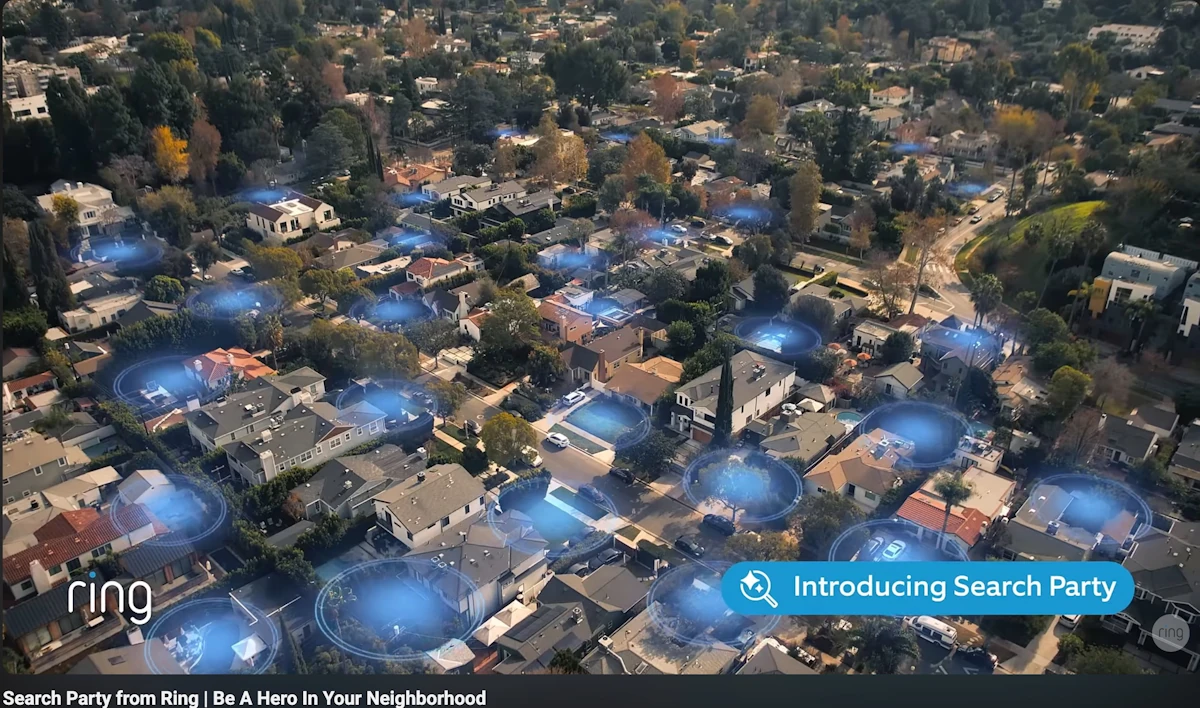
Ring promoted its Search Party feature during the Super Bowl, showing a neighborhood-wide network of cameras working together to find a lost dog. The online reaction focused less on the lost-dog use case and more on the idea of networked cameras plus cloud AI being used at scale, especially when these features are often enabled by default and require an opt-out.
When you’re looking for a Ring alternative for privacy, you do not need hype. You need clear answers to a few practical questions: Where does the video go? What still works when the internet goes down? Do you have to pay monthly to keep using core features?
This guide explains these questions in plain English, and will teach you what to look for in a cloud-free security camera system that can record locally and run fully offline.
Shop Our Selection of Cloud-Free Security Cameras
If privacy is your priority and you already know you want local recording with no required subscription, you can stop here. Browse our cloud-free security cameras and security camera systems without subscriptions that record locally and can run without internet. Remote viewing is optional and only works if you choose to connect the system to the internet and enable it. When enabled, remote access is protected using your device ID plus login credentials you have control over.
Ready to replace cloud surveillance with local control? Start with these subscription-free security camera systems.
Local recording. No subscriptions. Internet optional.
Upgrade from cloud-dependent cameras to professional PoE systems that record to an NVR on your property. Your footage stays under your control, with remote access enabled only if you choose.
If any of these sound like you, this article is for you:
You want cameras that work without internet for recording and local viewing.
You are tired of subscriptions for basic playback, event history, or longer clip storage.
You want local recording security cameras where footage stays on your property by default.
You want a professional-grade standalone camera or system (cameras plus an NVR) that can run offline, with internet only needed for remote viewing when you choose.
Cloud-free security cameras may not be the best fit if:
You want a set-it-and-forget-it consumer gadget and you are comfortable with cloud recording and recurring fees.
You need your video stored offsite, even if the camera or recorder is stolen (cloud cameras can be useful for this redundancy tradeoff).
You do not want any additional local hardware (like an NVR)
Cloud systems can be convenient, but they also add more moving parts: accounts, subscriptions, third-party storage, and data-sharing policies. If you want the cleanest path to privacy and control, local recording with optional remote access is the better fit.
What people are worried about with Ring right now
The Search Party backlash has a few distinct layers, and it helps to separate them to better understand the valid concerns that Ring customers, and consumer and privacy advocates have.
Concern 1: Default opt-in and consent
Multiple reports describe Search Party as enabled by default for eligible cameras, meaning participation will occur unless a customer finds the setting and opts out manually. That design choice is one of the many reasons why people feel uncomfortable.
Concern 2: Cloud AI scanning at neighborhood scale
Search Party is described as using AI to scan saved footage to find a match for a specific lost dog. While reporting and Ring documentation emphasize that the camera owner chooses whether to share a clip, critics worry about the underlying capability and how it could be repurposed or abused over time.
Concern 3: Law enforcement requests, third parties, and what happens after you share
Ring's Community Requests feature is voluntary, but Ring's own documentation states that when a customer shares video in response to a Community Request, the customers home address and account email are automatically provided to the investigator, and shared footage cannot be retracted or deleted afterward.
Concern 4: Federal access anxiety (including ICE) and trust in the overall ecosystem
In January and February 2026, Ring faced renewed backlash tied to concerns that footage could reach ICE (Immigration and Customs Enforcement) through broader law enforcement data networks. Ring denied an ICE partnership saying it does not share video with ICE, and has said they are no longer partnering with Flock, while reporting also noted the relevant integration had not gone live yet. Even so, the broader concern for many readers is how quickly policies and integrations can change quickly.
Concern 5: Subscription dependence and cloud lock-in
Concern 6: Reliability when cloud infrastructure has a bad day
In October 2025, the AWS outage impacted many services, and Ring was among those reported as affected. Even if an outage is rare, it reinforces a practical question: what happens to your security system when upstream cloud services fail?
Concern 7: Account access fears (even when an incident is not a breach)
In July 2025, some Ring users saw unfamiliar authorized devices and identical historical login dates. Ring said it was a display bug caused by a backend update and not unauthorized account access. But incidents like this still intensify concerns about account security and who can get into a cloud-linked camera system.
Concern 8: Biometrics and face recognition governance
In a November 2025 response letter to Senator Markey, Amazon described Ring's Familiar Faces feature as optional and disabled by default, discussed biometric data retention/deletion, and stated Ring does not have a mechanism to provide law enforcement access to live views. This is a different feature than Search Party, but it is part of why some readers see a broader shift toward more advanced surveillance capabilities.
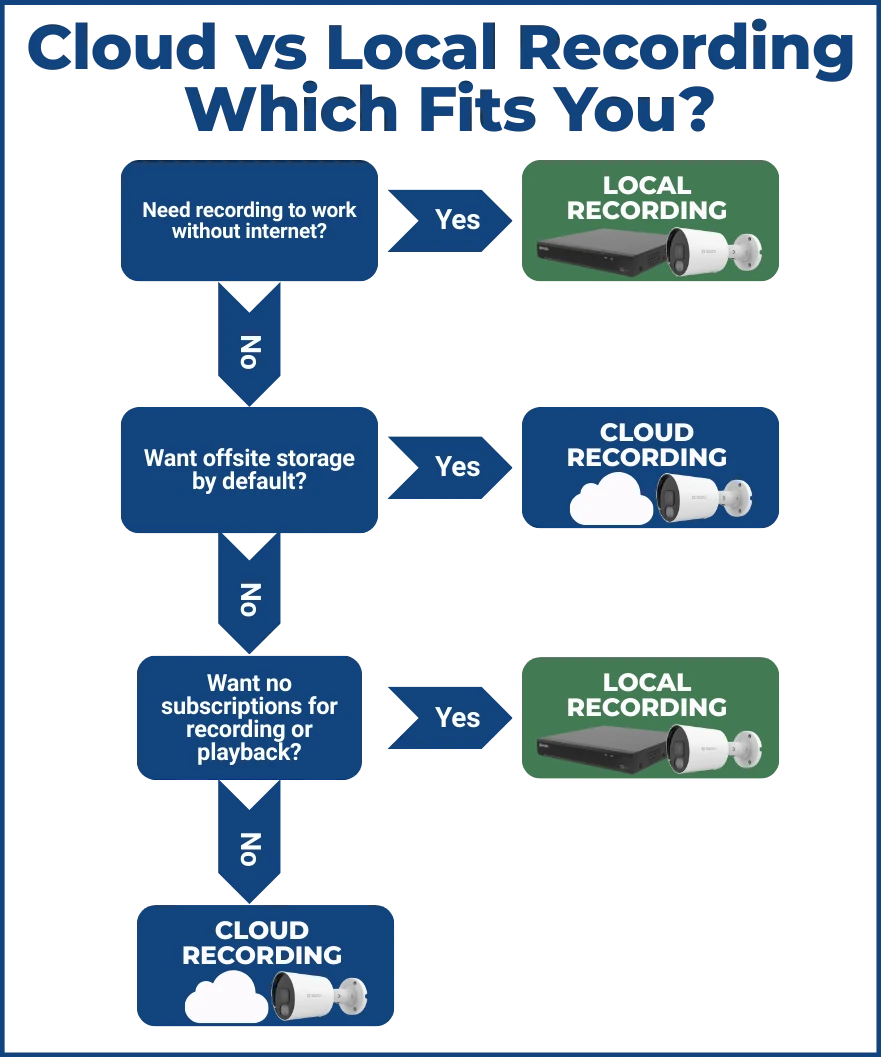
Local Recording vs. Cloud Recording In Plain English
If you are searching for "cloud free security camera system" or "security cameras without subscription,” understanding how cameras record is the main concern.
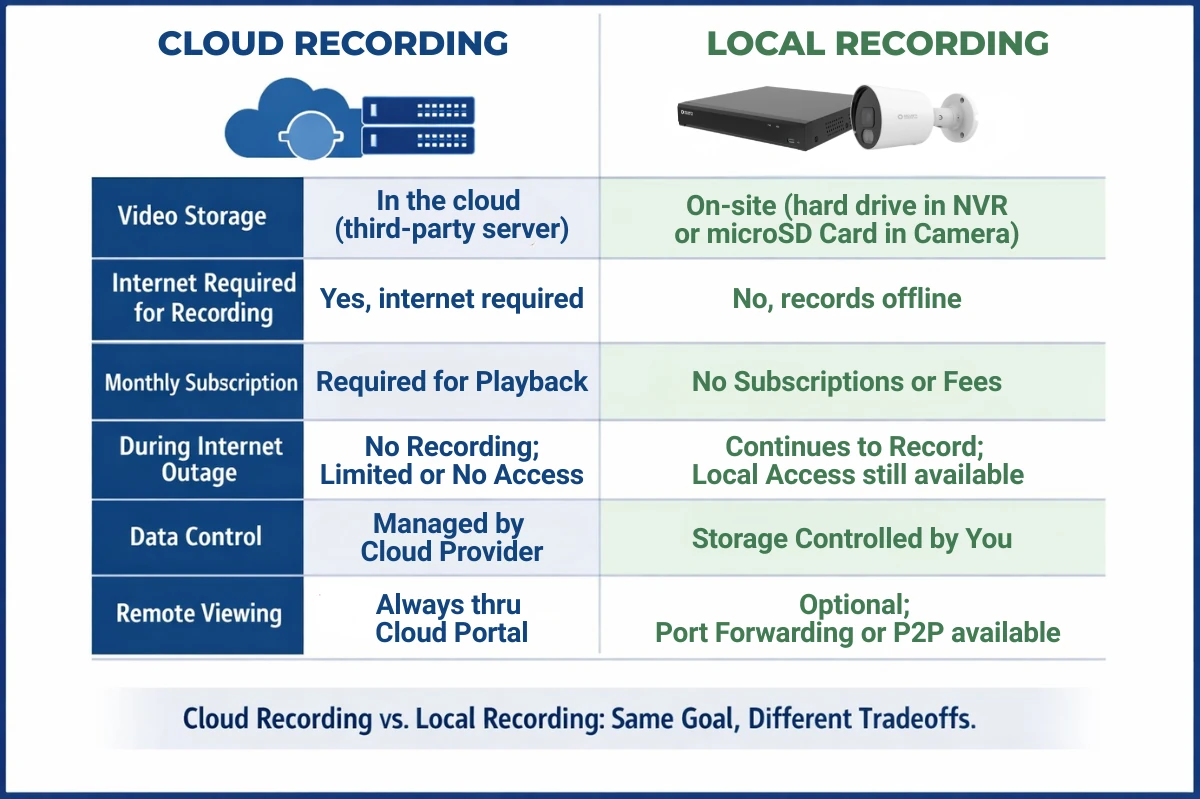
What cloud recording means: Cloud recording means your camera sends video to a remote server run by the manufacturer (or a cloud provider they rent from). You can usually only access clips through an app, and many brands charge a recurring fee for longer retention times or more in-depth features such as AI detection or review.
What local recording means: Local recording means your cameras store video on hardware at your property, such as a microSD card, an on-site NVR (Network Video Recorder) or a PC recording software suite. When footage is stored locally, it is not sent to the internet by default.
A simple, quotable rule: “Local recording is about data control: when something happens, video records directly to your camera or recorder, not to some server on the cloud.”
The Tradeoffs
While we strongly recommend local recording in almost all situations we understand there are situations where the convenience of cloud storage trumps the security and reliability of local storage. However, we do carry cameras that can record to Dropbox or Google Drive which offer finer control over your files but are still uploaded to the cloud.
Cloud storage can protect you from one real risk: if someone steals or destroys your camera, the video will likely still exist online.
Local storage can protect you from a different risk: you don’t need to trust any third parties with your data or private footage, and you can keep recording during an internet outage.
A practical local-storage drawback is physical security: if the recorder is stolen, your footage can be stolen too unless you plan for it (locked enclosure, hidden NVR, redundant storage, or optional offsite backup to a NAS (Network-attached storage) unit you control).
Cameras That Work Without Internet (Offline Operation)
What works offline
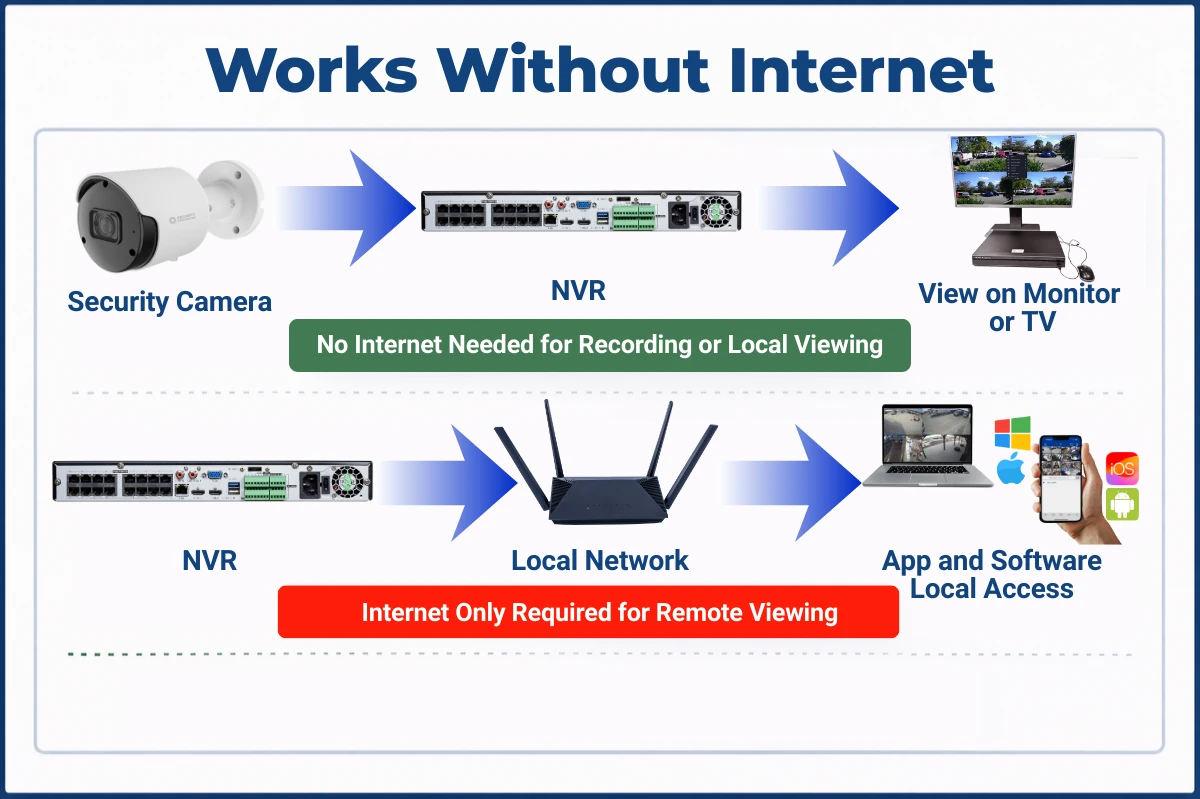
If your system uses an on-site NVR with a built-in Power over Ethernet switch or a local network setup, it can keep recording even with no internet connection. You can also view live video and play back recordings locally from within the same network with a PC or mobile device.
What needs internet
Remote viewing from your phone when you are away requires internet, because you are connecting from outside the building back into your network.
Also, push notifications require internet, even if recording is local, because the alert has to travel to your phone through an online service.
What an "offline system “ means
An offline-capable system should meet these two conditions:
The cameras keep recording when the internet is down.
You can view and export footage locally without logging into a cloud account.
This is why many people are looking beyond cloud doorbells after the Search Party controversy: they want security that behaves like reliable infrastructure, not like a social media app feature or a system that depends on third-party accounts, policies, and cloud uptime.
Recording is usually fully local to an internal surveillance-rated hard drive.
Local viewing works on the local network or from a monitor or TV connected to the NVR.
Internet is not required for recording or local playback.
Internet is only required if you choose to enable remote viewing (access when you’re away from home at work or on vacation).
We offer options that allow for upload to Google Drive, Dropbox, or personal NAS servers.
The function of a dependable security camera or system should not require a cloud subscription. Local storage, access, and control should be the default.
How to choose a privacy-forward system
Use this helpful checklist for learning the guidelines you should follow when purchasing security cameras that put your privacy first.
Checklist A: Where is the video stored?
Is your video stored on-site to an NVR or SD card?
Are recording and playback accessible without a subscription?
Is cloud uploading optional, clearly explained, and off by default?
Checklist B: Does it work without internet?
Does the camera or system explicitly support recording without internet?
Can you view live and recorded video on the local network without going through a cloud portal?
Checklist C: What are the data and video sharing policies? Even if you never plan to share footage, you should know what "sharing" means for the equipment you choose.
If the platform has a law-enforcement request feature, read what gets shared (video only, or also your identity and address.)
Ring, for example, states that Community Requests sharing includes the account email and home address along with video.
Look for clear controls to disable data sharing, community requests, or similar features.
Read the vendor and manufacturer end-user agreements, law enforcement guidelines, and emergency disclosure language, so you are not surprised later.
Checklist D: Account and network security basics
“Local Recording” does not mean "no security work", it means you are reducing unnecessary exposure.
Use strong unique passwords and do not reuse credentials.
Keep firmware updated and disable unused services/ports. Even offline setups still need hardening.
Consider placing cameras on a separate network or standalone Power over Ethernet switch if you have the option (especially for businesses.)
If you want local recording and offline operation, here is the simplest advice: Choose a system that records to an on-site NVR and does not require the internet to keep recording.
Frequently Asked Questions
Do security cameras work without WiFi?
Yes, security cameras can work without Wi-Fi. Many use Power over Ethernet to connect to an NVR for recording, and some can record locally to an internal microSD card. Wi-Fi is only a wireless network connection to a router or NVR.
Do I need internet for a local recording security camera?
Not for recording or local playback. Internet is only required for remote viewing and offsite features like push notifications or email alerts.
Can I remotely view cameras without internet?
No. An internet connection is required to view cameras when you are away from the property.
Will I still get motion alerts without internet?
No. An internet connection is required to get motion alerts, emails, and push notifications from your cameras or system.
Do Ring cameras record without a subscription?
Ring's own help documentation says reviewing recorded video requires a Ring subscription, and without a subscription you can only view live video and receive alerts as they happen
Why are people upset about Ring Search Party?
Reporting describes two main concerns: AI scanning of neighborhood camera footage, and the fact that this feature is enabled by default for eligible cameras. Critics worry the same capability could be repurposed to search for people and provide data to law enforcement agencies, although Ring has said Search Party is not designed to process human biometrics.
What is an NVR?
An NVR (network video recorder) records video from IP security cameras to an internal hard drive at the home or business. It allows for live view and playback on a monitor or from a computer within the same local network. Our systems have free PC software that allows for viewing and playback locally or remotely.
What does "cloud-free security camera system" actually mean?
It means that the system can record and be viewed locally without uploading video to a manufacturers or vendors cloud service. Remote viewing is usually available with an internet connection, but recording should work offline.
Are security cameras without subscription worth it?
In our opinion they are, especially if you want to avoid recurring fees and keep footage local. A well-designed local system can keep recording when the internet goes down, but you should plan for the physical security of the recorder or redundancy with SD cards in the cameras.
Is local storage more private than cloud storage?
Yes. Local storage reduces how much footage is sent to third parties, however, privacy can still depend on your equipment, device security, and whether you allow your system to access the internet for remote viewing purposes.
What should I look for if I want a Ring alternative for privacy?
Look for default local recording, offline-capable operation, optional remote access, clear sharing controls, and transparent policies around law enforcement requests and emergencies. We carry a large selection of security cameras and security camera systems that meet all of these conditions.