


Security Cameras for Marijuana Businesses: A State-by-State Compliance Guide

In the ever-growing legal cannabis industry of 2026, security and surveillance have become paramount for dispensaries, grow facilities, and transportation businesses. With state laws mandating 24/7 monitoring, secure storage, and proper camera placement, selecting the right cannabis video security is not only about protection—it's about compliance and the future of your business.
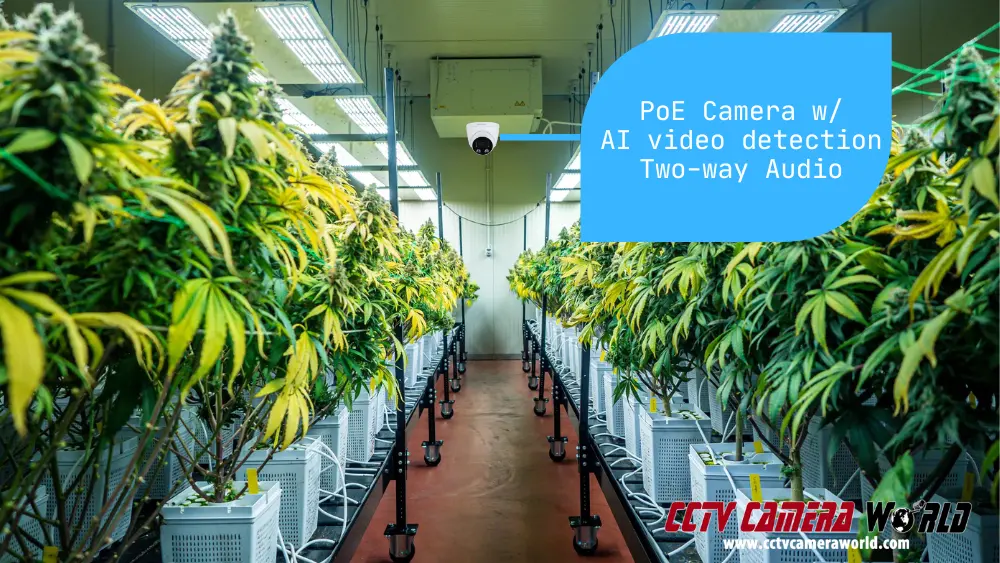
At CCTV Camera World, we've helped cannabis businesses of all sizes, from large grow operations to small dispensaries, helping them meet state requirements and protecting their bottom line. Whether you need 4K surveillance, face recognition, and smart detection, or just a budget-friendly system for compliance, this guide provides the following:
- State-by-state security camera requirements (updated for 2026)
- IP vs. Coaxial cameras: Selecting the right option
- Optimal security cameras for dispensaries and grow operations
- How to calculate and meet storage requirements
Need specific state requirements? Jump directly to the state-by-state cannabis surveillance requirements table.
Table of Contents
- Quick Reference: Cannabis Security Camera Requirements
- Choosing the Right Surveillance System for Your Cannabis Business
- Cannabis Security Camera Laws & Compliance for 2026
- Recreational marijuana dispensaries and cultivation security camera system minimum requirements by state
- How to Store & Manage Cannabis Surveillance Footage
- Cannabis Security FAQ
Quick Reference: Cannabis Security Camera Requirements
- 24/7 continuous recording: Most states require cameras to record at all times, not just on motion.
- Video retention: Plan for 30 to 90 days of stored footage, and verify your exact requirements with your licensing agency.
- Resolution: 1080p is the baseline for most locations, but 4MP or 4K is a better fit for entrances, point-of-sale counters, and any secure areas where identification matters.
- Frame rate: Most regulations have set minimum FPS targets. When in doubt, 15 fps in high-traffic areas is usually sufficient.
- Camera coverage: Expect required coverage at entrances, exits, POS, inventory storage, and limited-access areas.
- Time and date stamp: Make sure every camera stream is timestamped and the time is accurate. Some cameras and systems, when not connected to an internet connection, will drift over time.
- Tamper resistance: Implement user accounts with strict permissions and log access to the system if possible.
- Remote access: Some states require access by regulators or law enforcement upon request. Confirm what that means in your state.
Some cannabis businesses also choose NDAA-compliant equipment, particularly when working with government entities or planning for evolving procurement standards. If NDAA compliance is a consideration for your operation, confirm requirements early in your planning process.
Failure to comply with state security requirements for businesses can result in fines, license revocation, and legal risks. This guide will aid you in making informed decisions to maintain your marijuana business's security and compliance.
Choosing the Right Surveillance System for Your Cannabis Business
As the regulations above demonstrate, security camera requirements for cannabis businesses vary by state, which makes it difficult to determine the equipment you need. The best system for your business must meet legal requirements and protect your business, inventory, and employees.
Cannabis regulations vary significantly by state and jurisdiction, which is why many cannabis business operators choose to work with a surveillance provider experienced in regulated industries rather than a general consumer installer.
With experience in cannabis security camera solutions, we've helped dispensaries and grow operations understand compliance requirements and buy effective surveillance systems. We'll help you understand essential factors like camera resolution, IP PoE vs. coaxial systems, and storage capacity, ensuring you meet regulations without overspending.
Need help selecting the right marijuana security camera solution? Contact our experts for a custom quote at 716-229-0080.
Budget Planning
The total cost of a cannabis surveillance system depends on facility size, camera count, resolution requirements, and retention regulations. A small dispensary with a limited footprint may require a modest multi-camera setup, while a large cultivation or processing facility can require dozens of cameras and substantial storage infrastructure.
When budgeting for a compliant system, consider:
- Storage capacity required to meet your state's retention period.
- The number of cameras needed to properly cover restricted and operational areas.
- Long-term maintenance, including hard drive replacement and hardware lifecycle planning.
- Future expansion if your operation grows or regulations change.
Small 4-to-8 camera systems can range from $1,000 to several thousand dollars depending on resolution and storage requirements. Large 16-camera or higher systems designed to meet mandated retention times often fall into the $5,000 to $15,000+ range once storage capacity and redundancy is factored in.
Planning for scalability from the beginning helps prevent costly upgrades and storage shortfalls later.
Resolution & Video Quality
Our systems are ideal for high-quality cannabis surveillance monitoring, ensuring no detail goes unnoticed. The resolution, which is the size of a security camera's recorded video, directly impacts the level of detail captured in the picture. Cameras with high resolution and more detail use more storage, and vice versa; lower-resolution cameras require less storage.
Missouri, Nevada, and New Jersey's requirements of 1080p are a good baseline to start with, mostly because 480p and 720p are outdated technologies. You’ll want to consider a minimum of 1080p HD video unless your goal is to make your system as cheap as possible just to meet regulations. 1080p will ensure the cameras are able to see facial detail up to 20 feet, which is the typical requirement for states that don’t mention a specific resolution.
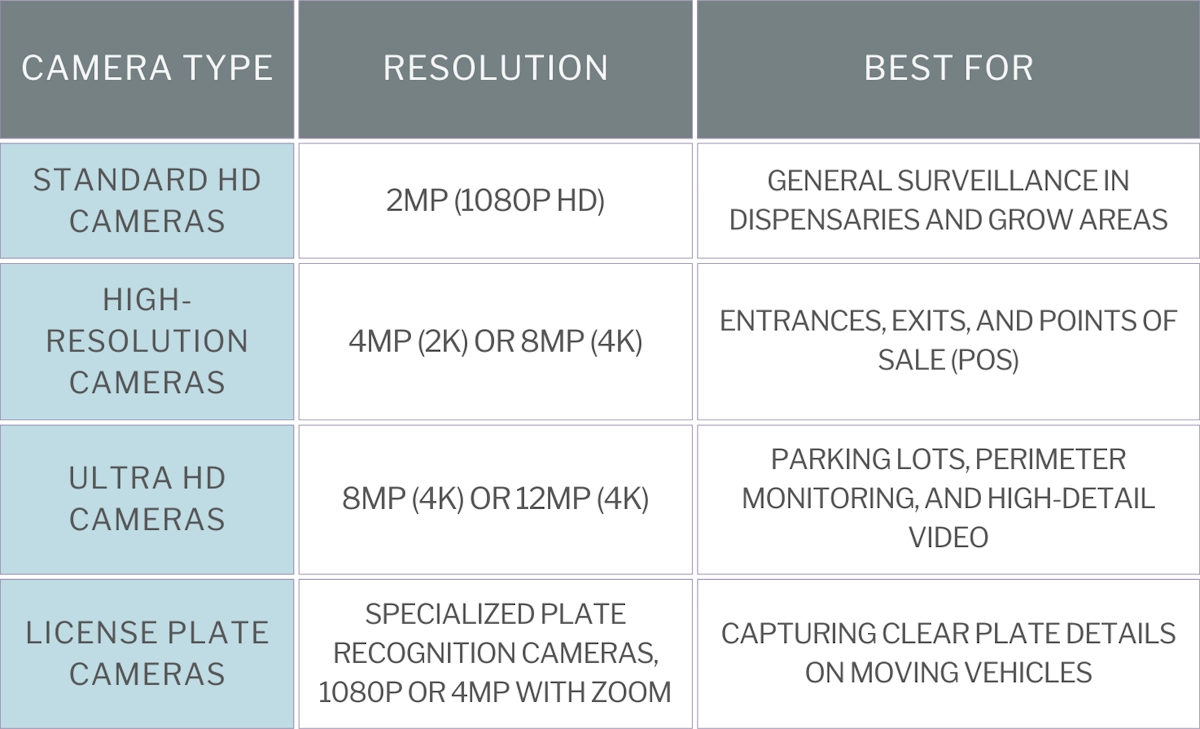
Here are general recommendations for cannabis business cameras:
- 2MP 1080p HD cameras for most areas and general surveillance
- 4MP 2K cameras or 8MP 4K for entrances and points of sale or transfer
- 8MP 4K cameras for monitoring parking lots and plate details on parked vehicles
- Specialized license plate cameras to reliably record tags and plates on moving vehicles
Frame Rates & Video Smoothness
Frame rate, measured in frames per second (fps), determines how smoothly video records and plays. Higher frame rates capture motion more clearly but also increase storage usage, while lower frame rates conserve space but may result in choppy footage.
Most states require at least 15 fps, which is sufficient for identifying faces and movements within 20 feet. However, higher frame rates are recommended for high-traffic areas like entrances and point-of-sale (POS) stations to ensure smooth motion capture.
Here are general recommendations for frame rates in cannabis security systems:
- 15 fps—Minimum recommended for compliance; suitable for general surveillance.
- 20–30 fps—Best for entrances, POS, and high-traffic areas where clear motion capture is essential.
- 10 fps or lower—Acceptable for storage rooms, grow areas, or low-activity zones to save storage.
Camera System Type: IP PoE vs. Coaxial
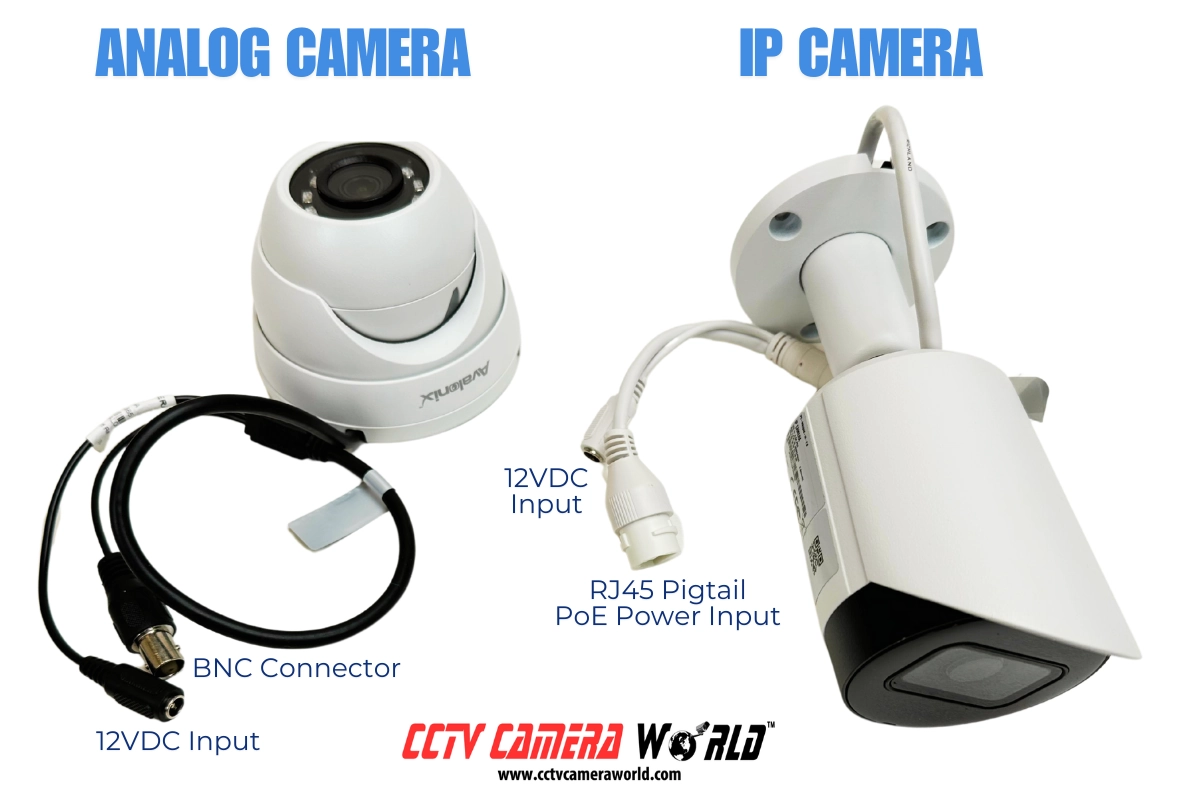
The best type of commercial grade surveillance system for cannabis use largely depends on the type of business and the size of the location. PoE camera systems are the best option for small dispensaries and indoor grow operations, while HD Analog surveillance systems are a better option for large grow operations and processing facilities that need long cable runs over 600 ft.
IP Camera Systems for Dispensaries & Small Grow Operations
IP cameras provide high-resolution video and advanced analytics over a single Ethernet cable using Power over Ethernet technology, which makes them ideal for cannabis stores and small processing facilities or indoor grow ops. They have a 328-foot cable limit per run, which limits their usefulness in larger warehouses and greenhouses. While you can use PoE extenders or special PoE switches for longer distances, they require more upkeep and increase maintenance expenses. Outdoor PoE camera installations also require additional junction boxes and enclosures to protect pigtails and extension devices, if used.
Despite these challenges, IP cameras offer superior features, including smart motion detection, face detection, and other smart detection algorithms that are extremely helpful for monitoring restricted areas, cash registers, and points of entry. They’re also easier to install and set up when using a plug-and-play PoE NVR for any cameras that connect directly to it. However, installing and managing an IP system can get tricky in larger camera systems over a network.
HD-over-Coaxial Systems for Large Grow Facilities & Greenhouses
For large grow operations and processing warehouses, HD-over-Coax systems are more cost-effective and easier to maintain. Siamese coax cables can run up to 500 ft or more depending on the camera’s resolution and power requirements. Analog and HD coax cameras rely solely on a DVR and a power box, minimizing failure points and simplifying replacements, unlike large network-based IP camera systems that need additional PoE switches and other networking equipment.
Another plus for coaxial systems is the lower upfront cost; they are 5–25% cheaper than similar IP setups, which makes them a fantastic option for businesses that want affordability and durability over advanced analytics.
For further technical information about the differences, we suggest reading our post on IP Cameras vs Analog Security Cameras.
Cannabis Security Camera Laws & Compliance for 2026
Cannabis businesses are under heavy scrutiny and require extensive regulations due to the nature of growing, processing, and selling a psychoactive substance. Dispensaries, grow operations, and transportation companies must comply with these regulations, as failure to do so can result in heavy fines, license revocation, and legal penalties. Most states require a minimum of 24/7 video recording and storage for 30 days or more.
Below is an overview of what most states require:
- Continuous 24/7 video surveillance covering all required operational and restricted areas.
- Minimum camera resolution and frame rates for clear identification of employees and customers.
- Secure storage of recorded footage for 30 to 90 days, depending on state laws.
- Tamper-proof video recording systems that prevent unauthorized access or deletion.
- Some states require a mirrored off-site backup.
Coverage Expectations in Practice
Beyond retention periods and frame rate requirements, most state regulations also imply clear coverage expectations. Even when not spelled out line-by-line, licensing agencies consistently look for complete visibility of product movement and customer interaction areas.
Use this practical checklist to compare your layout against your state's rules:
- Dispensary retail: POS counters (customer and employee faces), entrances and exits, sales floor, and any area where product is displayed or exchanged.
- Vaults and inventory storage: Continuous coverage with clear identification, including camera views that capture door access for monitoring and logging purposes.
- Cultivation and grow rooms: All limited-access areas where plants are grown, processed, or staged.
- Processing and packaging areas: Receiving, staging, weighing, labeling, and restricted processing zones.
- Perimeter and parking areas: Exterior doors, gates, loading zones, parking lots and vehicle approaches. If license plates are relevant to your security plan, use dedicated license plate cameras rather than relying on general view cameras.
Remote Access: What to Plan For
Some cannabis regulations require that video can be provided quickly to regulators or law enforcement. In practice, this often means having a way to export footage fast, and having secure remote access available when requested.
- Confirm if your state requires live remote viewing, or if they only require export on demand.
- Decide who controls access, and keep a written process so access is granted securely and only when required.
Cybersecurity & System Integrity Requirements
Most cannabis regulations focus on recording, retention, and coverage. However, regulators also expect that your surveillance system cannot be easily tampered with, disabled, or accessed by unauthorized users.
Protecting the integrity of your video system is part of maintaining compliance.
In practice, this means:
- Change Default Credentials: Changing all default passwords on recorders and cameras before the system goes live.
- Restrict Access: Restricting user permissions so employees cannot delete footage or modify recording settings.
- Avoid Port Forwarding: Avoiding direct exposure of recorders to the public internet without proper security controls.
- Network Segmentation: Separating your surveillance system from your main business network when possible, particularly from POS systems and guest WiFi.
If recorded footage can be easily accessed, altered, or deleted, it may be considered unusable during inspections or investigations. Taking cybersecurity seriously from the start will help ensure that your footage is in compliance and admissible.
Backup & Redundancy Planning
Many cannabis regulations require secure storage of surveillance footage, and some explicitly require off-site or mirrored backups. Even when not mandated, redundancy is an important part of protecting your license and preserving evidence.
Consider the following when designing your system:
- Redundant Hard Drive Configurations: Use recorders that support mirrored hard drives or RAID configurations to reduce the risk of data loss from a single drive failure.
- Have a Backup Policy: Immediately back up critical incident footage to have easily accessible copies after events occur.
- Off-site Backup: Confirm whether your state requires off-site storage, secondary backups, or additional retention of incident-related footage. Contact us for help if this is a requirement.
- Spare Drives & Drive Life Planning: Try to account for drive replacements for long-term planning, especially in systems with a high camera count (32+).
If a recorder fails and footage cannot be recovered, the issue may become a compliance liability rather than just a temporary inconvenience. A basic redundancy strategy helps prevent avoidable gaps in video retention.
Recreational marijuana dispensaries and cultivation security camera system minimum* requirements by state**
Each state has specific requirements for camera resolution, framerate, and video storage retention, as well as system monitoring, alerting, and maintenance. The table below lists the regulations for marijuana security cameras in 2026. Since legislation and associated rules are constantly changing, we recommend business owners also check with local county and city regulators for additional compliance requirements.
| State*** | Resolution | Frame rate | Storage | Reference |
|---|---|---|---|---|
| Alaska | 20 ft of facial detail or 720p |
Not specified | 40 days | 3 AAC 306.715 |
| Arizona | 704x480p | Not specified | 30 days | Ariz. Admin. Code § R9-18-312 |
| California | 20 ft of facial detail or 720p |
15 fps | 90 days | Cal. Code Regs. Tit. 4, § 15044 |
| Colorado | 20 ft of facial detail Not specified otherwise |
Not specified | 40 days | 1 CCR 212-2 R 306 |
| Connecticut | 20 ft of facial detail Not specified otherwise |
Not specified | 30 days | Section 21a-421j-7 |
| Delaware | 720p | 15 fps | 90 days | 5001 DE Admin Code 5001-6.3.2.4.2 |
| Illinois | Facial detail Distance not specified |
8 fps | 90 days | 410 ILCS 705/15-100 |
| Maine | 720p | 15 fps | 45 days | Maine Title 28-B |
| Maryland**** | Facial detail Distance not specified | Not specified | 30 days on-site (90 days off-site) | COMAR 10.62 |
| Massachusetts | Not specified | Not specified | 90 days | 935 CMR 500.110(5) |
| Michigan | 720p | Not specified | 30 days | LARA Rule 420.209 |
| Minnesota | Not specified | Not specified | 90 days | MAR 4770.0900 |
| Missouri | 1080p | 15 fps | 60 days | 19 CSR 100-1.070 |
| Montana | 640 x 470 | 10 fps | 60 days | ARM 42.39.121 |
| Nevada | 1080p | 15 fps | 30 days | NCCB Regulation 6.085 |
| New Jersey | 1080p | 15 fps | 30 days | N.J. Admin. Code § 17:30-9.10 |
| New Mexico | 720p | 15 fps | 60 days | N.M. Admin. Code § 16.8.2.10 |
| New York**** | Not specified | Not specified | 60 days | N.Y. Comp. Codes R. & Regs. tit. 9 § 125.3 |
| Ohio**** (varies by business role) | 480p | Processors: 15 fps Dispensaries: 30 fps | Processors: 45 days Dispensaries: 6 months | Ohio Admin. Code 3796:4-2-07 Ohio Admin. Code 3796:6-3-16 |
| Oregon | 720p | 10 fps | 90 days (30 days off-site) | OAR 845-025-1450 |
| Rhode Island**** | Not specified | Not specified | 60 days | 560-RICR-10-05-1 |
| Vermont**** | 720p | Not specified | 30 days | VT CCB Rule 2.4.2 |
| Virginia**** | Not specified | Not specified | 30 days | 3VAC10-40-140 |
| Washington | 640 x 470 | 10 fps | 45 days | WAC 314-55-083 |
* These are the bare minimum requirements as outlined by state regulations and subject to change. Most states require separate backups of videos of incidents as they occur for evidence.
** We are not lawyers, and the information presented here may be obsolete. This table does not provide legal advice. Before choosing a security camera system, confirm with your state or municipal licensure.
*** All states require 24/7 continuous recording.
**** Currently, some regulations are proposed, or medical dispensary rules are being used. We recommend contacting your state legislature or licensing department for clarification.
How to Store & Manage Cannabis Surveillance Footage
When setting up security cameras for a cannabis dispensary or grow operation, video storage is the other half of the battle. Most states require continuous 24/7 recording and storage retention times between 30 and 90 days. However, specific regulations around resolution are vague in some states, often only stating that footage must be clear enough to discern details like facial features up to 20 feet away. This leaves businesses to determine exactly what resolution they need to satisfy the requirements.
Compliance is just one factor. For footage to be useful in security investigations, it's a good idea to install higher-resolution cameras than the legal minimum. Of course, higher resolution means more storage.
Fortunately, there are strategies to optimize storage and retention. But first, let's figure out how much storage you actually need based on the number of cameras, resolution, and required retention period.
How to Calculate Storage Needs for a Cannabis Security System
Estimating storage requirements for a cannabis surveillance system can be complex, but careful planning will ensure compliance. We recommend overestimating storage needs by 10–15% to accommodate future camera additions and variations in recording usage.
To simplify this process, you can use our Security NVR and DVR Hard Drive Calculator, which can help provide an estimate based on your setup.
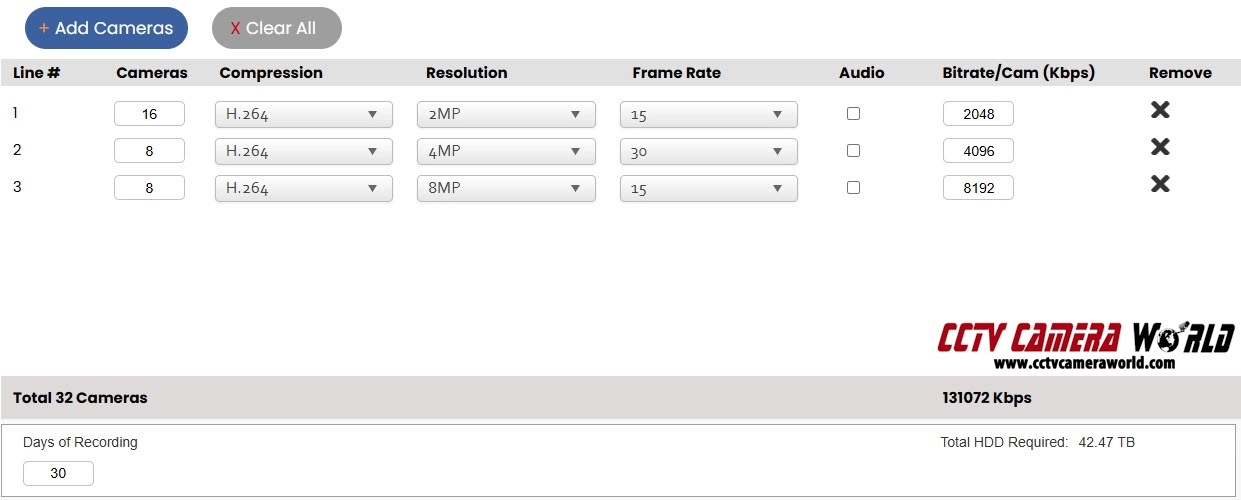
Steps to Estimate Your Storage Needs
- Determine Camera Requirements
- Estimate how many cameras you need and what resolution each location requires.
- General surveillance: 1080p (2MP)
- Sensitive areas: 2K (4MP)
- Entrances & Point-of-Sale: 4K (8MP)
- Use the Storage Calculator
- Click “Add Cameras” for each resolution you plan to use (1080p, 2K, or 4K).
- Enter the number of cameras for each resolution.
- Set Compression to H.264 for an overestimation.
- Select the Frame Rate your state requires (at least 15 fps if unspecified).
- Input the Days of Recording based on state retention laws.
- Review Your Total Storage Needs
- The “Total HDD Required” field will display the recommended storage.
- For example, a 32-camera system with the following requires more than 40 TB of storage for 30 days of recording.
- 16 x 1080p (2MP) cameras for general surveillance
- 8 x 4MP cameras for sensitive areas
- 8 x 8MP (4K) cameras for entrances & POS
- In states that require 90 days, the recommended storage triples to over 120 TB.
Best Practices for Optimizing Cannabis Surveillance Storage
Considering most personal computers have no more than 1 or 2 TB of internal drive space, it can be daunting to understand how to efficiently store 40 to 120 times that amount of data. Fortunately, there are a few strategies and technologies you can use to optimize your storage space.
Use H.265 Video Encoding
All of our systems support H.265 encoding, which is a newer and more efficient video encoding technology that offers up to 50% savings compared to H.264. In fact, most of our systems have H.265 enabled by default. However, H.265 does have more processing overhead that can affect an NVR's performance, so we don’t recommend setting all channels to H.265 if you fill the NVR’s channels with cameras.
You can use the Storage Calculator to estimate how much savings H.265 will provide. However, as we suggest, to ensure you have enough storage space, calculate and use the H.264 estimation.
Optimize Frame Rates
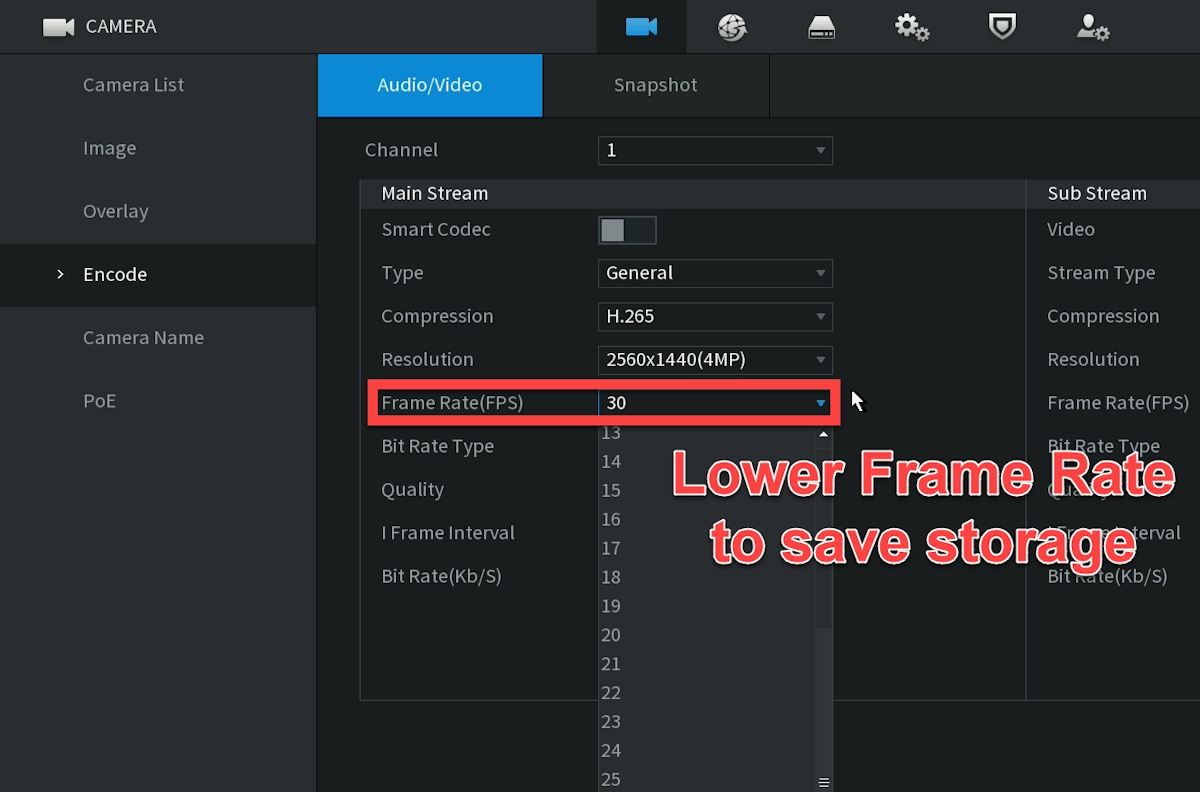
Frame rates are another straightforward and simple optimization that can be used. State laws often mandate a minimum of 15 frames per second, yet your cameras might have default frame rates of 20 or 30 fps. Going into the encoding settings and knocking it down to 15 or 10 fps can offer anywhere from 20% to 50% in savings right away.
Implement a Schedule and Substream Recording Strategy
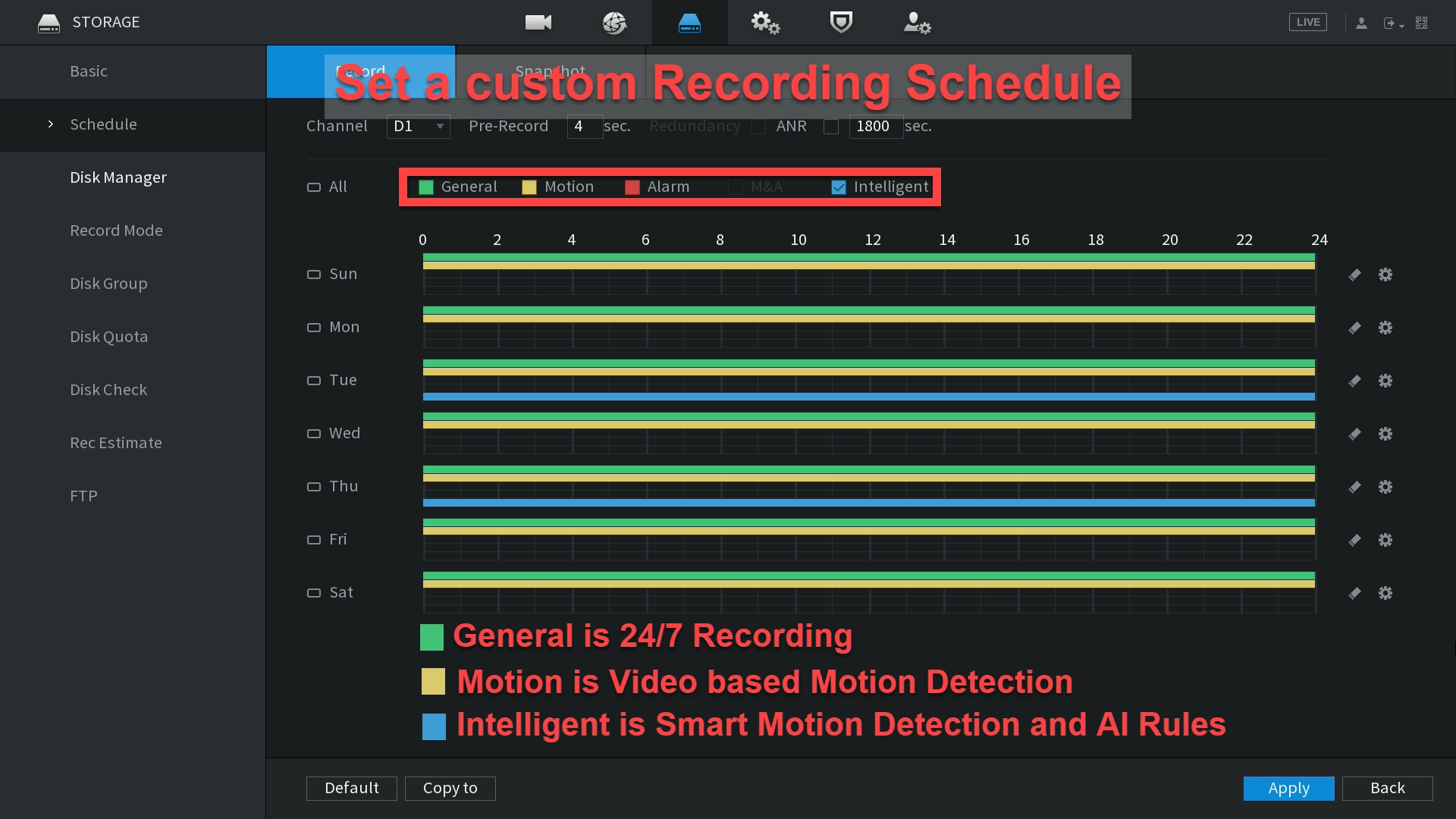
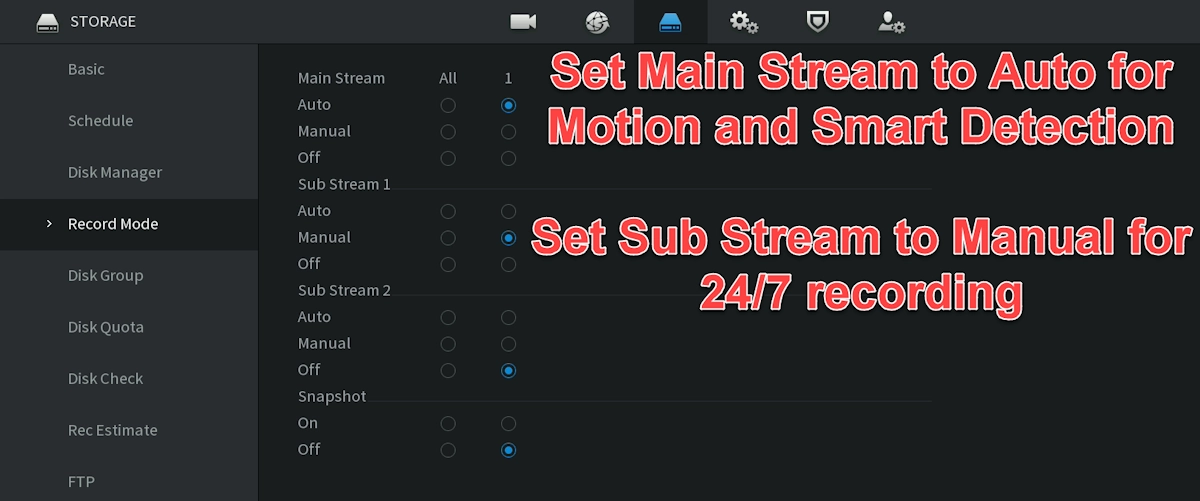
While most states require continuous recording, certain jurisdictions allow limited motion-based recording in low-risk areas. Where permitted, adjusting frame rates or using substream recording can reduce storage usage without sacrificing compliance. Always confirm with your licensing agency before implementing any schedule-based strategy.
Smart Detection and motion-based recording are also great ways to set up alerts that some states require your system to have. Our systems support email alerts and push notifications to smartphones. Our systems also support "Camera Offline" alerts, as required by some states.
Frequently Asked Questions about Cannabis Security
What resolution do cannabis security cameras need?
Most states require at least 1080p resolution to clearly capture facial detail. Some states also accept 720p, but 1080p is considered best practice for cannabis surveillance monitoring.
How many days of surveillance footage must be stored?
Storage requirements vary by state. Most cannabis businesses must store video surveillance footage for 30 to 90 days to remain compliant with marijuana security camera regulations.
Is live security camera monitoring required for cannabis businesses?
While not all states explicitly require live video monitoring, many cannabis businesses use real-time surveillance systems to meet compliance, enhance visibility, and improve security response.