


ANPR APIs 2.1
Public Category
In this section:
Interaction Model and Policy
Basic Info
Path: /jiaohu
Method: OPTIONS
Interface description:
1. Upstream interface (HTTP): The device initiates a message to the platform containing the basic information, vehicle information, alarms, etc.
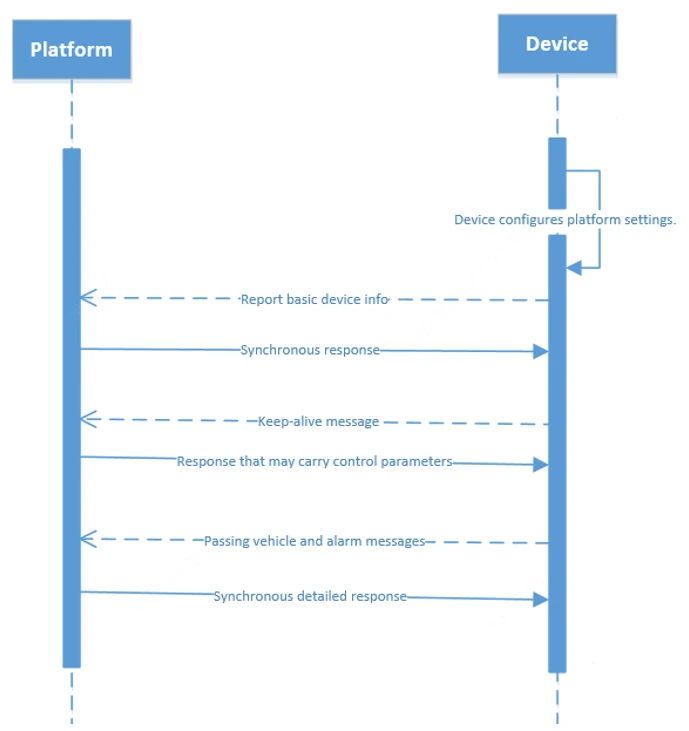
(1) The device sends the basic data every 30s till it receives a response from the platform.
(2) The device sends a keep-alive message every 30s by default. If the device fails to receive a response for 3 times, it assumes that the connection is lost and goes back to step (1).
(3) The device sends a notification to the platform after platform configuration has changed on the device.
(4) The keep-alive response may include control parameters to trigger non-realtime actions.
2. Downstream interface (HTTP): The device and the platform are on the same Local Area Network (LAN). The interfaces include device control and service configuration interfaces.
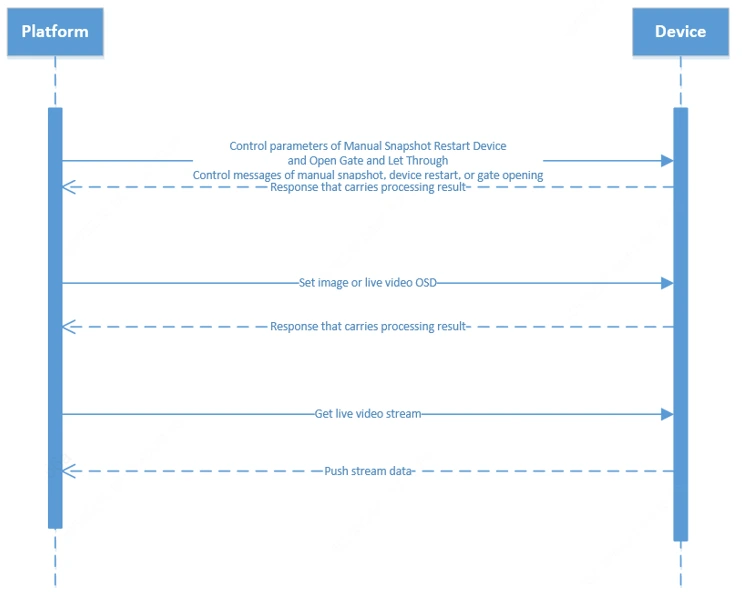
(1) Upstream interfaces (HTTP): See the above descriptions.
(2) The interfaces must use Digest authentication to ensure security.
3. Downstream interfaces (MQTT): The device is on the LAN, and the platform controls it from the Internet.
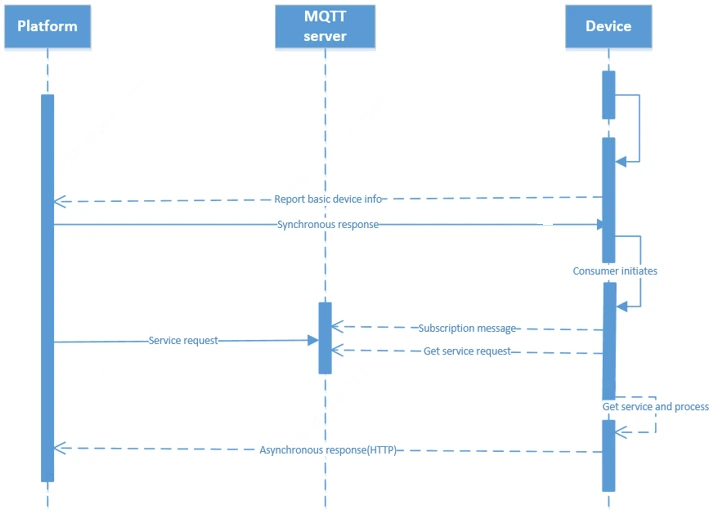
(1) Upstream interfaces (HTTP): See the above descriptions.
(2) The MQTT server is deployed on the platform server; the platform and the device interact with their own clients.
(3) To control all the devices in the parking lot from the platform through MQTT, fill in device IDs with “all”; batch configuration on the platform is unnecessary.
Request parameters
Revision History
Basic info
Path: /record
Method: OPTIONS
Interface description:
V1.0
Draft
V1.1
Completed interfaces, added field descriptions
V1.2
1. Added interaction model and interaction policy descriptions
2. Added example packets
V1.3
1. Changed record ID to UUID to ensure record uniqueness
2. Added downstream HTTP interfaces for LAN application
3. Corrected the "1ton” flag by changing it to “all” in MQTT downstream interfaces
4. Added the parking lot ID and camera ID fields to asynchronous MQTT response interfaces for differentiation in batch configuration
5. Added status code descriptions
V1.5
1.Added the vehicle brand field
2.Added blocklist/allowlist configuration under Downstream Interface (HTTP)
V2.0
1.Changed document format
2.Added LED control interface
3.Added gate control interface(HTTP)
Request parameters
Return Data
| Name | Type | Required | Default | Remarks | More Info |
|---|
Protocol Description
Basic info
Path: /explain
Method: OPTIONS
Interface description:
Overview
This guide defines interfaces used to connect AvaEye parking lot devices to AvaEye or third-party platforms.
Applicable Devices
High-pole road-side parking space detection cameras
Low-pole road-side parking space detection cameras
Entrance and exit cameras: HC121 or higher
Parking space detection camera
Interface Selection
This protocol supports upstream interfaces and downstream interfaces. Among which, the downstream interfaces include two forms (HTTP and MQTT) to meet different network and service requirements.
Data Convention
1. All Chinese characters are UTF-8 encoded.
2. All images are Base64 encoded.
3.We may add fields and parameters when expanding interface functions in future device versions. Users of these interfaces shall ensure compatibility with these fields.
Request parameters
Return Data
| Name | Type | Required | Default | Remarks | More Info |
|---|
Protocol Configuration
Basic info
Path: /peizhizhidao
Method: OPTIONS
Interface description:
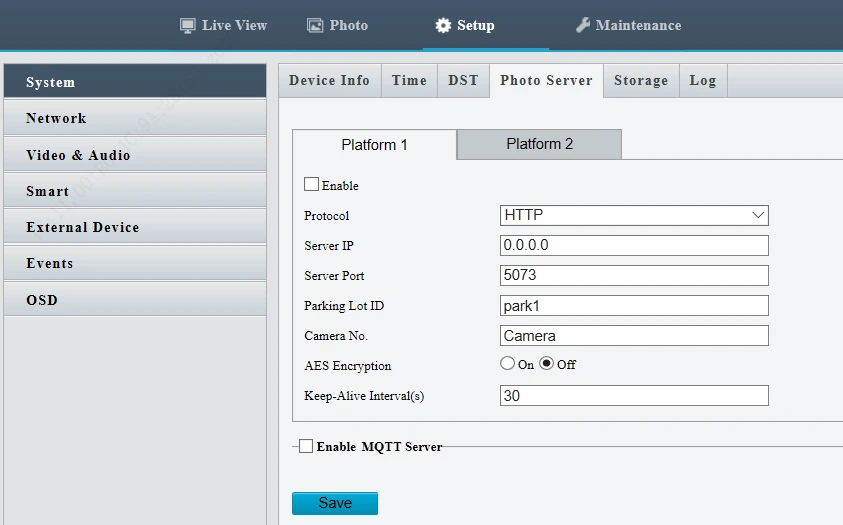
1. Parking lot ID and camera ID are used to identify different devices and can be customized on the platform.
2. If MQ configuration does not involve the interfaces, using the default settings is sufficient.
Request parameters
Return Data
| Name | Type | Required | Default | Remarks | More Info |
|---|
Upstream Interfaces (HTTP)
In this section:
Basic Data
Basic info
Path: /api/upark/basicinfo
Method: POST
Interface description:
Used by the camera to report the basic data, including the basic device information and device capabilities. This interface is applicable to entrance & exit cameras, parking space detection cameras.
Example of request parameters
{
"version": "1.0",
"parkId": "park01",
"deviceId": "2102512",
"params": {
"deviceType": 1,
"deviceName": "HC121@MAC-08S",
"senceType": 1,
"keepalive": 30,
"picFillType": 1,
"aliOssParam": {
"endpoint": "oss-cn-xxx.aliyuncs.com",
"accessKeyId": "xxxxxx",
"accessKeySecret": "xxxxxx",
"bucketName": "xxxxxx",
"ObjectNameHead": "xxxxxx",
},
"mqttEnable": 1,
"mqttParam": {
"address": "tcp://127.0.0.1:8080",
"user": "xxxxxx",
"pwd": "xxxxxx",
"reqTopic": "xxxxxx"
},
"deviceCapability": {
"isSupportLamp": 1,
"isSupportGate": 0,
"isSupprotCoil": 1,
"isSupportRadar": 1,
"isSupportLED": 1,
"isSupportStore": 1,
"isSupportParkDetection": 1
},
"totalParkNum": 2,
"parkInfo": {
"idInfo": [
{
"area": "A12",
"id": "001"
},
{
"area": "A12",
"id": "001"
}
]
},
"shootPosition": "1",
"ipAddress": "192.168.1.13",
"resolution": "1920*1080",
"softwareVersion": "PARK_1201-B0003",
"serialNum": "210235000000000",
"registerCode": "316RJSU04XXXXXXXXXX700M4F"
}
}
Response parameters
{
"code": 200,
"message": "success"
}
Request parameters
Headers
| Parameter | Value | Required | Example | Remarks |
|---|---|---|---|---|
| Content-Type | application/json | Yes |
Body
| Name | Type | Required | Default | Remarks | More Info |
|---|---|---|---|---|---|
| version | string | Yes | Protocol version number. Default: 1.0 |
mock: 1.0 |
|
| parkId | string | Yes | Parking lot ID, assigned by the platform |
mock: park01 |
|
| deviceId | string | Yes | Camera ID, used to identify different cameras in the same parking lot. |
mock: 2102512 |
|
| params | object | Yes | Parameter | ||
| ├─ deviceType | number | Yes | Device type. 1-Entrance & exit camera; 2-Parking space detection camera (fixed dome); 3-Roadside low-pole parking space detection camera; 4-Roadside high-pole parking space detection camera |
mock: 1 |
|
| ├─ deviceName | string | Yes | Device name. Example: HC121@MAC-08S |
mock: HC121@MAC-08S |
|
| ├─ senceType | number | Yes | Scene type. 1-Campus; 2-Road; 3-Line-shaped; 4-Non-character-shaped |
mock: 1 |
|
| ├─ keepalive | number | Yes | Keep-alive interval |
mock: 30 |
|
| ├─ picFillType | string | Yes | Image filling type. 0-Not fill; 1-Base64-encoded data; 2-Store on UCS; 3-Store on Aliyun OSS |
mock: 1 |
|
| ├─ aliOssParam | object | No | Aliyun OSS parameter, carried when picFillType is 3. | ||
| ├─ endpoint | string | Yes | OSS server node address | ||
| ├─ accessKeyId | string | Yes | Access ID | ||
| ├─ accessKeySecret | string | Yes | Access key | ||
| ├─ bucketName | string | Yes | Bucket name | ||
| ├─ ObjectNameHead | string | Yes | File path header | ||
| ├─ mqttEnable | number | Yes | Whether to enable MQTT. 0: Disable; 1: Enable | ||
| ├─ mqttParam | object | No | MQTT parameter, carried when mqttEnable is 1. | ||
| ├─ address | string | Yes | Server address, tcp://127.0.0.1:8080 | ||
| ├─ user | string | Yes | Username | ||
| ├─ pwd | string | Yes | Password | ||
| ├─ reqTopic | string | Yes | Request topic, used to initiate subscription from the MQTT server and receive downstream data | ||
| ├─ deviceCapability | object | Yes | Device capability | ||
| ├─ isSupportLamp | number | Yes | Whether parking space lamp is supported. 0-No; 1-Yes |
mock: 1 |
|
| ├─ isSupportGate | number | Yes | Whether gate control is supported. 0-No; 1-Yes |
mock: 0 |
|
| ├─ isSupprotCoil | number | Yes | Whether coil is supported. 0-No; 1-Yes |
mock: 1 |
|
| ├─ isSupportRadar | number | Yes | Whether radar is supported. 0-No; 1-Yes |
mock: 1 |
|
| ├─ isSupportLED | number | Yes | Whether LED display is supported. 0-No; 1-Yes |
mock: 1 |
|
| ├─ isSupportStore | number | Yes | Whether edge storage is supported. 0-No; 1-Yes |
mock: 1 |
|
| ├─ isSupportParkDetection | number | Yes | Whether parking space detection is supported. 0-No; 1-Yes |
mock: 1 |
|
| ├─ totalParkNum | number | No | Total number of parking spaces, carried when isSupportParkDetection is 1. |
mock: 2 |
|
| ├─ parkInfo | object | No | Parking space information, carried when isSupportParkDetection is 1. | ||
| ├─ idInfo | object [] | Yes | Parking space information |
item type: object |
|
| ├─ area | string | Yes | Area where the parking space is located. Example: A1 |
mock: A12 |
|
| ├─ id | string | Yes | Parking space ID. Example: 001 |
mock: 001 |
|
| ├─ shootPosition | string | Yes | Position to capture. 1-Front of vehicle; 2-Rear of vehicle; 3-Front/rear of vehicle |
mock: 1 |
|
| ├─ ipAddress | string | Yes | Device IP address |
mock: 192.168.1.13 |
|
| ├─ resolution | string | Yes | Device resolution |
mock: 1920*1080 |
|
| ├─ softwareVersion | string | Yes | Firmware version |
mock: PARK_1201-B0003 |
|
| ├─ serialNum | string | Yes | Device serial number |
mock: 210235000000000 |
|
| ├─ registerCode | string | Yes | Register code for getting online on EZCloud |
Return Data
| Name | Type | Required | Default | Remarks | More Info |
|---|---|---|---|---|---|
| code | number | Yes | Status code. Example: 200 |
mock: 200 |
|
| message | string | Yes | Status description. Example: success |
mock: success |
Heartbeat Keep-alive
Basic info
Path: /api/upark/keepalive
Method: POST
Interface description:
Used to sync time between the device and the platform and send non-realtime control messages. Control results are sent to the platform asynchronously.
Example of request parameters
{
"version": "1.0",
"parkId": "10000",
"deviceId": "1001",
"params": {
"uploadTime": 1589951640000
}
}
Example response:
{
"code": 200,
"message": "success",
"data": {
"svrTime": 1589951640000,
"parkId": "10001",
"deviceId": "1002",
"reboot": 0,
"getCapture": 0,
"lampCtrlMode": 0,
"letCarPass": 1,
"setLamp": {
"num": 2,
"lampInfo":[{
"id": "001",
"mode": 0,
"color": 0
},{
"id": "002",
"mode": 0,
"color": 0
}]
},
"svrAddress": "www.xxx.com",
"svrPort": 80,
"picFillType": 1,
"aliOssParam": {
"endpoint": "oss-cn-xxx.aliyuncs.com",
"accessKeyId": "xxxxxx",
"accessKeySecret": "xxxxxx",
"bucketName": "xxxxxx",
"ObjectNameHead": "xxxxxx",
},
"mqttEnable": 1,
"mqttParam": {
"address": "tcp://127.0.0.1:8080",
"user": "xxxxxx",
"pwd": "xxxxxx",
"reqTopic": "xxxxxx"
}
}
}
Request parameters
Headers
| Parameter | Value | Required | Example | Remarks |
|---|---|---|---|---|
| Content-Type | application/json | Yes |
Body
| Name | Type | Required | Default | Remarks | More Info |
|---|---|---|---|---|---|
| version | string | No | Protocol version number |
mock: 1.0 |
|
| parkId | string | No | Parking lot ID, assigned by the platform |
mock: park01 |
|
| deviceId | string | No | Device ID, used to identify different devices in the same parking lot. |
mock: 0123 |
|
| params | object | No | |||
| ├─ uploadTime | number | No | UTC time (UNIX timestamp in millisecond) |
mock: 1589951640000 |
Return Data
| Name | Type | Required | Default | Remarks | More Info |
|---|---|---|---|---|---|
| code | number | Yes | Status Code |
mock: 200 |
|
| message | string | Yes | Status description |
mock: success |
|
| data | object | Yes | Data. Except for server time, control parameters can carry only one type of data at a time. | ||
| ├─ svrTime | number | Yes | Server time (UNIX timestamp in millisecond), used for time synchronization. |
mock: 1589951640000 |
|
| ├─ parkId | string | No | Parking lot ID, assigned by the platform |
mock: park01 |
|
| ├─ deviceId | string | No | Device ID, used to identify different devices in the same parking lot. |
mock: 0123 |
|
| ├─ reboot | number | No | Carried to restart the device. 1-Restart |
mock: 1 |
|
| ├─ getCapture | number | No | Carried to perform a manual capture. 1-Manual capture |
mock: 1 |
|
| ├─ lampCtrlMode | number | No | Carried to control/stop controlling parking space lamp from the platform. 0-Controlled by camera; 1-Controlled by platform |
mock: 1 |
|
| ├─ letCarPass | number | No | Carried to open the gate. 1-Open gate |
mock: 1 |
|
| ├─ setLamp | object | No | Carried to control/stop controlling parking space lamp from the platform. | ||
| ├─ num | number | No | Number of lamps that the platform controls/stops controlling. | ||
| ├─ lampInfo | object [] | No | Lamp information |
item type: object |
|
| ├─ id | string | No | Parking space ID. Example: 001 |
mock: 001 |
|
| ├─ mode | number | No | Lamp mode. 0-Off; 1-Steady on; 2-Fast blink; 3-Slow blink |
mock: 1 |
|
| ├─ color | number | No | Lamp color. 1-Red; 2-Green; 3-Yellow |
mock: 1 |
|
| ├─ svrAddress | string | No | Carried when the server address has changed |
mock: www.xxx.com |
|
| ├─ svrPort | number | No | Carried when the server port has changed |
mock: 80 |
|
| ├─ picFillType | number | No | Carried to change image filling type: 0-Not fill; 1-Base64-encoded data; 2-Store on UCS; 3-Store on Aliyun OSS |
mock: 1 |
|
| ├─ aliOssParam | object | No | |||
| ├─ endpoint | string | Yes | OSS server node address | ||
| ├─ accessKeyId | string | Yes | Access ID | ||
| ├─ accessKeySecret | string | Yes | Access key | ||
| ├─ bucketName | string | Yes | Bucket name | ||
| ├─ ObjectNameHead | string | Yes | File path header | ||
| ├─ mqttEnable | number | No | Whether to enable MQTT. 0: Disable; 1: Enable | ||
| ├─ mqttParam | object | No | Carried when MQTT parameter has changed | ||
| ├─ address | string | Yes | Server address, tcp://127.0.0.1:8080 | ||
| ├─ user | string | Yes | Username | ||
| ├─ pwd | string | Yes | Password | ||
| ├─ reqTopic | string | Yes | Request topic, used to initiate subscription from the MQTT server and receive downstream data |
Vehicle Capture
Basic info
Path: /api/upark/capture
Method: POST
Interface description:
Used by entrance & exit cameras to proactively capture vehicles and report to the platform. This interface is applicable to entrance & exit cameras.
Request parameters
{
"version": "1.0",
"parkId": "park01",
"deviceId": "1234",
"params": {
"recordId": "ec7ede33-6c91-4aee-9e6b-a859046b8c91",
"picTime": "2020-01-01T15:00:00",
"plateNo": "A12345",
"confidence": 99,
"vehicleType": 1,
"vehicleColor": 1,
"plateType": 1,
"plateColor": 1,
"shootPosition": 1,
"picNum": 2,
"picInfo": [{
"type": 1,
"size": 1024,
"data": "Y2guY29tFw==",
"url": "xxx.xxx.xxx/image,jpg"
}]
}
}
Request parameters
Headers
| Parameter | Value | Required | Example | Remarks |
|---|---|---|---|---|
| Content-Type | application/json | Yes |
Body
| Name | Type | Required | Default | Remarks | More Info |
|---|---|---|---|---|---|
| version | string | Yes | Protocol version number |
mock: 1.0 |
|
| parkId | string | Yes | Parking lot ID |
mock: park01 |
|
| deviceId | string | Yes | Device ID |
mock: 1234 |
|
| params | object | Yes | Parameter | ||
| ├─ recordId | string | Yes | Unique record ID |
mock: ec7ede33-6c91-4aee-9e6b-a859046b8c91 |
|
| ├─ picTime | string | Yes | Capture time. Example: YYYY-MM-DDTHH:mm:ss |
mock: 2020-01-01T15:00:00 |
|
| ├─ plateNo | string | Yes | Vehicle plate number (UTF-8 encoded) |
mock: A12345 |
|
| ├─ confidence | number | Yes | Plate confidence (0-100) |
mock: 99 |
|
| ├─ vehicleType | number | Yes | Vehicle type. See Data Dictionary--Vehicle Type |
mock: 1 |
|
| ├─ vehicleColor | number | Yes | Vehicle body color. See Data Dictionary--Common Color |
mock: 1 |
|
| ├─ plateType | number | Yes | Vehicle plate type. See Data Dictionary--Vehicle Type |
mock: 1 |
|
| ├─ plateColor | number | Yes | Vehicle plate color. See Data Dictionary--Common Color |
mock: 1 |
|
| ├─ vehicleLogoType | string | Yes | Vehicle logo |
mock: A0 |
|
| ├─ vehicleBrandType | string | Yes | Vehicle brand |
mock: AODI-A6-2004 |
|
| ├─ shootPosition | number | Yes | Position to capture. 1-Front of vehicle; 2-Rear of vehicle; 3-Front/rear of vehicle |
mock: 1 |
|
| ├─ captureMode | string | Yes | Capture type. 1-Video; 2-Switch signal; 3-Manual |
mock: 1 |
|
| ├─ carListType | string | Yes | Vehicle list type. 0-Common; 1-Allowlist; 2-Blocklist | ||
| ├─ picNum | number | Yes | Number of photos |
mock: 2 |
|
| ├─ picInfo | object [] | Yes | Photo information |
item type: object |
|
| ├─ type | number | Yes | Photo type. 1-Vehicle photo; 2-Plate photo |
mock: 1 |
|
| ├─ size | number | Yes | Photo size |
mock: 1024 |
|
| ├─ data | string | Yes | Photo data (Base64-encoded). Example: Y2guY29tFw== |
mock: Y2guY29tFw== |
|
| ├─ url | string | Yes | Photo URL, required when picFillType is 1 or 2. |
Return Data
| Name | Type | Required | Default | Remarks | More Info |
|---|---|---|---|---|---|
| code | number | Yes | Status Code |
mock: 200 |
|
| message | string | Yes | Status description |
mock: success |
|
| data | string | Yes |
Upstream Transparent Channel
Basic info
Path: /api/upark/transchannel
Method: POST
Interface description:
Used to send messages from peripherals to the third-party platform transparently. This interface is applicable to entrance & exit cameras and parking space detection cameras.
Example request:
{
"version": "1.0",
"parkId": "10000",
"deviceId": "1001",
"params": {
"size": 1024,
"data": "77aa77aa"
}
}
Example response:
{
"code": 200,
"message": "success",
}
Request parameters
Headers
| Parameter | Value | Required | Example | Remarks |
|---|---|---|---|---|
| Content-Type | application/json | Yes |
Body
| Name | Type | Required | Default | Remarks | More Info |
|---|---|---|---|---|---|
| version | string | No | Protocol version number |
mock: 1.0 |
|
| parkId | string | No | Parking lot ID, assigned by the platform |
mock: park01 |
|
| deviceId | string | No | Device ID, used to identify different devices in the same parking lot. |
mock: 2102 |
|
| params | object | No | Parameter | ||
| ├─ size | number | No | Data size (bytes) |
mock: 256 |
|
| ├─ data | string | No | Data that are transferred transparently |
mock: 77AA |
Return Data
| Name | Type | Required | Default | Remarks | More Info |
|---|---|---|---|---|---|
| code | number | Yes | Status Code |
mock: 200 |
|
| message | string | Yes | Status description |
mock: success |
Report Manual Capture Results (Entrance & Exit)
Basic info
Path: /api/upark/notifyresult/manualcapture/common
Method: POST
Interface description:
Used by parking space detection cameras to push capture results asynchronously to the platform. Used to respond to MQTT/heartbeat/capture trigger.
Request parameters
Headers
| Parameter | Value | Required | Example | Remarks |
|---|---|---|---|---|
| Content-Type | application/json | Yes |
Body
| Name | Type | Required | Default | Remarks | More Info |
|---|---|---|---|---|---|
| requestId | string | No | Platform request ID. Used for matching MQTT manual capture message. |
mock: 0 |
|
| parkId | string | No | Parking lot ID, assigned by the platform |
mock: park01 |
|
| deviceId | string | No | Camera ID, used to identify different cameras in the same parking lot. |
mock: 123 |
|
| code | number | No | Status Code |
mock: 200 |
|
| message | string | No | Status description |
mock: success |
|
| data | object | No | |||
| ├─ recordId | string | No | Unique record ID |
mock: ec7ede33-6c91-4aee-9e6b-a859046b8c91 |
|
| ├─ picTime | string | No | Capture time |
mock: YYYY-MM-DDTHH:mm:ss |
|
| ├─ plateNo | number | No | Vehicle plate number (UTF-8 encoded). Example: A12345 |
mock: A12345 |
|
| ├─ confidence | string | No | Plate confidence (0-100). Example: 99 |
mock: 52 |
|
| ├─ identifyTime | number | No | Recognition time (ms). Example: 200 |
mock: 200 |
|
| ├─ vehicleType | string | No | Vehicle type. See Data Dictionary--Vehicle Type | ||
| ├─ vehicleColor | string | No | Vehicle body color. See Data Dictionary--Common Color | ||
| ├─ plateType | string | No | Vehicle plate type. See Data Dictionary--Plate Type | ||
| ├─ plateColor | string | No | Vehicle plate color. See Data Dictionary--Common Color | ||
| ├─ shootPosition | string | No | Position to capture. 1-Front of vehicle; 2-Rear of vehicle; 3-Front/rear of vehicle | ||
| ├─ picInfo | object | No | |||
| ├─ type | number | Yes | Photo type. 1-Vehicle photo; 2-Plate photo |
mock: 1 |
|
| ├─ size | number | Yes | Photo size |
mock: 1024 |
|
| ├─ data | string | Yes | Photo data (Base64-encoded). Example: Y2guY29tFw== |
mock: Y2guY29tFw== |
|
| ├─ picNum | string | No | Number of photos |
mock: 2 |
Return Data
| Name | Type | Required | Default | Remarks | More Info |
|---|
Downstream Interfaces (HTTP)
In this section:
- (Must-Read) HTTP Interface Description
- Get Live Video Stream
- Live View OSD Configuration
- Photo OSD
- Add Allowed Vehicle
- Edit Allowed Vehicle
- Delete Allowed Vehicle
- Add Forbidden Vehicle
- Edit Forbidden Vehicle
- Delete Forbidden Vehicle
- LED Display Control
- Gate Control
- Manual Capture
- Device Restart (HTTP)
(Must-Read) HTTP Interface Description
Basic info
Path: /jiekoushuoming
Method: OPTIONS
Interface description:
1. These interfaces are applicable when the device and the platform are on the same LAN
2. All the interfaces must use Digest authentication to ensure security
3. On the test stage, you can disable authentication before starting test: Login ->Maintenance->Security->Authentication->Set HTTP Authentication to None
Request parameters
Return Data
| Name | Type | Required | Default | Remarks | More Info |
|---|
Get Live Video Stream
Basic info
Path: /LAPI/V1.0/Channel/0/Media/LivingStream
Method: GET
Interface description:
1. The camera supports streaming by RTSP
2. The stream URL may vary with device and stream type
3. To prevent wasting camera resources, strictly follow the RTSP TEARDOWN process to end streaming
Example of response:
{
“Response”: {
“ResponseURL”: “/LAPI/V1.0/Channel/0/Media/LivingStream”,
“StatusCode”: 0,
“StatusString”: “Succeed”,
“Data”: “rtsp://192.168.1.13:554/media/video1”
}
}
Request parameters
Return Data
| Name | Type | Required | Default | Remarks | More Info |
|---|---|---|---|---|---|
| Response | object | No | |||
| ├─ ResponseURL | string | No | Response URL |
mock: /LAPI/V1.0/Channel/0/Media/LivingStream |
|
| ├─ StatusCode | number | No | Status Code |
mock: 0 |
|
| ├─ StatusString | string | No | Status description |
mock: Succeed |
|
| ├─ Data | string | No | Data |
mock: rtsp://192.168.1.13:554/media/video1 |
Live View OSD Configuration
Basic info
Path: /LAPI/V1.0/Channel/0/Media/OSD/0
Method: POST
Interface description:
Used to set live video OSD on camera
Explanation
1. Live video OSD support 8 areas
2. Each area allows 8 rows
3. Area coordinates information. Normally, it’s only needed to fill in with the coordinates of the upper-left corner, and fill in with 0 for the lower-right corner, which the system calculates automatically
4. The upper-left corner is (0,0), the lower-right corner is (99,99)
5. By default, areas 1-8 overlay on top of each other in the upper-left corner
Example of request parameters
{
"AreaNum": 2,
"InfoOSD": [
{
"Index": 1,
"Enable": 1,
"InfoParam": [
{
"InfoType": 2020,
"Value": “Hello"
}
],
"Area": {
"TopLeft": {
"X": 15,
"Y": 52
},
"BotRight": {
"X": 15,
"Y": 52
}
}
},
{
"Index": 1,
"Enable": 1,
"InfoParam": [
{
"InfoType": 2020,
"Value": "Hello"
}
],
"Area": {
"TopLeft": {
"X": 15,
"Y": 52
},
"BotRight": {
"X": 15,
"Y": 52
}
}
}
]
}
Response parameters
{
"Response": {
"ResponseURL": "/LAPI/V1.0/Channel/0/Media/OSD/0",
"StatusCode": 0,
"StatusString": "Succeed",
"Data": "null"
}
}
Request parameters
Headers
| Parameter | Value | Required | Example | Remarks |
|---|---|---|---|---|
| Content-Type | application/json | Yes |
Body
| Name | Type | Required | Default | Remarks | More Info |
|---|---|---|---|---|---|
| AreaNum | number | No | Number of OSD areas |
mock: 8 |
|
| InfoOSD | object [] | No | OSD area configuration. The number of members depends on AreaNum. |
item type: object |
|
| ├─ Index | number | Yes | Area ID. Range: [0,7], which corresponds to areas 1-8. |
mock: 1 |
|
| ├─ Enable | number | Yes | Used to enable/disable area. 0-Disable; 1-Enable |
mock: 1 |
|
| ├─ InfoParam | object [] | Yes | Information parameter, fixed-length array, must include information of 8 members. See the example. |
item type: object |
|
| ├─ InfoType | number | Yes | Information type. 0-Not in use; 1-Custom text; 2-Time and date (2020-07-15 12:00:00) |
mock: 2020-07-15 12:00:00 |
|
| ├─ Value | string | Yes | When InfoType is 1, this field is populated, and Chinese characters are encoded with UTF-8; this field is not populated when InfoType is 0 or 2. Example: Hello. |
mock: Hello |
|
| ├─ Area | object | Yes | |||
| ├─ TopLeft | object | No | Coordinates of top left corner. | ||
| ├─ X | number | No | X-coordinate. Range: [0,99] |
mock: 15 |
|
| ├─ Y | number | No | y-coordinate. Range: [0,99] |
mock: 52 |
|
| ├─ BotRight | object | No | |||
| ├─ X | number | No | X-coordinate. Range: [0,99] |
mock: 15 |
|
| ├─ Y | number | No | y-coordinate. Range: [0,99] |
mock: 52 |
Return Data
| Name | Type | Required | Default | Remarks | More Info |
|---|---|---|---|---|---|
| Response | object | No | |||
| ├─ ResponseURL | string | No | Response URL |
mock: /LAPI/V1.0/Channel/0/Media/OSD/0 |
|
| ├─ StatusCode | number | No | Status code. 0-Success; Otherwise-Failure |
mock: 0 |
|
| ├─ StatusString | string | No | Status description |
mock: Succeed |
|
| ├─ Data | string | No | Parameter |
mock: "" |
Photo OSD
Basic info
Path: /LAPI/V1.0/Media/PicOSD?BaseCfgType=0
Method: PUT
Interface description:
Used to set photo OSD on camera
Explanation
1. Live video/photo OSD support 8 areas
2. Each area allows 8 rows
3. Area coordinates information. Normally, it's only needed to fill in with the coordinates of the upper-left corner, and fill in with 0 for the lower-right corner, which the system calculates automatically.
4. In live video and photos, the coordinates of the upper-left corner is (0,0), coordinates of the lower-right corner is (99,99)
5. By default, areas 1-8 overlay on each other in the upper-left corner.
Request parameter
{
"OSDBaseCFG": {
"FontSpace": 5,
"Mode": 0,
"OSDPrame": 0,
"OSDSource": 0,
"BaseCfgType": 0,
"BackColor": 16777215,
"OSDStyle": {
"FontStyle": 1,
"FontSize": 0,
"FontType": 0,
"Color": 0,
"Alpha": 1,
"TimeFormat": 0,
"DateFormat": 0
},
"OSDArea": [
{
"TopLeft": {
"X": 54,
"Y": 55
},
"BotRight": {
"X": 55,
"Y": 22
}
}
]
},
"OSDNum": 2,
"PicOSDCFG": [
{
"OSDType": 0,
"Enable": 1,
"SpaceNum": 1,
"NewLineNum": 0,
"Location": -54392308.79433437,
"AreaIndex": 1,
"OSDName": "OSD test",
"OSDForm": ""
}
]
}
response parameter
{
"Response": {
"ResponseURL": "/LAPI/V1.0/Channel/0/Media/OSD/0",
"StatusCode": 0,
"StatusString": "Succeed",
"Data": "null"
}
}
Request parameters
Headers
| Parameter | Value | Required | Example | Remarks |
|---|---|---|---|---|
| Content-Type | application/json | Yes |
Body
| Name | Type | Required | Default | Remarks | More Info |
|---|---|---|---|---|---|
| OSDBaseCFG | object | Yes | OSD display style | ||
| ├─ FontSpace | number | Yes | Font space. Range: [0,10]. Unit: Pixel |
mock: 5 |
|
| ├─ Mode | number | Yes | OSD overlay mode. Fill in with 0. |
mock: 0 |
|
| ├─ OSDPrame | number | Yes | OSD basic parameters. Fill in with 0. |
mock: 0 |
|
| ├─ OSDSource | number | Yes | OSD source. Fill in with 0. |
mock: 0 |
|
| ├─ BaseCfgType | number | Yes | OSD configuration type. Fill with 0. |
mock: 0 |
|
| ├─ BackColor | number | Yes | Font background color, RGB format, valid only when FontStyle is Background. Example: 16777215 (0xffffff), white |
mock: 16777215 |
|
| ├─ OSDStyle | object | Yes | OSD style | ||
| ├─ FontStyle | number | Yes | Font style. 0-Background; 1-Stroke; 2-Hollow; 3-Normal; 4-Inverse |
mock: 1 |
|
| ├─ FontSize | number | Yes | Font size. 0-Large; 1-Medium; 2-Small; 3-X-large |
mock: 0 |
|
| ├─ FontType | number | Yes | Font, fill in with 0 |
mock: 0 |
|
| ├─ Color | number | Yes | Font color, RGB format. Example: 0 (0x000000), black |
mock: 0 |
|
| ├─ Alpha | number | Yes | Font transparency, fill in with 0 | ||
| ├─ TimeFormat | number | Yes | Time format. 0-hh:mm:ss; 5-hh:mm:ss.aaa |
mock: 0 |
|
| ├─ DateFormat | number | Yes | Date format. 0-yyyy-mm-dd; 1-mm-dd-yyyy; 2-yyyymmdd; 3-mmddyyyy; 4-yyyymmdd day of week |
mock: 0 |
|
| ├─ OSDArea | object [] | Yes | OSD area coordinates. Fixed-length array, 8 members, corresponding to areas 1 to 8. |
item type: object |
|
| ├─ TopLeft | object | Yes | Coordinates of top left corner. | ||
| ├─ X | number | Yes | X-coordinate. Range: [0,99] |
mock: 54 |
|
| ├─ Y | number | Yes | y-coordinate. Range: [0,99] |
mock: 55 |
|
| ├─ BotRight | object | Yes | Coordinates of the bottom right corner. Default: 0. The camera can calculate the coordinates automatically. | ||
| ├─ X | number | Yes | X-coordinate. Range: [0,99] |
mock: 55 |
|
| ├─ Y | number | Yes | y-coordinate. Range: [0,99] |
mock: 22 |
|
| OSDNum | number | Yes | Number of OSD configuration items | ||
| PicOSDCFG | object [] | Yes | Configuration list. The number of members is consistent with OSDNum. |
item type: object |
|
| ├─ OSDType | number | Yes | OSD type. 0-Time (format is determined by the time and date configuration in OSDStyle); 8-Plate number; 110-Custom content 1; 111-Custom content 2 |
mock: 0 |
|
| ├─ Enable | number | Yes | Enable or disable. 0-Disable; 1-Enable |
mock: 1 |
|
| ├─ SpaceNum | number | Yes | Number of spaces, fill in with 1 |
mock: 1 |
|
| ├─ NewLineNum | number | Yes | Number of lines, fill in with 0 |
mock: 0 |
|
| ├─ Location | number | Yes | Location, fill in with 0 | ||
| ├─ AreaIndex | number | Yes | Area ID. Range: [1,7], which corresponds to areas 1-8. |
mock: 1 |
|
| ├─ OSDName | string | Yes | When OSDType is 110 or 111, this field is populated with custom contents; in other cases, this field is populated with "” by default. |
mock: OSD overlay test |
|
| ├─ OSDForm | string | Yes | This field is currently not in use. Fill in with "". |
mock: "" |
Return Data
| Name | Type | Required | Default | Remarks | More Info |
|---|---|---|---|---|---|
| Response | object | No | |||
| ├─ ResponseURL | string | No | Response URL |
mock: /LAPI/V1.0/Channel/0/Media/OSD/0 |
|
| ├─ StatusCode | number | No | Status code. 0-Normal; Otherwise-Abnormal |
mock: 0 |
|
| ├─ StatusString | string | No | Status description |
mock: Succeed |
|
| ├─ Data | string | No | Data |
mock: "" |
Add Allowed Vehicle
Basic info
Path: /LAPI/V1.0/ParkingLots/Vehicles/AllowList
Method: POST
Interface description:
Used to add allowed vehicles to the camera so the vehicles can enter/exit the parking lot freely.
Request parameters
{
"Num": "1",
"AllowListInfo": [
{
"AllowID": 1,
"PlateNo": "A12345",
"BeginTime": 1592807453,
"EndTime": 1592808453,
"OwnerName": "Tom",
"PhoneNo": "123456789",
"Remarks": "In-school bus"
}
]
}
Response parameters
{
“Response”: {
“ResponseURL”: “/LAPI/V1.0/ParkingLots/Entrances/Lanes/0/GateControl”,
“StatusCode”: 0,
“StatusString”: “Succeed”,
“Data”: “null”
}
}
Request parameters
Headers
| Parameter | Value | Required | Example | Remarks |
|---|---|---|---|---|
| Content-Type | application/json | Yes |
Body
| Name | Type | Required | Default | Remarks | More Info |
|---|---|---|---|---|---|
| Num | string | Yes | Number of allowed vehicles |
mock: 1 |
|
| AllowListInfo | object [] | Yes | Information about the allowed vehicles |
item type: object |
|
| ├─ AllowID | number | Yes | ID of the allowed vehicle in the platform's library. The camera will record the ID and use it to edit or delete the allowed vehicle. |
mock: 1 |
|
| ├─ PlateNo | string | Yes | Plate number. Range: [1,16]. |
mock: A12345 |
|
| ├─ BeginTime | number | Yes | Start time (unit: second, UTC) |
mock: 1592807453 |
|
| ├─ EndTime | number | Yes | End time (unit: second, UTC) |
mock: 1592808453 |
Return Data
| Name | Type | Required | Default | Remarks | More Info |
|---|---|---|---|---|---|
| Response | object | No | |||
| ├─ ResponseURL | string | No | Response URL | ||
| ├─ StatusCode | number | No | Standard response code. 0-Success; Otherwise-Failure | ||
| ├─ StatusString | string | No | Response description |
mock: Succeed |
|
| ├─ Data | string | No | Data |
mock: "" |
Edit Allowed Vehicle
Basic info
Path: /LAPI/V1.0/ParkingLots/Vehicles/AllowList/1
Method: PUT
Interface description:
Used to edit allowed vehicles
/LAPI/V1.0/ParkingLots/Vehicles/AllowList/ID The ID in the URL corresponds to AllowID and shall be the same as the parameter value
ID in the parameter corresponds to AllowID
Request parameters
{
"PlateNo": "A12345",
"BeginTime": "1592806453",
"EndTime": "1592807453"
}
Response parameters
{
"Response": {
"ResponseURL": "/LAPI/V1.0/ParkingLots/Vehicles/AllowList/ID",
"StatusCode": 0,
"StatusString": "Succeed",
"Data": "null"
}
}
Request parameters
Headers
| Parameter | Value | Required | Example | Remarks |
|---|---|---|---|---|
| Content-Type | application/json | Yes |
Body
| Name | Type | Required | Default | Remarks | More Info |
|---|---|---|---|---|---|
| PlateNo | string | No | Plate number |
mock: A12346 |
|
| AllowID | number | Yes | Unique ID |
mock: 1 |
|
| BeginTime | number | No | Start time |
mock: 1592808453 |
|
| EndTime | number | No | End time |
mock: 1592810453 |
Return Data
| Name | Type | Required | Default | Remarks | More Info |
|---|---|---|---|---|---|
| Response | object | No | |||
| ├─ ResponseURL | string | No | Response URL |
mock: /LAPI/V1.0/ParkingLots/Entrances/Lanes/0/GateControl |
|
| ├─ StatusCode | number | No | Status code. 0-Success; Otherwise-Failure |
mock: 0 |
|
| ├─ StatusString | string | No | Status description |
mock: Succeed |
|
| ├─ Data | string | No | Data |
mock: "" |
Delete Allowed Vehicle
Basic info
Path: /LAPI/V1.0/ParkingLots/Vehicles/AllowList/ID
Method: DELETE
Interface description:
Request parameters
Headers
| Parameter | Value | Required | Example | Remarks |
|---|---|---|---|---|
| Content-Type | application/json | Yes |
Body
| Name | Type | Required | Default | Remarks | More Info |
|---|---|---|---|---|---|
| ID | number | Yes | Record ID of allowed vehicle |
Add Forbidden Vehicle
Basic info
Path: /LAPI/V1.0/ParkingLots/Vehicles/BlockList
Method: POST
Interface description:
Add forbidden vehicles to the camera so the vehicles cannot enter the parking lot freely.
Request parameters
{
"Num": 1,
"BlockListInfo": [
{
"BlockID": 1,
"PlateNo": "A12345",
"OwnerName": "Tom",
"PhoneNo": "123456789",
"BeginTime": 1592807453,
"EndTime": 1592809453,
"Remarks": "Multiple times of speeding"
}
]
}
Response parameters
{
“Response”: {
“ResponseURL”: “/LAPI/V1.0/ParkingLots/Vehicles/BlockList”,
“StatusCode”: 0,
“StatusString”: “Succeed”,
“Data”: “null”
}
}
Request parameters
Headers
| Parameter | Value | Required | Example | Remarks |
|---|---|---|---|---|
| Content-Type | application/json | Yes |
Body
| Name | Type | Required | Default | Remarks | More Info |
|---|---|---|---|---|---|
| Num | number | Yes | Number of forbidden vehicles |
mock: 1 |
|
| BlockListInfo | object [] | Yes | Information about the forbidden vehicles |
item type: object |
|
| ├─ BlockID | number | Yes | ID of the forbidden vehicle in the platform’s library. The camera will record the ID and use it to edit or delete the forbidden vehicle |
mock: 1 |
|
| ├─ PlateNo | string | Yes | Plate number. Range: [1,16]. |
mock: A12345 |
|
| ├─ BeginTime | number | Yes | Start time (unit: second, UTC) |
mock: 1592807453 |
|
| ├─ EndTime | number | Yes | End time (unit: second, UTC) |
mock: 1592809453 |
Return Data
| Name | Type | Required | Default | Remarks | More Info |
|---|---|---|---|---|---|
| Response | object | No | |||
| ├─ ResponseURL | string | No | Response URL |
mock: /LAPI/V1.0/ParkingLots/Vehicles/BlockList |
|
| ├─ StatusCode | number | No | Response code |
mock: 0 |
|
| ├─ StatusString | string | No | Response description |
mock: success |
|
| ├─ Data | string | No | Response data |
Edit Forbidden Vehicle
Basic info
Path: /LAPI/V1.0/ParkingLots/Vehicles/BlockList/ID
Method: PUT
Interface description:
Used to edit forbidden vehicles
/LAPI/V1.0/ParkingLots/Vehicles/BlockList/The ID in the URL corresponds to BlockID and shall be the same as the parameter value
ID in the parameter corresponds to BlockID
Request parameters
{
"PlateNo": "A12345",
"BeginTime": "1592806453",
"EndTime": "1592807453",
}
Response parameters
{
"Response": {
"ResponseURL": "/LAPI/V1.0/ParkingLots/Vehicles/BlockList/ID",
"StatusCode": 0,
"StatusString": "Succeed",
"Data": "null"
}
}
Request parameters
Headers
| Parameter | Value | Required | Example | Remarks |
|---|---|---|---|---|
| Content-Type | application/json | Yes |
Body
| Name | Type | Required | Default | Remarks | More Info |
|---|---|---|---|---|---|
| PlateNo | string | No | Plate number | ||
| BeginTime | number | No | Start time | ||
| EndTime | number | No | End time |
Return Data
| Name | Type | Required | Default | Remarks | More Info |
|---|---|---|---|---|---|
| Response | object | No | |||
| ├─ ResponseURL | string | No | Response URL |
mock: /LAPI/V1.0/ParkingLots/Entrances/Lanes/0/GateControl |
|
| ├─ StatusCode | number | No | Status code. 0-Success; Otherwise-Failure |
mock: 0 |
|
| ├─ StatusString | string | No | Status description |
mock: Succeed |
|
| ├─ Data | string | No | Data |
mock: "" |
Delete Forbidden Vehicle
Basic info
Path: /LAPI/V1.0/ParkingLots/Vehicles/BlockList/ID
Method: DELETE
Interface description:
Request parameters
Headers
| Parameter | Value | Required | Example | Remarks |
|---|---|---|---|---|
| Content-Type | application/json | Yes |
Body
| Name | Type | Required | Default | Remarks | More Info |
|---|---|---|---|---|---|
| ID | number | Yes | Record ID of allowed vehicle |
LED Display Control
Basic info
Path: /LAPI/V1.0/INTELLIGENT/ParkingLED
Method: PUT
Interface description:
Example of request parameters
{
"msgType":1,
"showTime":2,
"scenseNum":4,
"voiceLevel": 4,
"scenseInfoList":
[{"customContext":"Welcome",
"runType":2,
"isBroadcast":0,
"colorType":2},
{"customContext":"Plate No.: EJ677C",
"runType":2,
"isBroadcast":1,
"colorType":1
},
{"customContext":"Duration: 0 Day 0 Hour 4 Minute(s) Amount: 20.00",
"runType":2,
"isBroadcast":1,
"colorType":3
},
{"customContext":"Pay by QR code waiting for confirmation",
"runType":2,
"isBroadcast":0,
"colorType":3
}
]}
Response parameters
Example of response:
{
“Response”: {
“ResponseURL”: “/LAPI/V1.0/IO/OutputSwitches/ManualAlarm”,
“StatusCode”: 0,
“StatusString”: “Succeed”,
“Data”: “null”
}
}
Request parameters
Headers
| Parameter | Value | Required | Example | Remarks |
|---|---|---|---|---|
| Content-Type | application/json | Yes |
Body
| Name | Type | Required | Default | Remarks | More Info |
|---|---|---|---|---|---|
| msgType | number | Yes | Type of displayed data. 1-Temporary; 2-Constant |
mock: 2 |
|
| showTime | number | Yes | Display time, valid only when msgType is 1. |
mock: 10 |
|
| scenseNum | number | Yes | Number of scenes. Fixed to 4. |
mock: 4 |
|
| scenseType | number | No | Display type 0: 4-row, horizontal 1: 2-row, vertical |
mock: 0 |
|
| voiceLevel | number | No | Sound level: 1~10 | ||
| scenseInfoList | object [] | Yes | Corresponding LED contents of the scene. The array size is fixed to 4, corresponding to the four rows of LED contents |
item type: object |
|
| ├─ customContext | string | Yes | Custom contents, in the form of wildcard characters, padded with Chinese characters. #T-Time |
mock: #T |
|
| ├─ runType | number | Yes | Scroll mode. 0-Static; 1-Right to left, 2-Left to right; 3-Bottom to top; 4-Top to bottom |
mock: 1 |
|
| ├─ isBroadcast | number | Yes | Whether to play audio. 0-No; 1-Yes |
mock: 1 |
|
| ├─ colorType | number | Yes | Font color. 1-Red; 2-Green; 3-Yellow |
mock: 1 |
Return Data
| Name | Type | Required | Default | Remarks | More Info |
|---|---|---|---|---|---|
| Response | object | No | |||
| ├─ ResponseURL | string | No | Response URL |
mock: /LAPI/V1.0/INTELLIGENT/ParkingLED |
|
| ├─ StatusCode | number | No | Standard response code. 0-Success |
mock: 0 |
|
| ├─ StatusString | string | No | Response description. 200-Succeed; 401-Unauthorized |
mock: Succeed |
|
| ├─ Data | string | No | Data |
Gate Control
Basic info
Path: /LAPI/V1.0/ParkingLots/Entrances/Lanes/0/GateControl
Method: POST
Interface description:
Used to control the camera to open the gate.
Response parameters
{
"Response": {
"ResponseURL": "/LAPI/V1.0/ParkingLots/Entrances/Lanes/0/GateControl",
"StatusCode": 0,
"StatusString": "Succeed",
"Data": "null"
}
}
Request parameters
Headers
| Parameter | Value | Required | Example | Remarks |
|---|---|---|---|---|
| Content-Type | application/json | Yes |
Body
| Name | Type | Required | Default | Remarks | More Info |
|---|---|---|---|---|---|
| Command | number | Yes | Gate control command. 0-Open; 1-Open and Lock; 2-Unlock; 3-Close |
mock: 0 |
Return Data
| Name | Type | Required | Default | Remarks | More Info |
|---|---|---|---|---|---|
| Response | object | Yes | |||
| ├─ ResponseURL | string | Yes | Response URL |
mock: /LAPI/V1.0/ParkingLots/Entrances/Lanes/0/GateControl |
|
| ├─ StatusCode | number | Yes | Standard response code. 0-Success; Otherwise-Failure |
mock: 0 |
|
| ├─ StatusString | string | Yes | Response description |
mock: Succeed |
|
| ├─ Data | string | Yes | Data |
mock: "" |
Manual Capture
Basic info
Path: /LAPI/V1.0/Smart/CaptureExecution?IA_TRIGGER_FORMAL
Method: PUT
Interface description:
Used to trigger the camera to capture vehicle/parking space status and then send the captured contents to the platform through the upstream interface.
{
"Response": {
"ResponseURL": "/LAPI/V1.0/Smart/CaptureExecution?IA_TRIGGER_FORMAL",
"CreatedID": -1,
"StatusCode": 0,
"StatusString": "Succeed",
"Data": "null"
}
}
Request parameters
Headers
| Parameter | Value | Required | Example | Remarks |
|---|---|---|---|---|
| Content-Type | application/x-www-form-urlencoded | Yes |
Return Data
| Name | Type | Required | Default | Remarks | More Info |
|---|---|---|---|---|---|
| Response | object | Yes | |||
| ├─ ResponseURL | string | Yes | Response URL |
mock: /LAPI/V1.0/Smart/CaptureExecution?IA_TRIGGER_FORMAL |
|
| ├─ StatusCode | number | Yes | Standard response code |
mock: 0 |
|
| ├─ StatusString | string | Yes | Response description |
mock: Succeed |
|
| ├─ Data | string | Yes |
mock: "" |
Device Restart (HTTP)
Basic info
Path: /LAPI/V1.0/System/Reboot
Method: PUT
Interface description:
Used to restart camera
Response parameters
{
"Response": {
"ResponseURL": "/LAPI/V1.0/System/Reboot",
"StatusCode": 0,
"StatusString": "Succeed",
"Data": "null"
}
}
Request parameters
Headers
| Parameter | Value | Required | Example | Remarks |
|---|---|---|---|---|
| Content-Type | application/json | Yes |
Body
| Name | Type | Required | Default | Remarks | More Info |
|---|
Return Data
| Name | Type | Required | Default | Remarks | More Info |
|---|---|---|---|---|---|
| Response | object | No | |||
| ├─ ResponseURL | string | No | Response URL |
mock: /LAPI/V1.0/System/Reboot |
|
| ├─ StatusCode | number | No | Standard response code. 0-Success; Otherwise-Failure |
mock: 0 |
|
| ├─ StatusString | string | No | Response description |
mock: Succeed |
|
| ├─ Data | string | No | Data |
mock: "" |
Downstream Interfaces (MQTT)
In this section:
(Must-Read) MQTT Interface Description
Basic info
Path: /mqtt
Method: OPTIONS
Interface description:
- Applicable networking: MQTT is applicable when the platform needs to control devices on the LAN from the Internet (platform on the Internet==》devices on LAN).
- Key configuration: (1) Configure the MQTT server on the platform. (2) Configure the request topic on the camera (see the figure below). The camera functions as the MQTT client to subscribe from the MQTT server.
- Configure parameters: (1) The table below lists the parameters sent from the platform through MQTT. (2) The parameters are sent in .json format.
- Response interface: Results are sent to the platform through HTTP non-persistent connections.
!!! Important: The sent message body only needs to include the parameters shown in the table below and should be in json format. The request header is not involved unless it is the HTTP protocol.
!!! Important: The sent message body only needs to include the parameters shown in the table below and should be in json format. The request header is not involved unless it is the HTTP protocol.
!!! Important: The sent message body only needs to include the parameters shown in the table below and should be in json format. The request header is not involved unless it is the HTTP protocol.
示例: { "requestId": "202006171129000001", "version": "1.0", "parkId": "10000", "deviceId": "1001", "type": 2, //设备重启 "params": {} }| Parameter | Required | Type | Description |
|---|---|---|---|
| Request message: | |||
| requestId | Yes | string | Platform request ID. Example: 202006171129000001 |
| version | Yes | string | Protocol version number. Default: “1.0” |
| parkId | No | string | Parking lot ID, assigned by the platform |
| deviceId | Yes | string | Device ID, used to identify different devices in the same parking lot. In downstream interfaces, if the device ID is “1ton”, it means synchronization to all devices. |
| type | Yes | string | Service type. 1-Manual capture; 2-Restart device; 3-Set parking space lamp; 4-Sync block/allowlist; 5-Open gate; 6-Transparent channel; 7-LED; 8-Close gate |
| params | Yes | string | The carried parameters vary depending on the type parameter. See the corresponding service descriptions for details. |
Request parameters
Trigger Capture
Basic info
Path: /type==1
Method: POST
Interface description:
- Used by the platform to manually trigger cameras to capture passing vehicles and parking lot. This interface is applicable to entrance & exit cameras and parking space detection cameras.
- Requests and responses are sent via MQTT.
- When the mode field is absent, it is processed by the value of 1.
- Capture results are sent to the platform through the HTTP upstream interface Report Manual Capture Results.
{ "requestId": "202006171129000001", "version": "1.0", "parkId": "10000", "deviceId": "1001", "type": 1, "params": { "mode": 1 } }Request parameters
Headers
| Parameter | Value | Required | Example | Remarks |
|---|---|---|---|---|
| Content-Type | application/json | Yes |
Body
| Name | Type | Required | Default | Remarks | More Info |
|---|---|---|---|---|---|
| requestId | string | Yes | Platform request ID. Example: 202006171129000001 | ||
| version | string | Yes | Protocol version number. Default: “1.0” | ||
| parkId | string | Yes | Parking lot ID, assigned by the platform | ||
| deviceId | string | Yes | Device ID, used to identify different devices in the same parking lot. In downstream interfaces, if the device ID is “1ton”, it means synchronization to all devices. | ||
| type | number | Yes | Service type. 1-Manual capture; 2-Restart device; 3-Set parking space lamp; 4-Sync block/allowlist; 5-Open gate; 6-Transparent channel; 7-LED; 8-Close gate | ||
| params | object | Yes | Parameter | ||
| ├─ mode | number | No | Capture mode: 1-Capture and recognize; 2-Take a snapshot (without detection or recognition) |
Device Restart (MQTT)
Basic info
Path: /type==2
Method: POST
Interface description:
- Used by the platform to restart cameras. This interface is applicable to entrance & exit cameras and parking space detection cameras.
- Requests and responses are sent via MQTT.
{ "requestId": "202006171129000001", "version": "1.0", "parkId": "10000", "deviceId": "1001", "type": 2, "params": {} }Request parameters
Headers
| Parameter | Value | Required | Example | Remarks |
|---|---|---|---|---|
| Content-Type | application/json | Yes |
Body
| Name | Type | Required | Default | Remarks | More Info |
|---|---|---|---|---|---|
| requestId | string | Yes | Platform request ID. Example: 202006171129000001 | ||
| version | string | Yes | Protocol version number. Default: “1.0” | ||
| parkId | string | Yes | Parking lot ID, assigned by the platform | ||
| deviceId | string | Yes | Device ID, used to identify different devices in the same parking lot. In downstream interfaces, if the device ID is “1ton”, it means synchronization to all devices. | ||
| type | number | Yes | Service type. 1-Manual capture; 2-Restart device; 3-Set parking space lamp; 4-Sync block/allowlist; 5-Open gate; 6-Transparent channel; 7-LED; 8-Close gate | ||
| params | object | No |
Vehicle Blocklist/Allowlist
Basic info
Path: /type==4
Method: POST
Interface description:
- Used by the platform to sync blocklist/allowlist to cameras via MQTT. This interface is applicable to entrance & exit cameras.
- Requests and responses are sent via MQTT.
- For response messages see Report Blocklist/Allowlist Configuration Results
{ "requestId": "202006171129000001", "version": "1.0", "parkId": "10000", "deviceId": "1001", "type": 4, "params": { "listType": 1, "mode": 1, "num": 2, "listInfo": [ { "plateNo": "A12345", "startTime": "1589951640", "endTime": "1589951740" }, { "plateNo": "A12346", "startTime": "1589951640", "endTime": "1589951740" } ] } }Request parameters
Headers
| Parameter | Value | Required | Example | Remarks |
|---|---|---|---|---|
| Content-Type | application/json | Yes |
Body
| Name | Type | Required | Default | Remarks | More Info |
|---|---|---|---|---|---|
| requestId | string | Yes | Platform request ID. Example: 202006171129000001 | ||
| version | string | Yes | Protocol version number. Default: “1.0” | ||
| parkId | string | Yes | Parking lot ID, assigned by the platform | ||
| deviceId | string | Yes | Device ID, used to identify different devices in the same parking lot. In downstream interfaces, if the device ID is “1ton”, it means synchronization to all devices. | ||
| type | number | Yes | Service type. 1-Manual capture; 2-Restart device; 3-Set parking space lamp; 4-Sync block/allowlist; 5-Open gate; 6-Transparent channel; 7-LED; 8-Close gate | ||
| params | object | Yes | Parameter | ||
| ├─ listType | number | Yes | Vehicle list type. 1-Allowlist; 2-Blocklist | ||
| ├─ mode | number | Yes | Operation type. 1-Add; 2-Edit; 3-Delete | ||
| ├─ num | number | Yes | Number of forbidden/allowed vehicles | ||
| ├─ listInfo | object [] | Yes | List information |
item type: object |
|
| ├─ plateNo | string | Yes | Vehicle plate number. Example: A12345 | ||
| ├─ startTime | string | Yes | Start time (UTC timestamp in seconds) example, 1589951640 | ||
| ├─ endTime | string | Yes | End time (UTC timestamp in seconds). Example: 1589951740 |
Report Blocklist/Allowlist Results
Basic info
Path: /api/upark/notifyresult/list
Method: POST
Interface description:
Used by the camera to push sync results asynchronously after receiving an allowlist/blocklist sync request sent from the platform via MQTT.
Request parameters
{
“requestId”: “202006171129590001”,
“parkId”: “10000”,
“deviceId”: “1001”,
“code”: 200,
“message”: “success”,
“data”: {
}
}
Request parameters
Headers
| Parameter | Value | Required | Example | Remarks |
|---|---|---|---|---|
| Content-Type | application/json | Yes |
Body
| Name | Type | Required | Default | Remarks | More Info |
|---|---|---|---|---|---|
| requestId | string | No | Platform request ID |
mock: 202006171129590001 |
|
| parkId | string | No | Parking lot ID, assigned by the platform |
mock: park01 |
|
| deviceId | string | No | Device ID, used to identify different devices in the same parking lot. |
mock: 0021 |
|
| code | number | No | Status Code |
mock: 200 |
|
| message | string | No | Status description |
mock: success |
|
| data | object | No |
Open Gate
Basic info
Path: /type==5
Method: POST
Interface description:
- Used by the platform to control cameras to open gate. This interface is applicable to entrance & exit cameras.
- Requests and responses are sent via MQTT.
- For control results see the Report Gate Control Results interface.
{ "requestId": "202006171129000001", "version": "1.0", "parkId": "10000", "deviceId": "1001", "type": 5, "params": {} }Request parameters
Headers
| Parameter | Value | Required | Example | Remarks |
|---|---|---|---|---|
| Content-Type | application/json | Yes |
Body
| Name | Type | Required | Default | Remarks | More Info |
|---|---|---|---|---|---|
| requestId | string | Yes | Platform request ID. Example: 202006171129000001 | ||
| version | string | Yes | Protocol version number. Default: “1.0” | ||
| parkId | string | Yes | Parking lot ID, assigned by the platform | ||
| deviceId | string | Yes | Device ID, used to identify different devices in the same parking lot. In downstream interfaces, if the device ID is “1ton”, it means synchronization to all devices. | ||
| type | number | Yes | Service type. 1-Manual capture; 2-Restart device; 3-Set parking space lamp; 4-Sync block/allowlist; 5-Open gate; 6-Transparent channel; 7-LED; 8-Close gate | ||
| params | object | Yes |
Close Gate
Basic info
Path: /type==8
Method: POST
Interface description:
- Used by the platform to control cameras to close gate. This interface is applicable to entrance & exit cameras.
- Requests and responses are sent via MQTT.
- For control results see the Report Gate Control Results interface.
{ "requestId": "202006171129000001", "version": "1.0", "parkId": "10000", "deviceId": "1001", "type": 8, "params": {} }Request parameters
Headers
| Parameter | Value | Required | Example | Remarks |
|---|---|---|---|---|
| Content-Type | application/json | Yes |
Body
| Name | Type | Required | Default | Remarks | More Info |
|---|---|---|---|---|---|
| requestId | string | Yes | Platform request ID. Example: 202006171129000001 | ||
| version | string | Yes | Protocol version number. Default: “1.0” | ||
| parkId | string | Yes | Parking lot ID, assigned by the platform | ||
| deviceId | string | Yes | Device ID, used to identify different devices in the same parking lot. In downstream interfaces, if the device ID is “1ton”, it means synchronization to all devices. | ||
| type | number | Yes | Service type. 1-Manual capture; 2-Restart device; 3-Set parking space lamp; 4-Sync block/allowlist; 5-Open gate; 6-Transparent channel; 7-LED; 8-Close gate | ||
| params | object | Yes | Parameter |
Report Gate Control Results
Basic info
Path: /api/upark/notifyresult/gatecontrol
Method: POST
Interface description:
Request parameters
Headers
| Parameter | Value | Required | Example | Remarks |
|---|---|---|---|---|
| Content-Type | application/json | Yes |
Body
| Name | Type | Required | Default | Remarks | More Info |
|---|---|---|---|---|---|
| requestId | string | No | Platform request ID |
mock: 202006171129590001 |
|
| parkId | string | No | Parking lot ID, assigned by the platform |
mock: park01 |
|
| deviceId | string | No | Device ID, used to identify different devices in the same parking lot. |
mock: 0021 |
|
| code | number | No | Status Code |
mock: 200 |
|
| message | string | No | Status description |
mock: success |
|
| data | object | No | Data |
Downstream Transparent Channel
Basic info
Path: /type==6
Method: POST
Interface description:
- The platform sends data to cameras via MQTT, and the cameras transparently transmit data to the RS485 serial port. This interface is applicable to entrance & exit cameras and parking space detection cameras.
- Requests and responses are sent via MQTT.
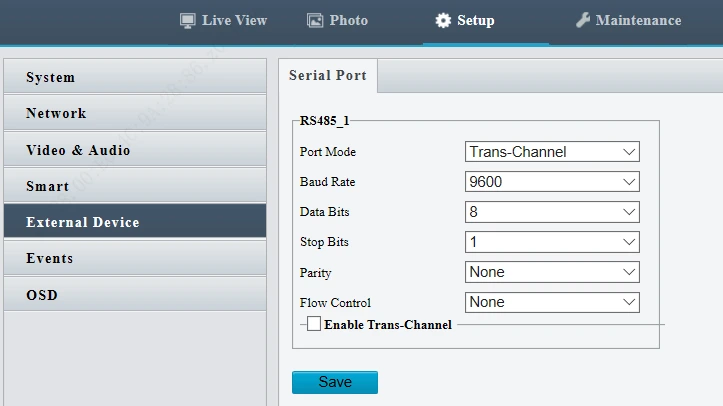
{ "requestId": "202006171129000001", "version": "1.0", "parkId": "10000", "deviceId": "1001", "type": 6, "params": { "serialNo": 1, "type": 1, "size": 7, "data": "abcdefg" } }!!! Important: To use this function, make sure Port Mode is set to Trans-Channel
!!! Important: To use this function, make sure Port Mode is set to Trans-Channel
!!! Important: To use this function, make sure Port Mode is set to Trans-Channel.
Request parameters
Headers
| Parameter | Value | Required | Example | Remarks |
|---|---|---|---|---|
| Content-Type | application/json | Yes |
Body
| Name | Type | Required | Default | Remarks | More Info |
|---|---|---|---|---|---|
| requestId | string | Yes | Platform request ID. Example: 202006171129000001 | ||
| version | string | Yes | Protocol version number. Default: “1.0” | ||
| parkId | string | Yes | Parking lot ID, assigned by the platform | ||
| deviceId | string | Yes | Device ID, used to identify different devices in the same parking lot. In downstream interfaces, if the device ID is “1ton”, it means synchronization to all devices. | ||
| type | number | Yes | Service type. 1-Manual capture; 2-Restart device; 3-Set parking space lamp; 4-Sync block/allowlist; 5-Open gate; 6-Transparent channel; 7-LED; 8-Close gate | ||
| params | object | Yes | Parameter | ||
| ├─ serialNo | number | No | Serial port through which the device outputs data. 1-RS485_1; 2-RS485_2 | ||
| ├─ type | number | Yes | Transmission type. 1-ASCII; 2-HEX | ||
| ├─ size | number | Yes | Data length (byte). Max 1024 bytes. | ||
| ├─ data | string | Yes | Data for transparent transmission. Example: "abcdefghi";"77aa77aa" |
LED Display
Basic info
Path: /type==7
Method: PATCH
Interface description:
- Used by the platform to control cameras to display/announce messages on the display. This interface is applicable to entrance & exit cameras.
- Requests and responses are sent via MQTT.
- Control results are sent to the platform through the Report LED Display Results interface.
{ "requestId": "202006171129000001", "version": "1.0", "parkId": "10000", "deviceId": "1001", "type": 7, "params": { "msgType": 1, "showTime": 20, "scenseInfoList": [ { "colorType": 1, "customContext": "一路顺风", "isBroadcast": 0, "runType": 0 }, { "colorType": 1, "customContext": "A12345", "isBroadcast": 1, "runType": 0 }, { "colorType": 1, "customContext": "收费5元", "isBroadcast": 1, "runType": 0 }, { "colorType": 1, "customContext": "#T", "isBroadcast": 0, "runType": 0 } ] } }Request parameters
Headers
| Parameter | Value | Required | Example | Remarks |
|---|---|---|---|---|
| Content-Type | application/json | Yes |
Body
| Name | Type | Required | Default | Remarks | More Info |
|---|---|---|---|---|---|
| requestId | string | Yes | Platform request ID |
mock: 202006171129000001 |
|
| version | string | Yes | Protocol version number. Default: “1.0” |
mock: 1.0 |
|
| parkId | string | Yes | Parking lot ID, assigned by the platform |
mock: park01 |
|
| deviceId | string | Yes | Device ID, used to identify different devices in the same parking lot. In downstream interfaces, if the device ID is “1ton”, it means synchronization to all devices. |
mock: 123 |
|
| type | number | Yes | Service type. 1-Manual capture; 2-Restart device; 3-Set parking space lamp; 4-Sync block/allowlist; 5-Open gate; 6-Transparent channel; 7-LED; 8-Close gate |
mock: 7 |
|
| params | object | Yes | Parameter | ||
| ├─ msgType | number | Yes | Type of displayed data. 1-Temporary; 2-Constant |
mock: 2 |
|
| ├─ showTime | number | Yes | Display time, valid only when msgType is 1. Unit: s |
mock: 10 |
|
| ├─ scenseInfoList | object [] | Yes | Corresponding LED contents of the scene. The array size is fixed to 4, corresponding to the four rows of LED contents. For two-row LED display, fill in with two rows of contents. |
item type: object |
|
| ├─ customContext | string | Yes | Text contents, in the form of wildcard characters, padded with Chinese characters. #T-Display time, displayed on a separate row Example: “#T” |
mock: #T |
|
| ├─ isBroadcast | number | Yes | Whether to play audio. 0-No; 1-Yes |
mock: 1 |
|
| ├─ runType | number | Yes | Scroll mode. 0-Static; 1-Right to left, 2-Left to right; 3-Bottom to top; 4-Top to bottom |
mock: 1 |
|
| ├─ colorType | number | Yes | Font color. 1-Red; 2-Green; 3-Yellow |
mock: 1 |
Report LED Display Results
Basic info
Path: /api/upark/notifyresult/ledcontrol
Method: POST
Interface description:
Used by the camera to push control results asynchronously to the platform after receiving a parking space lamp control request sent from the platform via MQTT
Example of parameters
{
"requestId": "202006171129590001",
"parkId": "10000",
"deviceId": "1001",
"code": 200,
"message": "success",
"data": {
}
}
Request parameters
Headers
| Parameter | Value | Required | Example | Remarks |
|---|---|---|---|---|
| Content-Type | application/json | Yes |
Body
| Name | Type | Required | Default | Remarks | More Info |
|---|---|---|---|---|---|
| requestId | string | No | Platform request ID. Example: 202006171129590001 |
mock: 202006171129590001 |
|
| parkId | string | No | Parking lot ID, assigned by the platform |
mock: park01 |
|
| deviceId | string | No | Device ID, used to identify different devices in the same parking lot. |
mock: 0021 |
|
| code | number | No | Status Code |
mock: 200 |
|
| message | string | No | Status description |
mock: success |
|
| data | object | No |
Data Dictionary
In this section:
Plate Type
Basic info
Path: /plateType
Method: OPTIONS
Interface description:
| Code | Description |
|---|---|
| 0 | Large vehicle |
| 1 | Small vehicle |
| 2 | Embassy vehicle |
| 3 | Consulate vehicle |
| 4 | Overseas vehicle |
| 5 | Foreign vehicle |
| 6 | Common motorcycle (2-wheel, 3-wheel motorcycle plate) |
| 7 | Light motorcycle |
| 8 | Embassy motorcycle |
| 9 | Consulate motorcycle |
| 10 | Foreign motorcycle |
| 11 | Overseas motorcycle |
| 12 | Low speed vehicle plate (agricultural products transportation vehicle) |
| 13 | Tractor |
| 14 | Trailer |
| 15 | Coach vehicle |
| 16 | Coach motorcycle |
| 17 | Temporary entry vehicle |
| 18 | Temporary entry motorcycle |
| 19 | Temporary vehicle |
| 20 | Police vehicle |
| 21 | Police motorcycle |
| 22 | Agricultural machine vehicle plate |
| 23 | Border crossing vehicle (Hong Kong) |
| 24 | Border crossing vehicle (Macau) |
| 25 | WJ plate |
| 26 | Military plate |
| 27 | Pedestrian |
| 28 | Non-motor vehicle |
| 29 | Large new energy plate vehicle |
| 30 | Small new energy plate vehicle |
| 31 | Midsize vehicle |
| 32 | Testing vehicle |
| 33 | Testing motorcycle |
| 98 | Other |
| 99 | Unknown |
Previous Appendix A Protocol Configuration Guide
Next Vehicle Type
Request parameters
Status Code
Basic info
Path: /errorCode
Method: OPTIONS
Interface description:
| Status Code | Description |
|---|---|
| 200 | success |
| 101 | common error |
| 301 | invalid param |
Request parameters
Vehicle Types
Basic info
Path: /vehicleType
Method: OPTIONS
Interface description:
| Value | Description |
|---|---|
| 0 | 3-wheel vehicle |
| 1 | Large bus |
| 2 | Midsize vehicle |
| 3 | Small vehicle |
| 4 | Large vehicle |
| 5 | 2-wheel vehicle |
| 6 | Motorcycle |
| 7 | Tractor |
| 8 | Farm Truck |
| 9 | Sedan |
| 10 | SUV |
| 11 | Minibus |
| 12 | Minivan |
| 13 | Midsize bus |
| 14 | Large bus |
| 15 | Large truck |
| 16 | Pickup |
| 17 | MPV |
| 18 | Roadster |
| 19 | Mini car |
| 20 | Two-box sedan |
| 21 | Three-box sedan |
| 22 | Light bus |
| 23 | Medium duty truck |
| 24 | Trailer |
| 25 | Tanker |
| 26 | Street sprinkler |
| 998 | Other |
| 999 | Unknown |
Previous Plate Types
Next Common Colors
Request parameters
Common Colors
Basic info
Path: /color
Method: OPTIONS
Interface description:
| Code | Description |
|---|---|
| 0 | Black |
| 1 | White |
| 2 | Gray |
| 3 | Red |
| 4 | Blue |
| 5 | Yellow |
| 6 | Orange |
| 7 | Brown |
| 8 | Green |
| 9 | Purple |
| 10 | Cyan |
| 11 | Pink |
| 12 | Transparent |
| 13 | Silver |
| 14 | Dark |
| 15 | Light color |
| 16 | No color |
| 17 | Yellow & green |
| 18 | Gradient green |
| 99 | Other |
| 100 | Unknown |