


How to Combine Multiple DVRs and NVRs into One NVR Using RTSP and ONVIF
Quick answer: Yes, you can often combine multiple DVRs and NVRs into one modern NVR by pulling video streams over the network using RTSP or ONVIF, as long as your existing recorders support those protocols.
What you need: LAN access to each recorder, valid login credentials, and the correct RTSP stream path (or ONVIF enabled). RTSP commonly uses port 554 and ONVIF commonly uses port 80.
Best use cases: upgrading in phases, keeping legacy analog cameras temporarily, consolidating multiple buildings, or setting up a backup recorder that mirrors another system.
Video: Full Step-by-Step Integration Demo
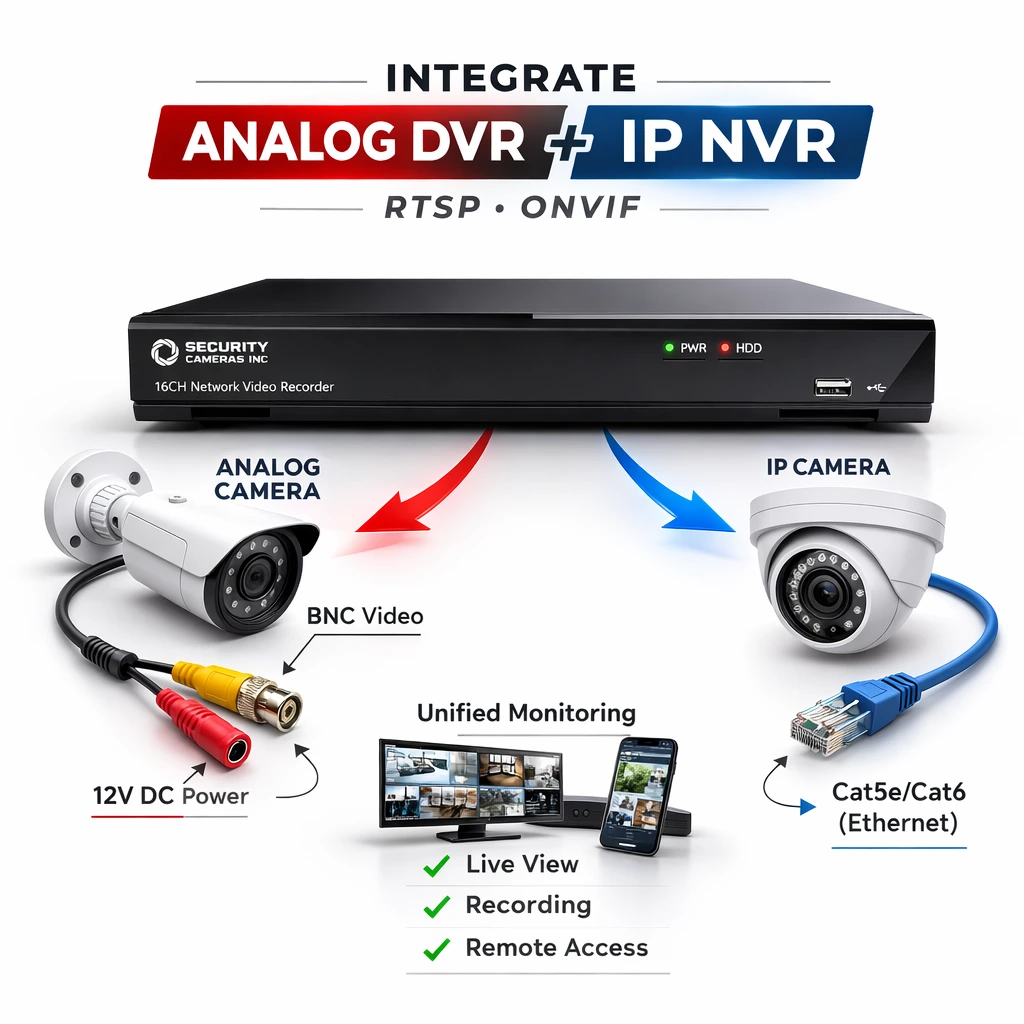
In this video, I demonstrate pulling streams from an older analog DVR and a separate NVR and bringing them into one Security Cameras Inc™ NVR using RTSP and ONVIF.
What this guide covers
- How RTSP and ONVIF allow recorder-to-recorder integration
- When you can keep old analog cameras and still upgrade your recorder
- Real-world business scenarios where this approach saves money and time
- Limitations to know (especially motion detection and HTTPS)
Why this approach is useful for commercial upgrades
This method is most useful when you have a mix of equipment you cannot replace all at once, such as legacy analog cameras on coax and newer IP cameras on a separate NVR. Instead of running multiple apps and playback systems, you can often centralize everything into one recorder that becomes your main monitoring and recording hub. Common examples:- Warehouses and industrial buildings: legacy coax cameras in storage aisles, newer IP cameras at docks and entrances
- Retail and multi-site businesses: upgrading one location at a time while keeping existing cameras temporarily
- Apartments and property management: multiple DVR closets across buildings that need one central view
- Churches and schools: budget-conscious upgrades where rewiring is not realistic this year
- Backup and redundancy: using one NVR to mirror or back up another NVR over the network
What makes this possible: RTSP vs ONVIF
RTSP (Real Time Streaming Protocol)
RTSP is the method used to pull a live video stream over the network, typically by entering an RTSP URL, credentials, and a port (commonly 554). Many DVRs and NVRs have per-channel RTSP streams including the Avalonix security camera recorders I used in this example.ONVIF
ONVIF is a compatibility standard that often makes discovery and channel selection easier than manually building RTSP URLs. In many environments, ONVIF tools can also help identify stream details when the exact RTSP path is unknown.Real demonstration: analog + IP + mixed recorders
In my demo, I pulled:- a legacy analog camera connected to an older BNC DVR (the DVR digitizes and serves it over the network)
- a separate IP camera connected to another NVR
- both streams into a single 16-channel Security Cameras Inc™ NVR over LAN
Common upgrade scenarios and how to handle them
Can I keep my old analog cameras if I upgrade?
Often, yes. If your DVR supports RTSP output per channel, you can leave analog cameras connected to the DVR, put the DVR on the network, and add the streams to your new NVR. This is especially useful if you want to spread upgrade costs over time and avoid rewiring. Related reading: IP vs Analog Security CamerasCan I combine two NVRs into one?
Often, yes. If the source NVR can output RTSP or supports ONVIF well, the destination NVR can pull one or more channels over the network. In my demo, I show both methods and how ONVIF can make channel selection easier than managing many RTSP URLs.Will motion detection still work after I pull streams in?
Usually not the way people expect. When you pull video into an NVR via RTSP or ONVIF, you are typically pulling video only. Motion metadata and AI events often do not carry over, so many integrations end up recording 24/7. If you need AI features, the best path is to connect cameras directly to the NVR that will be doing analytics. Related reading: Smart Event DetectionCan I do this over the internet?
Sometimes, but you should treat it as an advanced setup. You need stable upload bandwidth, correct port forwarding, and security considerations. Also, some ONVIF connections rely on plain HTTP and port 80, and HTTPS-only settings can break discovery in certain setups.How to add an RTSP stream to an NVR
- Select RTSP as the protocol.
- Paste the correct RTSP URL for the channel you want to pull.
- Enter the recorder username and password.
- Add main stream and substream if supported.
- Confirm live video connects (most systems show a status icon or preview button).
Important technical notes before you start
- RTSP commonly uses port 554.
- ONVIF commonly uses port 80 in many local discovery and profile flows.
- If ONVIF is not working, check whether HTTPS-only settings are enabled and whether the device is reachable on the expected port.
- Some consumer-grade recorders do not expose RTSP per channel, even if they offer remote viewing apps.
Recommended upgrade paths
If you are planning a staged upgrade, a practical approach is to centralize recording first and then upgrade cameras over time. Here are useful categories to browse as you plan:When a full replacement is the better move
Integration is a great bridge, but sometimes full replacement makes more sense, especially if:- your cameras are extremely low resolution and are no longer usable for identification
- cabling is damaged or poorly terminated
- your recorder does not support RTSP or ONVIF in a usable way
- you want full AI analytics and event-based recording on every channel
Final thoughts
You do not always need to rip out every camera to modernize your security system. If your DVR or NVR supports RTSP or ONVIF, you can often centralize monitoring, simplify playback, and upgrade in phases while keeping legacy cameras temporarily. If you want help verifying whether your existing recorder supports this, contact us with the brand, model number, and firmware version, and we will point you in the right direction.FAQ
Can I add my old DVR to a new NVR without replacing cameras?
How do I find the correct RTSP stream URL for my DVR or NVR?
What ports do RTSP and ONVIF use?
Will motion detection and AI events work when I pull streams into another NVR?
Can I combine two NVRs into one for backup recording?
Why is ONVIF not working on my recorder?