

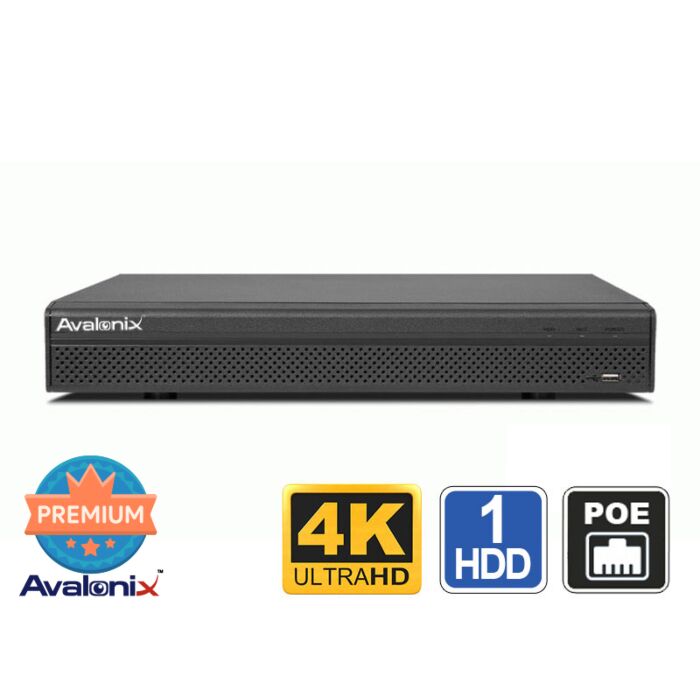

8 Channel 4K NVR Mini
Special Price
$449.99
Regular Price
$549.99
18% off
Overview
8 Channel PoE NVR - Compact recorder with 8 built-in PoE ports for compatible IP cameras.
4K and 12MP Support - Records common IP camera resolutions up to 12MP, including 4K cameras.
Recorder-Side Smart Motion Detection - Supports human and vehicle filtering on up to 4 compatible ONVIF camera channels.
Local Recording - Records to one internal hard drive up to 20TB without requiring a monthly cloud storage plan.
Remote Viewing and Backup - Supports mobile access, computer software, HDMI and VGA viewing, USB backup, and network backup.

8 Channel PoE NVR with AI Detection for ONVIF IP Cameras
The Avalonix Premium Series NVR1084K is an 8 channel PoE NVR made for homes, small businesses, offices, shops, warehouses, and other properties that need dependable local video recording without monthly cloud storage fees. It has 8 built-in PoE ports for compatible PoE cameras and supports IP cameras up to 12MP resolution, including 4K security cameras.
This model is a good step up from a basic 4 camera recorder when you need more coverage but still want a compact NVR. It gives you room for up to 8 cameras, local hard drive storage, mobile viewing, computer viewing, and support for many IP cameras. A key feature is that the recorder can run Smart Motion Detection on compatible third-party ONVIF cameras, helping filter motion events for humans and vehicles even when the camera does not provide the same AI processing on its own.
For the best plug-and-play experience, pair the NVR1084K with Avalonix Premium Series cameras. If you are upgrading an older IP camera system or mixing camera brands, ONVIF support gives this recorder more flexibility than closed app-based camera systems.
8 Built-In PoE Ports for Easier Camera Wiring
The NVR1084K includes 8 built-in PoE ports, allowing compatible IP cameras to plug directly into the recorder using CAT5e or CAT6 network cable. Each cable carries camera power, video, and network data, so most standard installations do not require a separate PoE switch.
The PoE ports support IEEE 802.3af/at with a total PoE power budget of 72W and a maximum of 25.5W from a single port. That gives you enough power for many standard PoE cameras, but cameras with higher power needs should be checked before installation.
Recorder-Side AI for Compatible Third-Party ONVIF Cameras
The NVR1084K can perform Smart Motion Detection by the recorder on up to 4 channels. This is helpful when using compatible third-party ONVIF cameras because the NVR can help identify human and vehicle motion instead of treating all movement the same.
In real use, this can make playback much less frustrating. Instead of scrubbing through every lighting change, tree movement, insect, or shadow, you can focus on the events that are more likely to matter, such as a person walking into view or a vehicle entering the scene.
When connected to compatible Avalonix Premium Series cameras, the system can also use camera-side AI features where supported, including Digital Tripwire, Intrusion Detection, and Smart Motion Detection. Feature availability depends on the camera model being used.
Using ONVIF Cameras with the NVR1084K
The NVR1084K supports ONVIF 23.12 with Profile T, Profile S, and Profile G. This makes it useful for recording from many third-party ONVIF IP cameras, especially when replacing an older recorder or expanding a system that already has IP cameras installed.
ONVIF is helpful, but it is not the same as guaranteed full feature matching across every camera brand. Live view and recording are usually the easiest functions to support. Advanced features such as audio, camera-side motion events, and special configuration options can depend on the camera model, firmware, ONVIF implementation, and network settings.
For smoother setup, we recommend Avalonix Premium Series cameras or cameras that are known to support ONVIF properly.
Local Recording Without Monthly Cloud Fees
The NVR1084K records video locally to an internal hard drive, so you are not forced into a monthly cloud storage plan. After setup, the recorder can keep recording on-site even without internet access. Internet is only needed for remote viewing, remote playback, mobile alerts, email notifications, and other off-site access features.
This makes it a better fit for customers who want control over their own video, predictable long-term cost, and a more professional setup than typical consumer cloud cameras. If you are comparing this type of NVR system against subscription-based camera products, our Ring alternatives guide may be useful.
Standalone Operation with Local Monitor Viewing
The NVR1084K works as a standalone recorder and does not need a computer for normal recording. It has an embedded Linux operating system and a local menu that can be controlled with the included mouse.
For local viewing, the recorder includes HDMI and VGA outputs. HDMI supports up to 3840 x 2160 resolution, while VGA supports up to 1920 x 1080. You can view a single camera or use multi-camera layouts including 1, 4, 8, and 9-view display modes.
Video Recording Capabilities
The NVR1084K supports IP camera resolutions including 12MP, 8MP, 6MP, 5MP, 4MP, 3MP, and 1080p. It supports Smart H.265+, H.265, Smart H.264+, and H.264 video compression.
Recording bandwidth depends on whether recorder-side AI is enabled. With AI disabled, the NVR supports up to 144 Mbps incoming bandwidth, 144 Mbps recording bandwidth, and 72 Mbps outgoing bandwidth. With AI enabled, bandwidth is reduced to 72 Mbps incoming, 72 Mbps recording, and 36 Mbps outgoing. This matters when choosing camera resolution, frame rate, compression, and bitrate settings.
For most systems, H.265 or Smart H.265 is recommended when supported by the cameras because it helps reduce bandwidth and storage usage compared with older compression methods.
Decoding performance also changes depending on AI usage. With AI disabled, the NVR can decode up to 1 channel at 12MP, 1 channel at 8MP, 2 channels at 6MP, 2 channels at 5MP, 3 channels at 4MP, or 6 channels at 1080p at 30fps. With AI enabled, decoding supports up to 1 channel at 8MP, 1 channel at 6MP, 1 channel at 5MP, 2 channels at 4MP, or 4 channels at 1080p at 30fps.
Best Use Cases for the NVR1084K
This 8 channel PoE NVR is a good fit when a 4 camera system is too small, but a larger commercial recorder is more than you need. It provides enough capacity for common home and small business layouts while keeping installation simple.
- Homes that need camera coverage at multiple doors, driveways, garages, and side yards
- Small businesses with front entrance, register, stock room, office, and parking lot cameras
- Retail shops, clinics, offices, and small warehouses
- Upgrading from an older 4 channel recorder to allow more camera coverage
- Replacing an older IP camera recorder while keeping compatible ONVIF cameras
- Using recorder-side SMD on compatible third-party ONVIF cameras
- Customers who want a smaller system before moving into larger commercial security camera systems
If you need more than 8 cameras, visit our security camera systems page or browse larger Avalonix NVR models.
Audio Support
The NVR1084K supports 8 channel audio over IP when used with compatible IP cameras that have built-in microphones. This is useful for recording audio at supported camera locations such as entrances, counters, office areas, and service desks where audio recording is allowed.
Storage and Backup
The NVR1084K has 1 SATA hard drive bay and supports an internal hard drive up to 20TB, depending on the drive model and operating environment. How long the system records depends on camera count, resolution, frame rate, bitrate, compression, and whether the cameras record continuously or only on motion and smart events.
You can estimate recording time with our security camera storage calculator. To extend retention time, you can lower camera bitrates, use H.265 compression, reduce frame rate, or use motion and smart event recording instead of continuous recording on every channel.
Footage can be exported to a USB device or backed up over the network when configured. For instructions, see our guide on backing up footage. You can also use our free PC software to review and back up recorded video from a computer.
Remote Viewing and Alerts
The NVR1084K supports remote viewing from iPhone, iPad, Android phones, Android tablets, and compatible computer software. Once the recorder is connected to your network and remote access is configured, you can view live video, search playback, and receive alerts away from the property.
Mobile access is available through our free mobile app. For desktop viewing, our Camera Monitoring Software gives Windows and Mac users a better way to manage live view and playback from a computer.
The recorder supports alerts for motion detection, smart detection events, video loss, camera offline warnings, and system events. You can configure push notifications and email notifications for supported events.
The system supports up to 5 simultaneous remote users and up to 30 total users.
Features
- 8 channel PoE NVR for compatible IP cameras
- 8 built-in PoE ports for direct camera connection
- PoE supports IEEE 802.3af/at
- 72W total PoE power budget, max 25.5W from a single port
- Supports IP cameras up to 12MP resolution
- Supports 12MP, 8MP, 6MP, 5MP, 4MP, 3MP, and 1080p camera resolutions
- AI disabled bandwidth: 144 Mbps incoming, 144 Mbps recording, 72 Mbps outgoing
- AI enabled bandwidth: 72 Mbps incoming, 72 Mbps recording, 36 Mbps outgoing
- Smart H.265+, H.265, Smart H.264+, and H.264 video compression
- AI by recorder supports 4 channel Smart Motion Detection for human and vehicle filtering
- AI by camera supports perimeter protection and Smart Motion Detection when supported by the connected camera
- HDMI and VGA monitor outputs
- HDMI output supports up to 3840 x 2160 resolution
- VGA output supports up to 1920 x 1080 resolution
- 1, 4, 8, and 9-view display layouts
- Up to 8 channel synchronized playback
- Recording modes include general, motion detection, intelligent, and alarm recording
- Playback modes include instant playback, general playback, event playback, tag playback, and smart playback
- Backup by USB device or network
- 1 SATA hard drive bay, supports up to 20TB depending on drive and operating conditions
- 2 USB 2.0 ports, 1 front and 1 rear
- 8 channel audio over IP, camera dependent
- Gigabit RJ-45 network port
- Remote viewing from iPhone, iPad, Android phones, Android tablets, and compatible computer software
- Supports 5 simultaneous remote users and up to 30 total users
- ONVIF 23.12 support with Profile T, Profile S, and Profile G
- Compatible browser access using Chrome, Edge, and Firefox
What's Included?
- (1) Avalonix Premium Series NVR1084K 8 Channel NVR with PoE
- (1) Power Supply
- (1) Mouse
Frequently Asked Questions
Does the NVR1084K work with ONVIF cameras?
Yes. The NVR1084K supports ONVIF 23.12 with Profile T, Profile S, and Profile G. It can work with many compatible third-party ONVIF IP cameras. Feature support can vary, so Avalonix Premium Series cameras are recommended for the easiest plug-and-play setup. Third-party ONVIF cameras may require manual IP address and camera setting configuration.
Can this NVR perform AI detection on third-party cameras?
Yes. The NVR1084K can perform Smart Motion Detection by the recorder on up to 4 compatible ONVIF camera channels. This allows human and vehicle filtering with many third-party ONVIF cameras.
How many cameras can the NVR1084K record?
The NVR1084K can record up to 8 compatible IP cameras and includes 8 built-in PoE ports for direct camera connection.
Does this NVR need internet to record video?
No. The recorder stores video locally on its internal hard drive and can record without internet. Internet access is only needed for remote viewing, mobile app access, email alerts, push notifications, and off-site access features.
What is the maximum camera resolution supported?
The NVR1084K supports IP cameras up to 12MP resolution. It also supports common resolutions such as 8MP 4K, 6MP, 5MP, 4MP, 3MP, 1080p, and 720p.
Does this NVR have monthly fees?
No. The NVR1084K records to a local hard drive and does not require a monthly cloud storage subscription. Remote viewing can be configured without a required subscription.
Can this NVR record audio from cameras with built-in microphones?
Yes. The NVR supports 8 channel audio over IP when used with compatible IP cameras that have built-in microphones. Check your local laws before enabling audio recording.
How much hard drive storage does this NVR support?
The NVR1084K has 1 SATA hard drive bay and supports an internal hard drive up to 20TB.
Specifications
| System | |
| Main Processor | Industrial-grade processor |
| Operating System | Embedded Linux |
| Operating Interface | Web, Local GUI |
| AI | |
| AI by Recorder | Smart Motion Detection |
| AI by Camera | Perimeter protection, Smart Motion Detection |
| AI by Camera Performance | All channels, 4 targets per second |
| SMD by Recorder | 4 channels, secondary filtering for human and motor vehicle targets |
| SMD by Camera | All channels, 8 targets per second |
| Audio and Video | |
| Access Channel | 8 channels |
| Network Bandwidth | AI disabled: 144 Mbps incoming, 144 Mbps recording, 72 Mbps outgoing AI enabled: 72 Mbps incoming, 72 Mbps recording, 36 Mbps outgoing |
| Resolution | 12MP, 8MP, 6MP, 5MP, 4MP, 3MP, 1080p, 720p, 960p, D1, CIF, QCIF |
| Decoding Capability |
AI disabled: 1 channel 12MP at 30fps, 1 channel 8MP at 30fps, 2 channels 6MP at 30fps, 2 channels 5MP at 30fps, 3 channels 4MP at 30fps, 6 channels 1080p at 30fps AI enabled: 1 channel 8MP at 30fps, 1 channel 6MP at 30fps, 1 channel 5MP at 30fps, 2 channels 4MP at 30fps, 4 channels 1080p at 30fps |
| Video Output | 1 HDMI, 1 VGA |
| HDMI Resolution | 3840 x 2160, 1920 x 1080, 1280 x 1024, 1280 x 720 |
| VGA Resolution | 1920 x 1080, 1280 x 1024, 1280 x 720 |
| Multi-screen Display | 1/4/8/9 |
| Third-party Camera Access | ONVIF |
| Compression Standard | |
| Video Compression | Smart H.265+, H.265, Smart H.264+, H.264 |
| Audio Compression | G.711a, G.711u, PCM, G726 |
| Network | |
| Network Protocol | HTTP, HTTPS, TCP/IP, IPv4, IPv6, UDP, NTP, DHCP, DNS, SMTP, IP Filter, DDNS, IP Search, P2P, Auto Registration |
| Mobile Phone Access | iOS, Android |
| Interoperability | ONVIF 23.12, Profile T, Profile S, Profile G, CGI, SDK |
| Browser | Chrome, Edge, Firefox |
| User Access | 5 simultaneous users, 30 total users |
| Recording Playback | |
| Multi-channel Playback | Up to 8 channels |
| Record Mode | General, motion detection, intelligent, alarm |
| Backup Method | USB device and network |
| Playback Mode | Instant playback, general playback, event playback, tag playback, smart playback |
| Alarm | |
| General Alarm | Motion detection, camera external alarm, PIR alarm |
| Anomaly Alarm | No disk, disk error, low space, low quota space, network disconnection, IP conflict, MAC conflict, video loss, video tampering, camera offline |
| Intelligent Alarm | Perimeter protection, SMD Plus |
| Alarm Linkage | Recording, snapshot, buzzer, log, preset, email, tour |
| Port | |
| Audio Input | 8 channel audio over IP, camera dependent; 1 channel RCA audio input |
| Audio Output | 1 channel RCA |
| Alarm Input | N/A |
| Alarm Output | N/A |
| Disk Interface | 1 SATA port, up to 20TB depending on operating temperature and environment |
| USB | 2 USB 2.0 ports, 1 front and 1 rear |
| HDMI | 1 |
| VGA | 1 |
| Network Port | 1 RJ-45 10/100/1000 Mbps Ethernet port |
| PoE Port | 8 ports, 10/100 Mbps, IEEE 802.3af/at |
| General | |
| Power Supply | 53V DC, 1.81A |
| Power Consumption | NVR: less than 10W without HDD |
| PoE Power Budget | 72W total PoE output, max 25.5W from a single port |
| Gross Weight | 4.52 lb |
| Product Dimensions | 10.24" x 9.15" x 1.87" (W x D x H) |
| Operating Temperature | 14°F to 131°F |
| Operating Humidity | 10% to 93% RH, non-condensing |
| Installation | Flat table top / shelf |
| Recording Resolutions | 12MP, 8MP, 4K, 6MP, 5MP, 4MP, 3MP, 1080P, 1.3MP, 720P |
|---|---|
| Total Incoming IP Bandwidth | 144 Mbps |
| Total IP Recording Bandwidth | 144 Mbps |
| eSATA Port | None |
| USB Ports | (2) USB 2.0 |
| Video Outputs | (1) HDMI, (1) VGA |
| Power Input | 110-220V AC |
| Rackmountable | No |
| Number of Audio Inputs | 8 IP Streams |
| Encoding Supported | H.265+, H.265, H.264+, H.264 |
| Number of PoE Inputs | 8 |
| Max Hard Drive Capacity | 1HDD, 20TB |
| Hot Swap HDD | No |
| RAID Redundancy | No |
| Warranty | 1 Year |
| Recorder Type | NVR |
| CPU | Embedded Dual Core |
| Total Cameras Supported | 8 |
| Supported Camera Signals | IP |
| Number of BNC Inputs | Does Not Support BNC Cameras |
| Number of IP Cameras Supported | 8 |
| Total PoE Power | 72 W |
| Return Policy | 30 Days Return Policy |
| Brand | CCTVCameraWorld |
| Series | Avalonix |
Write Your Own Review
Product Questions
How do I remotely view the Avalonix Premium Series DVR or NVR via iphone, ipad, android phone or tablet, laptop, etc?
Question by: Sanders on Apr 21, 2026, 5:15 PM
You can remotely view an Avalonix Premium Series DVR or NVR from an iPhone, iPad, Android phone, Windows PC, or Mac as long as the DVR is connected to the internet through your router.
For mobile remote viewing, including iPhone and iPad, please see this guide:
https://www.cctvcameraworld.com/dummies-guide-watching-security-camera-system-internet/
For Windows PC and Mac remote viewing software, please see this guide:
https://www.cctvcameraworld.com/cmsoftware/
In general, remote viewing works by connecting the DVR to your network, then using the free mobile app or computer software to scan the DVR’s QR code or add the system. Once set up, you can watch live video, play back recorded footage, and receive alerts remotely.
If you are using an Avalonix Premium Series DVR or NVR with compatible cameras, internet is optional for local recording, but it is required for remote viewing away from the property.
For mobile remote viewing, including iPhone and iPad, please see this guide:
https://www.cctvcameraworld.com/dummies-guide-watching-security-camera-system-internet/
For Windows PC and Mac remote viewing software, please see this guide:
https://www.cctvcameraworld.com/cmsoftware/
In general, remote viewing works by connecting the DVR to your network, then using the free mobile app or computer software to scan the DVR’s QR code or add the system. Once set up, you can watch live video, play back recorded footage, and receive alerts remotely.
If you are using an Avalonix Premium Series DVR or NVR with compatible cameras, internet is optional for local recording, but it is required for remote viewing away from the property.
Answer by: CCTV Camera World on Apr 22, 2026, 9:53 AM
Does the unit allow for multiple logins from remote PC's to monitor the cameras?
Does the unit have the concept of different user accounts for monitoring and administration tasks?
Does the unit have the concept of different user accounts for monitoring and administration tasks?
Question by: Alan Brown on Feb 23, 2026, 10:49 AM
Yes, all Avalonix Premium Series recorders allow multiple remote logins using our free smartphone app as well as our Windows and Mac viewing software.
You can create multiple user accounts with different permission levels. The system supports both administrator and standard user roles, and you can assign access at a granular level per camera channel. For example, you can create a user account that only has live view and/or playback rights for specific cameras while restricting access to system settings.
The number of users who can log in simultaneously depends on your available network and internet bandwidth, as well as the number of camera streams and their resolution being viewed.
When viewing multiple cameras in grid view, the software automatically uses the sub-stream to reduce bandwidth usage. When a single camera is viewed full screen, it switches to the main stream for full-resolution viewing. The main stream is the camera’s full recording resolution, while the sub-stream is a lower-resolution stream (typically around 480P) used for efficient remote monitoring.
You can create multiple user accounts with different permission levels. The system supports both administrator and standard user roles, and you can assign access at a granular level per camera channel. For example, you can create a user account that only has live view and/or playback rights for specific cameras while restricting access to system settings.
The number of users who can log in simultaneously depends on your available network and internet bandwidth, as well as the number of camera streams and their resolution being viewed.
When viewing multiple cameras in grid view, the software automatically uses the sub-stream to reduce bandwidth usage. When a single camera is viewed full screen, it switches to the main stream for full-resolution viewing. The main stream is the camera’s full recording resolution, while the sub-stream is a lower-resolution stream (typically around 480P) used for efficient remote monitoring.
Answer by: CCTV Camera World on Feb 23, 2026, 11:02 AM
Related Products
-
4 Channel NVR PoE 4K H.265 H.264Special Price $299.99 Regular Price $399.99 25% off
-