Audio takes a few extra pieces: a camera or recorder that supports it, a microphone or speaker, and the right setting switched on. These guides cover adding a microphone to an IP camera or a PTZ camera, connecting a two-way audio mic and speaker, enabling audio recording and streaming on a DVR, and getting the most out of two-way audio cameras.
Laws on recording audio vary by location, so check yours before you turn it on.
If you want to hear what is happening near a security camera and talk back through your phone, the camera needs a microphone and a speaker. A compatible camera with external audio connections lets you add those with a two-way audio kit. In this video, I connect our two-way audio kit to an Avalonix Premium […]
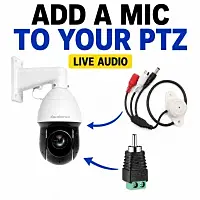
Want to add a microphone to a PTZ camera for live streaming? In this hands-on video, Ray from CCTV Camera World connects an outdoor security camera microphone to the Avalonix LIVECAMPTZ and shows the wiring, microphone gain, power setup, and actual audio coming through the camera. The LIVECAMPTZ does not have a built-in microphone, but […]
Can an external security camera microphone hear someone speaking from 75 feet away? In this real warehouse audio test, Ray from CCTV Camera World connects an AvaEye outdoor microphone to an Avalonix PoE mini PTZ camera, configures the camera for Line In audio, and records speech from several measured distances between approximately 75 and 15 […]
Some professional PoE security cameras do not have a built-in microphone, especially vandal-resistant dome cameras. That does not always mean you are stuck without audio. In this video, I show how to add an external microphone to a compatible PoE/IP security camera that has audio input and power terminals inside the camera body.
Two-way audio security cameras are a popular choice for keeping homes and businesses safe as they allow you to listen-in and talk through the camera using a smartphone app. However, many people find that the audio quality from cameras made by big brands like Nest and Ring isn’t great. Often, the speaker’s sound is too […]
Most security cameras that are outdoor rated do not come with built-in microphones to ensure that no water can leak in. This means that you must add an external security camera microphone to these cameras in order to record audio. CCTV Camera World carries microphones for indoor or outdoor cameras. Most IP security cameras with […]
Whether you have a security camera system for a home or business, the need for two-way audio interaction with talk-back capability may arise. CCTV Camera World offers solutions for both one-way and two-way audio. One-way audio is great for listening to sound originating from the location of a camera, but it will not allow interaction […]
Almost all of our DVRs offer the ability to add a speaker using the RCA audio-out. This feature is meant for users looking to setup two-way audio or bidirectional talk in their security camera system. By using add-on security camera mics or security cameras with built-in microphone, you can hear audio from the person in […]
Outdoor PTZ Cameras do not come with a built-in microphone for weather proofing reasons. In order to record audio along with your security camera’s video you have to use an add-on security camera mic of some sort. CCTV Camera World has microphones for both indoor and outdoor applications. Having an external microphone provides more flexibility […]
Audio recording and streaming capabilities are a standard part of almost all of the security camera DVRs that we sell. For the analog CCTV camera DVR and the HDCVI DVR it is necessary to enable audio recording through the user interface, whereas for IP cameras with built-in mic the NVR auto detects the presence of […]