

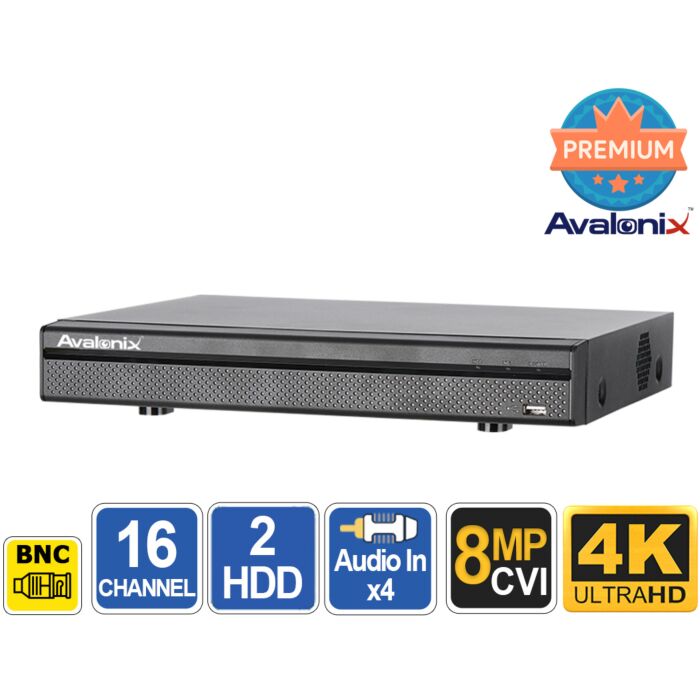

Ultimate 4K 16 Channel DVR with AI
Special Price
$999.99
Regular Price
$1,999.99
50% off
Overview
16 CHANNEL 4K HYBRID DVR / XVR - Avalonix Premium Series recorder for coax, HD over coax, and compatible IP security cameras in home and business security camera systems.
COAX + ONVIF IP CAMERA SUPPORT - Records HDCVI, AHD, TVI, CVBS analog cameras, and compatible ONVIF IP cameras, making it useful for upgrading older coax systems without replacing all wiring.
EXPANDABLE CAMERA OPTIONS - Use up to 16 BNC/coax cameras plus IP cameras in hybrid setups, or configure up to 32 IP cameras total when used as an IP recorder.
SMART MOTION DETECTION - AI by DVR supports Smart Motion Detection Plus on up to 16 BNC/coax channels to help reduce false alerts from lights, shadows, insects, and basic motion changes.
AI EVENT DETECTION - Supports Tripwire and Intrusion Detection on up to 2 BNC/coax channels for more focused alerts at doors, gates, driveways, and restricted areas.
AUDIO, STORAGE, AND REMOTE VIEWING - Supports 4 RCA audio inputs, audio over compatible HDCVI/IP cameras, free phone/PC apps, and 2 SATA hard drives up to 10TB each for 20TB total storage.

16-Channel 4K Hybrid DVR (XVR) for Coax and IP Cameras
The Avalonix Premium Series XVRPT16AI4K is a professional 16-channel 4K hybrid DVR, also known as an XVR, for customers upgrading an older coax camera system or building a new mixed camera system. It records HD over coax cameras, older analog CCTV cameras, and compatible IP cameras, giving you a practical way to keep existing coax wiring while adding newer cameras where needed.
This recorder is a good fit for homes, retail stores, offices, warehouses, churches, small businesses, and commercial properties that need a dependable 16 channel DVR with smart detection, remote viewing, large storage support, and flexible camera options. It can be used as the recording hub for a standalone DVR setup, a mixed coax/IP installation, or as part of a larger security camera system for home or business.
What it records
This is a Pentabrid DVR, meaning it supports five major camera signal types:
- HDCVI cameras - Use HD over coax cameras up to 4K resolution. Where supported by the camera, audio and PTZ controls can travel over the same coax cable.
- AHD cameras - Video support for our 4-in-1 analog cameras and many third-party 4-in-1 cameras.
- TVI cameras - Video support for our 4-in-1 analog cameras and many third-party 4-in-1 cameras.
- Analog CVBS cameras - Standard-definition CCTV cameras, commonly found in older systems.
- IP cameras - Add compatible network cameras up to 8MP / 4K resolution over the network using a PoE switch.
These options make it easier to upgrade in stages. You can replace older analog cameras with HD coax cameras, add IP cameras over the network, or eventually move toward an all-IP setup without replacing the recorder right away. If you are shopping for complete systems instead of a recorder by itself, see our home security camera systems or our business security camera systems for preconfigured options.
Hybrid camera modes explained
The XVRPT16AI4K has 16 BNC inputs for coax cameras. It can also support compatible IP cameras over the network. In normal hybrid use, you can record up to 16 coax cameras plus 16 IP cameras. If you are building an all-IP setup, the recorder can be configured for up to 32 IP cameras total, with no BNC cameras in use.
There is an important AI analytics trade-off when IP cameras are added. The recorder's built-in AI by DVR features, including Smart Motion Detection Plus, Tripwire, Intrusion Detection, and Face Recognition, are available for supported BNC/coax channels when the recorder is being used for BNC channels only. If IP cameras are added/enabled on the DVR, those recorder-side AI functions are not available on the BNC channels or the IP channels. IP cameras must rely on their own camera-side analytics for smart event detection.
The recorder supports up to 128Mbps total IP camera bandwidth. As a simple planning guideline, if you are using all 32 IP channels, budget around 4Mbps per IP camera. If you use fewer IP cameras, each camera can be configured with a higher bitrate depending on resolution, frame rate, and scene activity.
IP cameras require network wiring and power. For PoE cameras, use a PoE switch so each camera can receive power and send video over a single Cat5e or Cat6 network cable.
Upgrade an older coax camera system
If you already have coax cable in place, this 16 channel XVR lets you upgrade your older CCTV system without starting over. As long as the existing cable is suitable, you can replace old standard-definition cameras with HD over coax cameras and keep the same cable path. That makes this recorder a practical choice for upgrading older DVR systems in homes and businesses.
If you are unsure which type of camera is right for your setup, see our Security Camera Buying Guide for help understanding camera types, resolutions, night vision, lenses, and installation basics. For higher-resolution camera options, browse our 4K security cameras.
Audio recording options
This 16 channel DVR includes 4 RCA audio inputs for add-on security camera microphones. It can also record audio from compatible HDCVI cameras with built-in microphones over coax, and from compatible IP cameras with built-in microphones over the network.
That gives you multiple ways to add audio without making every camera location complicated. For example, you can use audio-over-coax where supported, use IP cameras with built-in microphones, or connect separate microphones to the RCA audio inputs.
AI analytics that reduce false alerts
The XVRPT16AI4K includes AI-assisted video analytics for coax cameras to help reduce false alerts and make recorded video easier to search. Smart Motion Detection Plus can be used on up to 16 BNC channels to help filter human and vehicle motion instead of triggering on every shadow, insect, light change, or tree branch.
For more specific event detection, the recorder supports Tripwire and Intrusion Detection on up to 2 BNC channels. These features are useful for watching driveways, doors, gates, entrances, restricted areas, and pathways where you want the DVR to react when a person or vehicle crosses a line or enters a defined box.
Face Recognition is supported on up to 2 BNC channels. It works best in controlled locations where people pass close enough to the camera for a usable face image, such as entrances, reception areas, counters, or narrow walkways. Camera angle, lighting, distance, and face size in the image are important for reliable results. For more background on this feature, see our guide to Face Detection.
The important detail is that these AI by DVR features are only available for supported BNC/coax channels when IP cameras are not added to the recorder. If IP cameras are added/enabled, the DVR's built-in SMD, Tripwire, Intrusion Detection, and Face Recognition are not available on the BNC channels or the IP channels. IP cameras need their own compatible camera-side analytics for smart event detection. We guarantee compatibility with the Avalonix Premium Series IP cameras we offer. Some third-party ONVIF cameras may work for basic video, but third-party camera analytics are not possible over ONVIF.
See how SMD helps reduce false motion alerts
The video below shows how Smart Motion Detection works on Avalonix DVRs with analog BNC cameras. It demonstrates why basic motion detection can trigger from lights, shadows, and environmental changes, then shows how SMD helps filter alerts for people and vehicles.
Storage and recording
This 1U DVR supports 2 internal SATA hard drives up to 10TB each, for a maximum of 20TB total storage. Actual recording time depends on camera resolution, frame rate, bitrate, motion level, and whether you record continuously or by motion/event. To estimate storage, use our security camera storage calculator.
The recorder supports H.265+, H.265, H.264+, and H.264 video compression to reduce storage use while maintaining good video quality. Recording options include continuous recording, scheduled recording, motion detection, alarm/event recording, manual recording, and smart detection recording.
Local and remote viewing
View cameras locally using the HDMI or VGA output. The HDMI output supports up to 4K display resolution, while VGA supports up to 1080P. You can also view live and recorded video remotely using free mobile apps for iPhone, iPad, and Android, or the free Windows/Mac central monitoring software.
Remote viewing requires a working network and internet connection with enough upload bandwidth. There are no monthly fees for basic remote viewing through the supported apps.
Why buy this model
- 16 channel DVR / XVR flexibility: Use coax cameras, IP cameras, or a mix of both.
- Expandable IP support: Record up to 16 BNC cameras plus 16 IP cameras, or configure up to 32 IP cameras total.
- 4K camera support: Supports HD over coax cameras up to 4K and compatible IP cameras up to 8MP.
- Smart alerts: SMD Plus on up to 16 BNC channels helps reduce false motion alerts from non-human and non-vehicle movement.
- Perimeter detection: Tripwire and Intrusion Detection on up to 2 BNC channels for more focused event alerts.
- Face Recognition: Supports face recognition on up to 2 BNC channels when cameras are installed correctly.
- Audio options: Supports audio over HDCVI, audio over compatible IP cameras, and 4 RCA audio inputs for add-on microphones.
- PoE camera ready: Add PoE IP cameras over the network using a PoE switch.
- Professional support: Free lifetime technical support from CCTV Camera World for the original purchaser.
Features
- 16 Channel 4K Pentabrid DVR / XVR
- Avalonix Premium Series recorder
- Supports HDCVI, AHD, TVI, CVBS analog, and IP cameras
- 16 BNC camera inputs
- Hybrid mode: up to 16 BNC cameras + 16 IP cameras
- IP mode: up to 32 IP cameras total
- Compatible IP cameras up to 8MP / 4K resolution
- 128Mbps total IP camera bandwidth, approximately 4Mbps per IP channel when fully populated
- H.265+, H.265, H.264+, and H.264 video compression
- Main stream and sub stream dual-stream recording
- Selectable resolution, frame rate, and bitrate per camera
- HDMI output up to 4K resolution
- VGA output up to 1080P
- 4 RCA audio inputs and 1 RCA audio output
- Supports audio over HDCVI cameras and compatible IP cameras with built-in microphones
- Smart Motion Detection Plus on up to 16 BNC channels for human and vehicle filtering
- Tripwire and Intrusion Detection on up to 2 BNC channels
- Face Recognition on up to 2 BNC channels
- AI by DVR limitation: Recorder-side SMD, Tripwire, Intrusion Detection, and Face Recognition are for supported BNC/coax channels only when IP cameras are not added/enabled. If IP cameras are added, DVR-side analytics are not available on BNC or IP channels.
- Motion detection, video loss, tampering, and diagnosis alerts
- Alarm input/output support: 16 alarm inputs and 3 relay outputs
- Supports PTZ control by RS485 and compatible network PTZ controller
- Free iPhone, iPad, Android, Windows, and Mac viewing apps
- USB and network video backup
- Supports up to 128 user accounts
- 1 RJ45 Gigabit network port
- 2 USB ports: 1 USB 2.0 and 1 USB 3.0
- 2 SATA hard drive bays, up to 10TB each
- 20TB maximum internal storage
- 1U desktop recorder
- ONVIF 16.12 and CGI conformant
1. We guarantee compatibility with Avalonix Premium Series cameras and IP cameras sold by CCTV Camera World for this recorder.
2. Third-party ONVIF cameras may work for basic video, but analytics and advanced features are not guaranteed.
3. Remote viewing requires a LAN and/or internet connection with sufficient bandwidth.
Connectors on back of DVR
- (16) BNC video inputs
- (4) RCA audio inputs
- (1) RCA audio output
- (1) HDMI video output
- (1) VGA video output
- (1) RJ45 Gigabit network port
- (2) USB ports
- (1) RS485 port for PTZ control
- (1) Alarm input/output block
- (1) DC 12V power input
What's Included?
- (1) 16 Channel 4K XVR with AI
- (1) 12V DC power adapter
- (1) Mouse
- (1) Alarm terminal block
- (1) Set of HDD mounting screws
Specifications
| Model | XVRPT16AI4K |
|---|---|
| Product Type | 16 channel 4K hybrid DVR / XVR |
| Camera Signal Support | HDCVI, AHD, TVI, CVBS analog, and IP cameras |
| BNC Camera Inputs | 16 BNC video inputs |
| IP Camera Support | Up to 16 IP cameras in hybrid mode, or up to 32 IP cameras total in IP mode |
| Max IP Camera Resolution | Up to 8MP / 4K per compatible IP camera |
| IP Camera Bandwidth | 128Mbps total incoming bandwidth, approximately 4Mbps per IP camera when using 32 IP channels |
| HDCVI Camera Support | 4K, 6MP, 4MP, 1080P, 720P |
| AHD Camera Support | 5MP, 4MP, 3MP, 1080P, 720P |
| TVI Camera Support | 5MP, 4MP, 3MP, 1080P, 720P |
| CVBS Camera Support | PAL / NTSC standard-definition analog cameras |
| Video Compression | H.265+, H.265, H.264+, H.264 |
| Recording Resolutions | 4K, 6MP, 5MP, 4MP, 3MP, 4M-N, 1080P, 720P, 960H, D1, CIF, QCIF |
| BNC Record Rate | Main stream: 4K (1-7fps), 6MP (1-10fps), 5MP (1-12fps), 4MP/3MP (1-15fps), 4M-N/1080P/720P/960H/D1/CIF/QCIF (1-25/30fps). Sub stream: 960H (1-15fps), D1/CIF/QCIF (1-25/30fps) |
| Bitrate | 32Kbps to 6144Kbps per channel |
| Record Modes | Manual, schedule, continuous, motion detection, video loss, tampering, alarm, stop |
| Record Interval | 1 to 60 minutes per file, pre-record 1 to 30 seconds, post-record 10 to 300 seconds |
| Audio Inputs / Outputs | 4 RCA audio inputs, 1 RCA audio output |
| Audio Over Camera Signal | Supports audio over compatible HDCVI cameras and compatible IP camera streams |
| Two-Way Talk | Reuse RCA audio input/output |
| Audio Compression | AAC for first channel, G.711A, G.711U, PCM |
| Audio Sample Rate | 8KHz, 16-bit per channel |
| HDMI Output | 1 HDMI output, up to 3840 x 2160 |
| VGA Output | 1 VGA output, up to 1920 x 1080 |
| Output Resolution | HDMI: 3840 x 2160, 2560 x 1440, 1920 x 1080, 1280 x 1024, 1280 x 720. VGA: 1920 x 1080, 1280 x 1024, 1280 x 720 |
| Multi-Screen Display | Without IP extension: 1/4/8/9/16. With IP extension: 1/4/8/9/16/25 |
| Smart Motion Detection Plus | Up to 16 BNC channels by recorder, human and vehicle filtering |
| Perimeter Protection | Up to 2 BNC channels, Tripwire and Intrusion Detection, up to 10 rules |
| Face Recognition | Up to 2 BNC channels, up to 12 face pictures per second processing |
| Face Database | Up to 10 face databases with 10,000 face images total |
| Motion Detection Zones | 396 zones, 22 x 18 grid |
| AI by DVR Limitation | Recorder-side SMD, Perimeter Protection, and Face Recognition are available for supported BNC/coax channels only when IP cameras are not added/enabled. If IP cameras are added, DVR-side analytics are not available on BNC or IP channels. IP cameras require compatible camera-side analytics. |
| Alarm Inputs | 16 |
| Alarm Relay Outputs | 3 |
| Alarm / Event Actions | Recording, PTZ, tour, video push, email, FTP, snapshot, buzzer, screen tips, alarm output |
| Playback | 1, 4, 9, or 16 channel playback |
| Search Mode | Time/date, alarm, motion detection, exact search accurate to the second |
| Backup | USB device or network backup |
| Internal Storage | 2 SATA hard drive bays, up to 10TB each, 20TB total |
| eSATA | N/A |
| USB Ports | 2 USB ports, 1 USB 2.0 and 1 USB 3.0 |
| Network Port | 1 RJ45 Gigabit Ethernet port |
| Network Protocols | HTTP, HTTPS, TCP/IP, IPv4/IPv6, UPnP, RTSP, UDP, SMTP, NTP, DHCP, DNS, IP Filter, PPPoE, DDNS, FTP, Alarm Server, P2P, IP Search |
| Mobile Apps | iPhone, iPad, Android |
| Max User Access | 128 users |
| ONVIF | ONVIF 16.12, CGI conformant |
| RS485 | 1 port for PTZ control |
| RS232 | N/A |
| Power Supply | DC 12V / 5A |
| Power Consumption | Less than 15W without hard drive |
| Operating Temperature | +14F to +131F (-10C to +55C) |
| Operating Humidity | 0% to 90% RH |
| Storage Temperature | -4F to +158F (-20C to +70C) |
| Dimensions | 14.8 x 11.3 x 2.1 inches (375 x 287 x 53mm) |
| Weight | 3.7 lb (1.8kg), without hard drive |
| Installation | Desktop / shelf installation |
| Case Size | 1U compact desktop chassis |
| Certifications | FCC, CE |
| Warranty | 1 year |
Frequently Asked Questions
Is this a 16 channel DVR or a 32 camera recorder?
Both, depending on how it is configured. It has 16 BNC inputs for coax cameras and can also support IP cameras over the network. In hybrid mode, it can record up to 16 BNC cameras plus 16 IP cameras. In IP-only mode, it can support up to 32 IP cameras total.
Does Smart Motion Detection work on all 16 coax channels?
Yes. Smart Motion Detection Plus is supported on up to 16 BNC/coax channels by the DVR. It helps filter motion events by human and vehicle activity, which can reduce false alerts from lights, shadows, insects, leaves, and other basic pixel changes.
How many channels support Tripwire and Intrusion Detection?
Tripwire and Intrusion Detection are supported on up to 2 BNC/coax channels by the DVR. These rules are better for focused detection areas, such as doors, gates, driveways, walkways, and restricted zones where you want the DVR to detect a person or vehicle crossing a line or entering a box.
Do the DVR's AI features work when IP cameras are added?
No. The DVR's built-in AI by recorder features are for supported BNC/coax channels only when IP cameras are not added/enabled. If IP cameras are added, the DVR-side SMD, Tripwire, Intrusion Detection, and Face Recognition features are not available on the BNC channels or the IP channels. IP cameras need their own compatible camera-side analytics for smart event detection.
Can I use my old coax cameras with this DVR?
Yes. This XVR supports older analog CVBS cameras as well as newer HDCVI, AHD, and TVI cameras. It is useful when upgrading an older CCTV system because you can keep existing coax wiring in many installations.
Can I add PoE IP cameras to this DVR?
Yes. You can add compatible PoE IP cameras over the network using a PoE switch. The PoE switch powers the cameras and carries video and data over the same Cat5e or Cat6 cable.
Can this DVR be used in a business security camera system?
Yes. This 16 channel hybrid DVR is a practical fit for small business and commercial security camera systems where existing coax wiring is already in place, but the owner may also want to add newer IP or PoE cameras over the network.
How much storage does this 16 channel DVR support?
The recorder supports two internal SATA hard drives up to 10TB each, for a total of 20TB internal storage. Actual recording time depends on camera resolution, bitrate, frame rate, motion activity, and recording schedule.
| Recording Resolutions | 8MP, 4K, 6MP, 5MP, 4MP, 3MP, 1080P, 1.3MP, 720P |
|---|---|
| Total Incoming IP Bandwidth | 128 Mbps |
| Total IP Recording Bandwidth | 128 Mbps |
| eSATA Port | None |
| USB Ports | (1) USB 2.0, (1) USB 3.0 |
| Video Outputs | (1) HDMI, (1) VGA |
| Power Input | 12V DC |
| Rackmountable | No |
| BNC Recording Frame Rate | 4K 7fps, 5MP 12fps, 4MP 15fps, 1080P / 720P / 960H / D1 / CIF 30fps |
| Number of Audio Inputs | 4 RCA |
| Encoding Supported | H.264, H.265 |
| Number of PoE Inputs | None, uses network for connection |
| Hot Swap HDD | No |
| RAID Redundancy | No |
| Warranty | 1 Year |
| Recorder Type | DVR Pentabrid Type XVR |
| CPU | Embedded Quad Core |
| Total Cameras Supported | 32 |
| Supported Camera Signals | Analog, HDCVI, TVI, AHD, IP |
| Number of BNC Inputs | 16 |
| Number of IP Cameras Supported | 16 |
| Total PoE Power | No Built-in PoE Ports |
| Return Policy | 30 Days Return Policy |
| Brand | CCTVCameraWorld |
| Series | Avalonix |
Write Your Own Review
Product Questions
How do I remotely view the Avalonix Premium Series DVR or NVR via iphone, ipad, android phone or tablet, laptop, etc?
Question by: Sanders on Apr 21, 2026, 5:15 PM
You can remotely view an Avalonix Premium Series DVR or NVR from an iPhone, iPad, Android phone, Windows PC, or Mac as long as the DVR is connected to the internet through your router.
For mobile remote viewing, including iPhone and iPad, please see this guide:
https://www.cctvcameraworld.com/dummies-guide-watching-security-camera-system-internet/
For Windows PC and Mac remote viewing software, please see this guide:
https://www.cctvcameraworld.com/cmsoftware/
In general, remote viewing works by connecting the DVR to your network, then using the free mobile app or computer software to scan the DVR’s QR code or add the system. Once set up, you can watch live video, play back recorded footage, and receive alerts remotely.
If you are using an Avalonix Premium Series DVR or NVR with compatible cameras, internet is optional for local recording, but it is required for remote viewing away from the property.
For mobile remote viewing, including iPhone and iPad, please see this guide:
https://www.cctvcameraworld.com/dummies-guide-watching-security-camera-system-internet/
For Windows PC and Mac remote viewing software, please see this guide:
https://www.cctvcameraworld.com/cmsoftware/
In general, remote viewing works by connecting the DVR to your network, then using the free mobile app or computer software to scan the DVR’s QR code or add the system. Once set up, you can watch live video, play back recorded footage, and receive alerts remotely.
If you are using an Avalonix Premium Series DVR or NVR with compatible cameras, internet is optional for local recording, but it is required for remote viewing away from the property.
Answer by: CCTV Camera World on Apr 22, 2026, 9:53 AM
Does the unit allow for multiple logins from remote PC's to monitor the cameras?
Does the unit have the concept of different user accounts for monitoring and administration tasks?
Does the unit have the concept of different user accounts for monitoring and administration tasks?
Question by: Alan Brown on Feb 23, 2026, 10:49 AM
Yes, all Avalonix Premium Series recorders allow multiple remote logins using our free smartphone app as well as our Windows and Mac viewing software.
You can create multiple user accounts with different permission levels. The system supports both administrator and standard user roles, and you can assign access at a granular level per camera channel. For example, you can create a user account that only has live view and/or playback rights for specific cameras while restricting access to system settings.
The number of users who can log in simultaneously depends on your available network and internet bandwidth, as well as the number of camera streams and their resolution being viewed.
When viewing multiple cameras in grid view, the software automatically uses the sub-stream to reduce bandwidth usage. When a single camera is viewed full screen, it switches to the main stream for full-resolution viewing. The main stream is the camera’s full recording resolution, while the sub-stream is a lower-resolution stream (typically around 480P) used for efficient remote monitoring.
You can create multiple user accounts with different permission levels. The system supports both administrator and standard user roles, and you can assign access at a granular level per camera channel. For example, you can create a user account that only has live view and/or playback rights for specific cameras while restricting access to system settings.
The number of users who can log in simultaneously depends on your available network and internet bandwidth, as well as the number of camera streams and their resolution being viewed.
When viewing multiple cameras in grid view, the software automatically uses the sub-stream to reduce bandwidth usage. When a single camera is viewed full screen, it switches to the main stream for full-resolution viewing. The main stream is the camera’s full recording resolution, while the sub-stream is a lower-resolution stream (typically around 480P) used for efficient remote monitoring.
Answer by: CCTV Camera World on Feb 23, 2026, 11:02 AM
Related Products