


DVR vs NVR: What’s the Difference and Which Is Better?
One of the first decisions when choosing a security camera system is whether to use a DVR or an NVR.
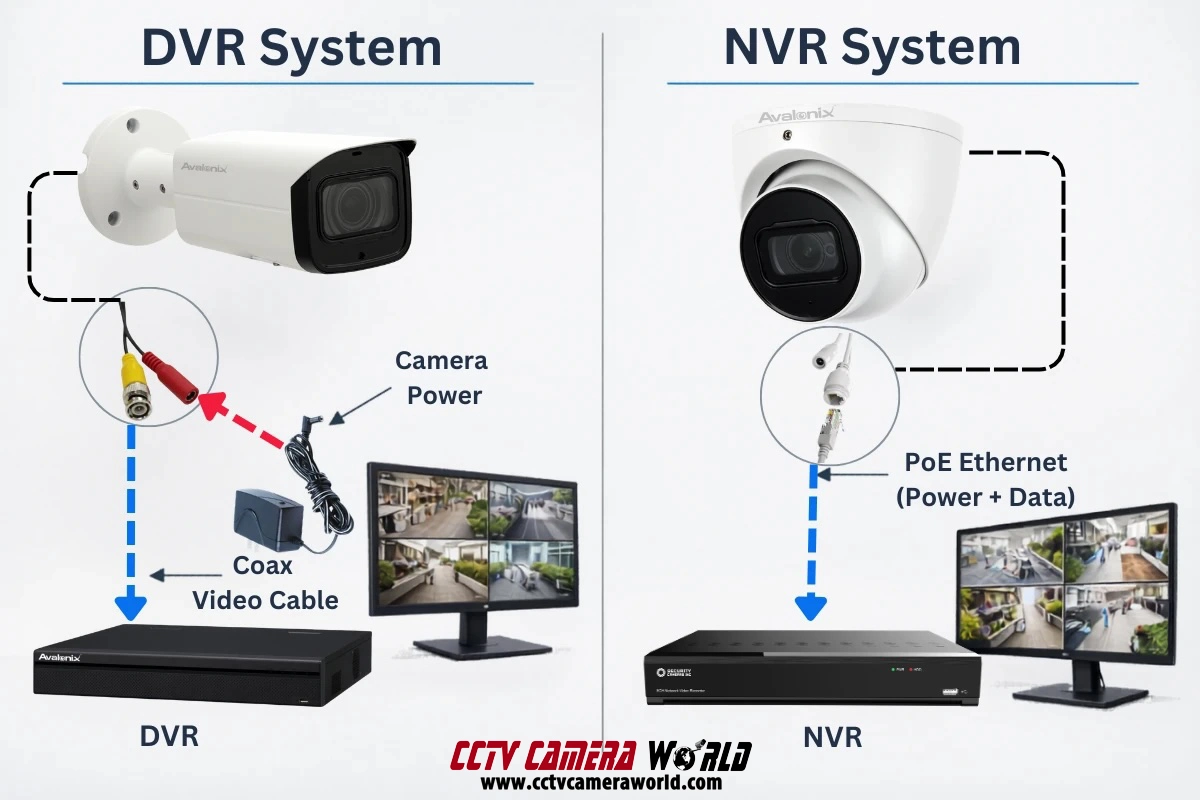
The difference between a DVR and NVR is simple: DVR systems record video from analog HD-over-coax cameras, while NVR systems record video from IP Power over Ethernet network cameras.
Both systems record surveillance footage, but they handle video processing, cabling, and installation very differently. Understanding these differences can help you choose the right type of system for your home or business.
In this guide we explain:
- How DVR and NVR systems work
- The types of cameras they use
- Wiring and installation differences
- Advantages and limitations of each system
By the end, you'll have a clear understanding of which system makes the most sense for your situation.
DVR vs NVR: NVR systems use IP cameras and Ethernet cables with Power over Ethernet (PoE), while DVR systems use coax cameras with separate power. NVR systems are best for new installations, while DVR/XVR systems are best for upgrading existing coax systems.
DVR vs NVR: At-a-Glance
The table below summarizes the core differences between DVRs and NVRs. While both recorders serve the same purpose of storing security footage, they use different camera technologies, wiring, and system architectures.
| DVR System | NVR System | |
|---|---|---|
| Camera Type | Analog or HD-over-coax cameras | IP (network) cameras |
| Video Processing | Video is encoded and processed inside the DVR | Video is encoded inside the camera and stored by the NVR |
| Cabling | Coaxial cable for video, separate power required | Ethernet cable carries both power and data (PoE) |
| Connectors | BNC Coax | RJ45 Ethernet |
| Installation Complexity | More wires due to separate power connections | Simpler installation with single-cable PoE connections |
| Maximum Cable Distance | Supports longer direct cable runs without extenders | Single Ethernet runs limited to 328 ft (100 m) |
| Camera Features | Fewer advanced features | Advanced features like analytics and AI detection on some models |
| System Cost | Lower equipment costs | IP Cameras and NVRs are usually more expensive |
| Best Use Case | Facilities with existing coax wiring | New installations and modern surveillance systems |
In most modern installations, NVR systems are preferred for new deployments, while DVR/XVR systems remain a practical choice when existing coax infrastructure is already installed.
How to Choose: DVR vs NVR
Now that we’ve covered the technical differences between DVR and NVR systems, the next question most buyers ask is simple: which one should I choose?
In reality, both systems can deliver reliable surveillance. The better option usually depends on factors such as existing wiring, installation complexity, camera features, and budget. The guidelines below can help you quickly determine which system makes the most sense for your situation.
Choose an NVR If…
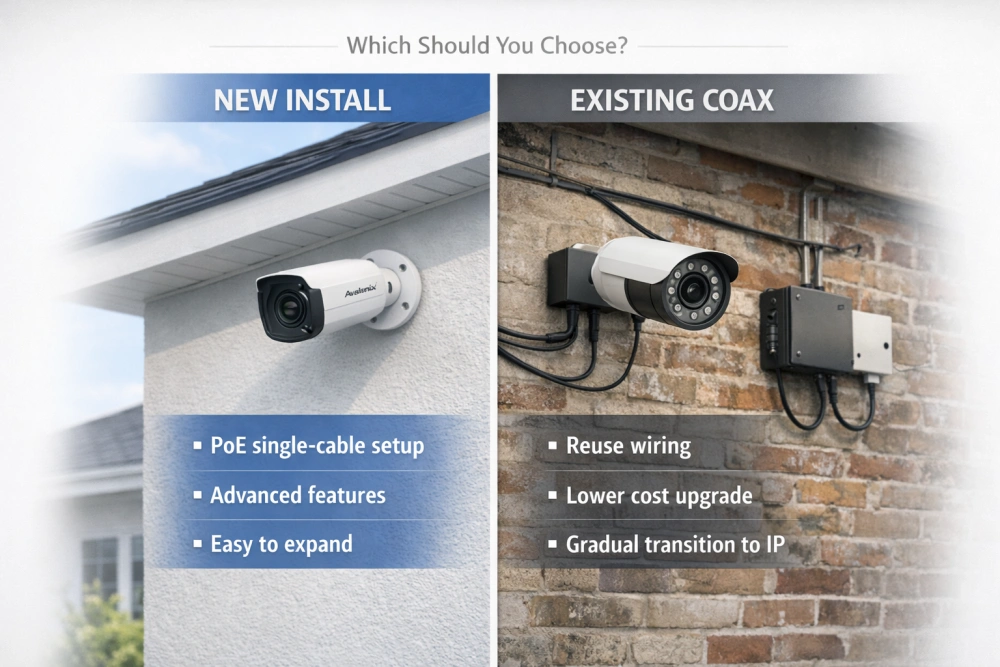
An NVR system with IP cameras is usually the best choice for new installations and those looking for the most up to date features.
Reasons to consider an NVR system:
- New Installs: You are installing a brand-new system and do not already have coaxial cable installed.
- Simple Setup: You want the simplest wiring setup, using a single Ethernet cable per camera with Power over Ethernet (PoE).
- Full 4K Performance: You want 4K 8MP cameras without worrying about cable quality or framerate limitations.
- Smart Detection: Advanced camera features are important to you, including analytics, smart detection, and active deterrence options.
- Easier Expansion: You expect to expand the system later, since network-based systems can scale more easily.
For most homes, small businesses, and modern commercial installations, PoE NVR systems have become the standard choice because of their simplicity and flexibility.
Choose a DVR (XVR) System If…
A DVR system is an excellent choice when coaxial cabling is already installed or when long cable runs are required. Modern recorders have evolved significantly from older analog DVRs and are commonly referred to as XVRs. An XVR (hybrid DVR) can record traditional coax cameras while also supporting IP cameras connected through a PoE switch, allowing both types of cameras to record to the same recorder.
You should consider a DVR/XVR system for the following reasons:
- Reuse Coax: Your building already has coaxial cabling installed and you want to reuse it to avoid the cost, disruption, and time required to rewire the building.
- Long Runs: You need very long cable runs (350+ feet) between cameras and the recorder.
- Cost Efficiency: You are building a cost-sensitive system where lower equipment costs are a priority.
- Gradual Upgrades: Starting with an XVR allows you to gradually upgrade to IP cameras over time.
- Less Complicated Tech: You want a straightforward and matured system that doesn’t rely on newer technologies.
Because hybrid DVRs support both coax and IP cameras, they provide a flexible upgrade path. Facilities with older analog infrastructure can modernize their surveillance system without completely replacing existing cabling and slowly transition over to an NVR system if needed.
DVR vs NVR: The Core Difference Explained
The main difference between a DVR and NVR is where and how the video is processed. A DVR records video from coax cameras and handles the video encoding inside the recorder, while an NVR records video from IP cameras that encode the video inside the camera before sending it to the recorder.
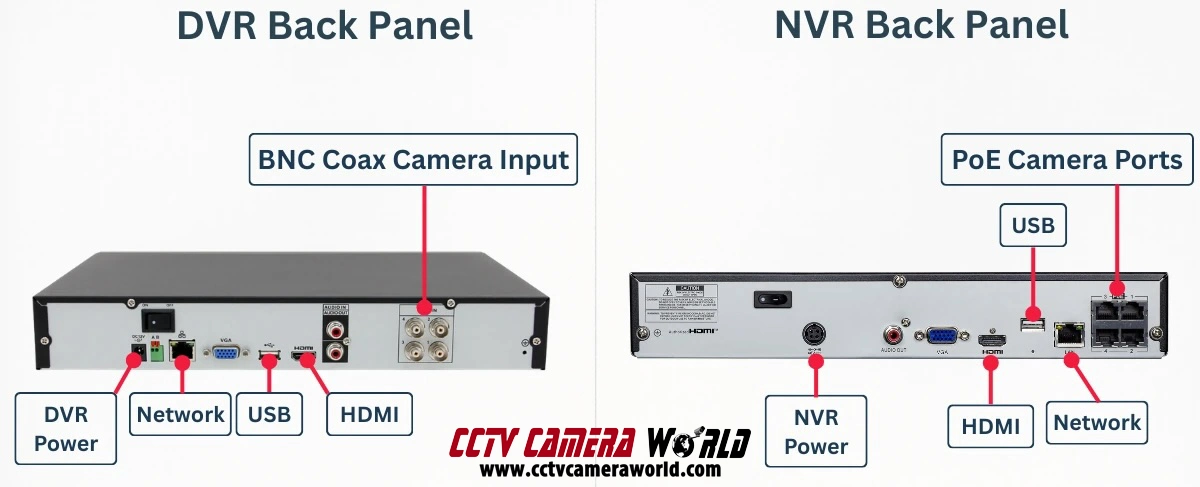
One of the easiest ways to tell them apart is by looking at the back of the recorder. DVRs use round BNC connectors for coaxial camera cables, while NVRs use RJ45 Ethernet ports for network cameras. In most PoE NVR systems, a single Ethernet cable carries both power and data to the camera. DVR systems, by comparison, require separate power for each camera, usually using Siamese cable or a separate power supply.
NVR (Network Video Recorder)
NVR (Network Video Recorder) systems work with IP cameras that transmit video over a network connection. These cameras process and encode video internally before sending it to the recorder, allowing the NVR to focus primarily on storing and managing the video streams.
This architecture allows IP cameras to function as intelligent devices capable of advanced image processing and analytics.
What Cameras Do NVR Systems Use?
NVR systems use IP cameras, which transmit digital video over a network connection. There are two primary types of IP cameras used with NVR systems.
Power over Ethernet (PoE) Cameras
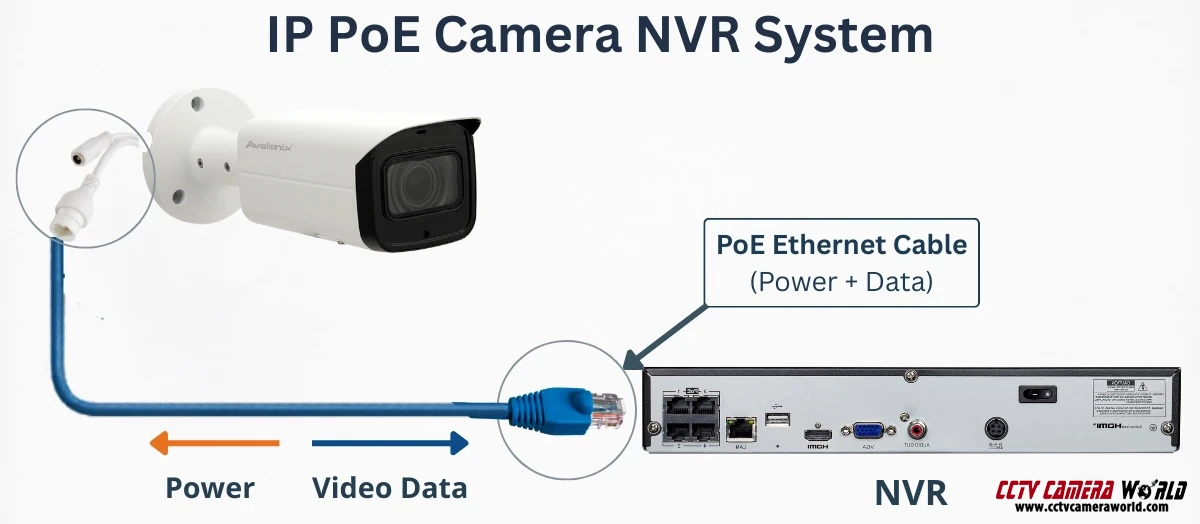
The most common type is a PoE (Power over Ethernet) camera. These cameras use standard Ethernet cable to provide both power and data through a single connection. One cable runs from the camera directly to the NVR or to a PoE switch.
PoE cameras are the preferred option for most professional surveillance systems because they simplify installation. Instead of running separate power and video cables, a single network cable handles both. This makes installations cleaner and easier to manage, especially when running multiple cameras.
What Cables Do NVR Systems Use?
NVR systems use Ethernet network cable, such as CAT5e or CAT6, to connect cameras to the recorder or to a network switch.
Ethernet cabling is thinner, more flexible, and easier to install than traditional coaxial cable. It also supports Power over Ethernet, allowing cameras to receive power and transmit video over the same cable.
Standard Ethernet cable runs can reach up to about 328 feet (100 meters) between the camera and the recorder. For installs that require runs over 328 feet there are options including PoE extenders, PoE switches, or fiber-uplink switches to expand the network.
Although Ethernet cable itself is often affordable, IP cameras tend to cost more than coax-based cameras because they include onboard processors and advanced features. However, the added flexibility and features of IP camera systems are a few of the many reasons NVR setups are the preferred choice for most new installations.
Wireless (WiFi) Cameras
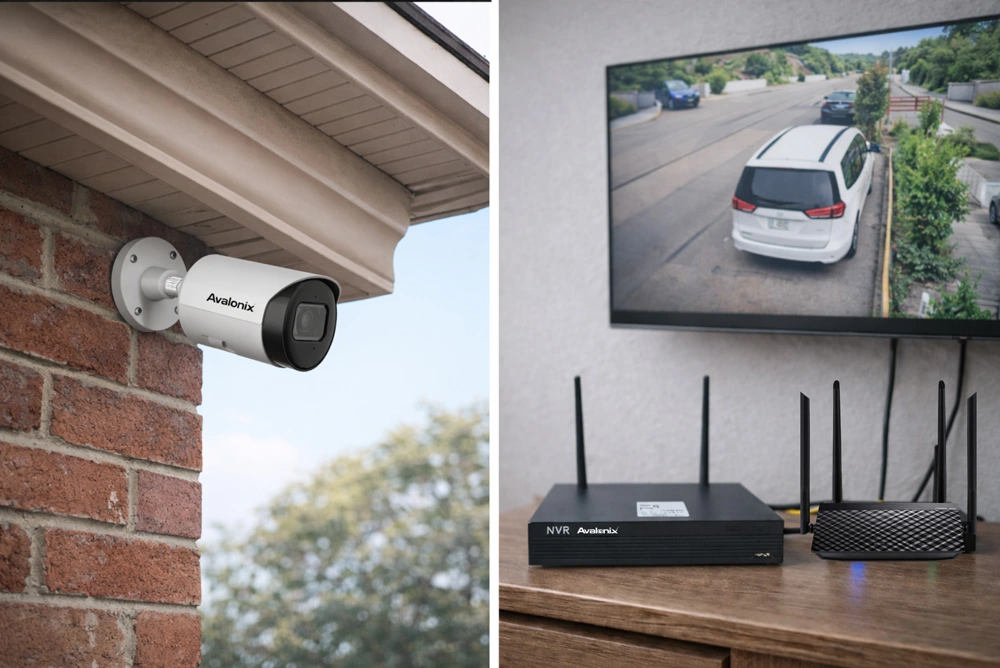
Another type of IP camera is a wireless or WiFi camera. These cameras connect to a network using WiFi instead of an Ethernet cable. NVRs can automatically search the network for compatible cameras and add them. There are also Wireless NVRs that have a built-in WiFi network to pair with wireless cameras. However, wireless cameras require a nearby power outlet because they cannot receive power wirelessly.
While WiFi cameras may sound convenient, they are generally less reliable for professional surveillance. Wireless networks are susceptible to WiFi jammers, interference, signal loss, and bandwidth limitations. For this reason, most commercial and professional installations prefer wired PoE cameras rather than WiFi connections.
Wireless cameras are still useful in situations where running cable is difficult or impractical. For example, a camera monitoring a detached building or across a parking lot can connect using a wireless bridge or access point when trenching cable is not possible.
DVR (Digital Video Recorder)
DVR (Digital Video Recorder) systems are designed for cameras that transmit video over coaxial cable. These systems are commonly used in installations where coax infrastructure already exists or where very long camera runs are required.
Modern DVRs are often referred to as XVRs, meaning they support multiple video technologies and can record both traditional coax cameras and IP cameras on the same recorder.
What Cameras Do DVR Systems Use?
DVR systems use analog or HD-over-coax cameras. These cameras connect to the recorder using siamese coaxial cable terminated with BNC connectors.
Each camera must have a dedicated cable run directly back to the DVR. This type of wiring is commonly referred to as a "home-run” setup, where every camera cable terminates at the recorder.
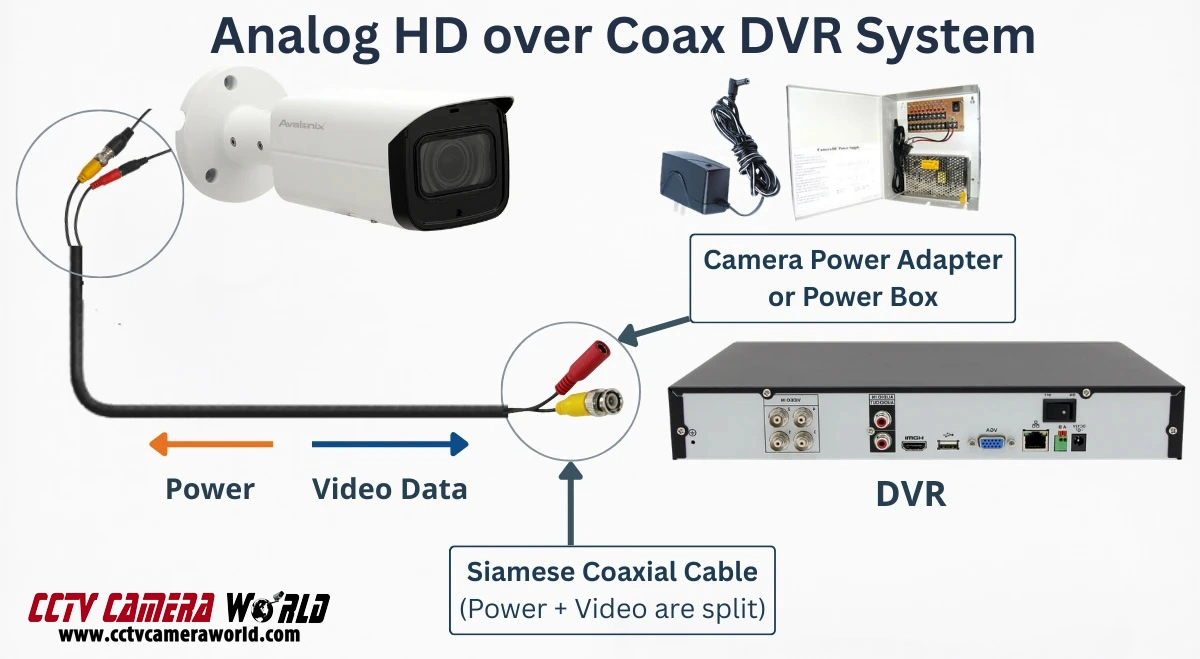
Another important difference is how power is delivered. Unlike PoE cameras used with NVR systems, coax cameras do not receive power through the video cable. Instead, they require a separate power connection.
Most installations use Siamese cable, which combines a coaxial video cable with a pair of power wires attached to it. The video signal travels through the coax line, while the power wires connect to either a nearby power adapter or a centralized power supply box located near the DVR.
This means DVR systems require two connections per camera: the video cable and the power supply.
Can DVR Systems Record Audio?
Modern DVR systems are not as limited with audio as a lot of older guides make them sound. In the past, audio often required a separate RCA audio input on the recorder. Today, many HD-over-coax camera systems can send audio over the same BNC video connection when used with compatible cameras and DVRs.
From our testing, audio over coax is often tied to the signal type and factory platform being used. For example, cameras using a default CVI signal will usually work best for audio with CVI-compatible recorders, while TVI default cameras usually work best with TVI-compatible recorders. Because of that, audio support is not always universal across mixed-format DVR/XVR systems, even when the video itself works.
That is also one reason dedicated RCA audio inputs are harder to find on modern DVRs than they used to be. However, some DVRs still include audio input ports for installations that need separate audio connections, such as our 16 channel DVR which supports dedicated audio inputs.
What Cables Do DVR Systems Use?
DVR systems use RG59 coaxial cable, most commonly in the form of Siamese cable which means it has both video and power wires side-by-side.
Coaxial cable has been used in surveillance systems for decades and is still popular in buildings where existing coax infrastructure is already installed. If a building already has coax cabling installed, it can usually be reused to upgrade to HD-over-coax cameras without rewiring.
One advantage of coax-based systems is that they can support very long cable runs without additional extenders or boosters. Coax cameras can reliably operate hundreds of feet from the recorder, and in some systems longer distances over 1000 feet are possible depending on the camera resolution and power delivery.
Coax cameras are generally more affordable because they are simpler devices and do not contain onboard processors. DVR recorders are also typically less expensive than NVR systems, making DVR setups a common choice for budget installs or facilities upgrading older analog systems.
However, DVR systems offer fewer advanced features compared to IP camera systems. While modern HD-over-coax cameras have improved significantly and support higher resolutions, advanced capabilities such as AI analytics and smart detection features are more common in IP-based NVR systems.
DVR vs. NVR Frequently Asked Questions
What is the main difference between DVR and NVR systems?
The main difference between DVR and NVR systems is where and how video is processed. A DVR receives raw video signals from coax cameras and records the video inside the recorder. An NVR records video from IP cameras that encode the video internally before sending it to the recorder. Other differences include cabling, and available features.
Which is better: DVR or NVR?
The best choice depends on the installation. NVR systems are usually better for new installations because they support higher resolutions, advanced camera features, and simpler plug-and-play wiring. DVR or XVR systems are the better choice when coaxial cabling is already in place, since the wiring can be reused without replacing infrastructure.
Do NVR cameras need internet to work?
No. NVR camera systems do not require internet access to record video. IP cameras connect directly to the NVR using its PoE ports or indirectly over a local network, and the recorder stores the footage locally. Internet access is only required if you want to view cameras remotely from a phone or computer outside the network.
Can DVR systems support IP cameras?
Many modern DVRs are actually XVR recorders, which means they can support both coax cameras and IP cameras. An XVR can record traditional HD-over-coax cameras while also adding IP cameras connected through a network switch. This allows people to gradually upgrade from coax cameras to IP cameras over time.
How far can security camera cables run?
The maximum cable distance depends on the system type.
Ethernet cable used for NVR systems typically supports runs up to 328 feet (100 meters) without additional extenders or equipment.
Coaxial cable used with DVR systems can support longer runs, often several hundred feet and sometimes over 1000 feet depending on the camera type and power delivery.
Are NVR systems more expensive than DVR systems?
NVR systems often cost more because IP cameras contain onboard processors and advanced features.
However, cheaper wiring and the additional capabilities of IP camera systems can offset some of the cost.
DVR systems typically have lower equipment costs and are often used in budget installations or when upgrading an existing coax camera system
Can you mix DVR and NVR cameras on the same system?
Traditional analog DVRs cannot record IP cameras. However, modern XVR recorders have support for both coax cameras and IP cameras over the network on the same system.