

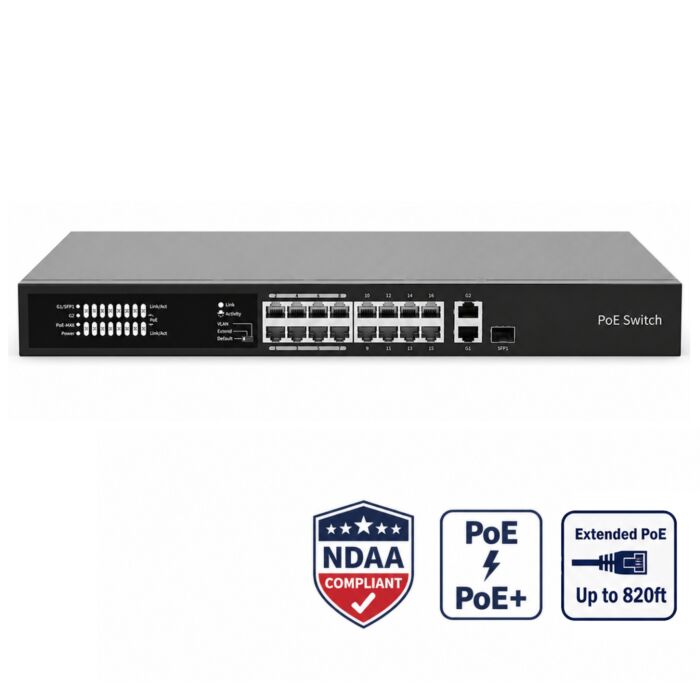


16 Port High Power PoE Switch, 250W, NDAA Compliant
Special Price
$299.99
Regular Price
$499.99
40% off
Overview
High Power 16 Port PoE Switch - AvaEye 16 port PoE switch for IP camera systems that need more power capacity than a small desktop switch.
250W PoE Budget - Provides 250W total PoE power, with up to 30W per port for compatible PoE devices.
Gigabit Uplinks - Includes 1 gigabit RJ45 uplink and 1 gigabit combo uplink port for connection back to an NVR, router, or main network switch.
Camera Network Modes - Supports Default, VLAN/Secure, and Extend mode for supported camera network layouts.
Long Run Support - Extend mode supports up to 250 meters for compatible camera runs when installed with proper cabling and equipment.
Rackmountable Design - All-metal housing with rackmount ears for professional installations.
Ndaa Compliant - Suitable for projects that require NDAA compliant network equipment.
AvaEye 16 Port PoE Switch for Security Cameras, 250W High Power, NDAA Compliant
The AvaEye 16POEHP is a high power 16 port PoE switch made for IP security camera systems that need more power capacity than a small desktop PoE switch can provide. It gives you 16 PoE camera ports, a 250W total PoE power budget, up to 30W per port, and dedicated Gigabit uplink options for connecting back to an NVR, router, or main network switch.
This switch is a practical choice for homes, offices, warehouses, retail stores, and business security camera systems where multiple PoE cameras need to be powered from one central location. Instead of running separate power adapters to each camera, the AvaEye 16POEHP sends both power and network data over standard Ethernet cable. That keeps the installation cleaner and makes it easier to manage your camera network.
The 16POEHP is especially useful for security camera systems because it includes camera-friendly working modes, a large PoE budget, long-run Extend mode, VLAN/Secure mode, and an all-metal rackmountable housing. It is also NDAA compliant, making it a good fit for customers who need professional surveillance equipment that meets NDAA compliance requirements.
Quick Highlights
- Best for: PoE security camera systems, NVR expansion, business camera networks, and long cable runs
- PoE ports: 16 PoE ports for IP cameras and other compatible PoE devices
- PoE budget: 250W total, up to 30W per port
- Uplink ports: 1 Gigabit RJ45 uplink and 1 Gigabit combo uplink port
- Working modes: Default, VLAN/Secure, and Extend/Surveillance mode
- Long run support: Up to 820ft (250 meters) in Extend/Surveillance mode
- Switch type: Unmanaged PoE switch
- Mounting: Rackmountable with included rack ears
- Compliance: NDAA compliant
Why Choose the AvaEye 16POEHP for Security Cameras?
A lot of PoE switches are made for general networking. The AvaEye 16POEHP is better suited for surveillance installations where camera power, uplink bandwidth, port isolation, and long cable runs matter. It gives installers and property owners a simple way to power up to 16 PoE cameras from one switch while keeping the camera network organized.
Use it when your NVR does not have enough built-in PoE ports, when your cameras are spread across a building, or when you want a dedicated PoE switch for your IP camera network. It can be connected to an NVR, router, firewall, or main network switch depending on how your system is designed. You can also browse our full selection of PoE switches if you need a different port count or power budget.
This switch works well for many common PoE camera types, including IP cameras, bullet cameras, turret cameras, dome cameras, fixed lens cameras, motorized zoom cameras, and other compatible 802.3af/at PoE devices. As with any PoE switch, the key is making sure your total camera power draw stays within the switch's 250W PoE budget.
250W PoE Budget for 16-Camera Systems
The AvaEye 16POEHP provides a total PoE power budget of 250W. Each PoE port can provide up to 30W to compatible PoE and PoE+ devices, which is enough for most standard IP security cameras and many higher-power camera models.
One important thing to understand is that 30W per port does not mean every port can use 30W at the same time. If all 16 ports used 30W at once, the total would be 480W, which is higher than the switch's total PoE budget. In real camera systems, most cameras use far less than 30W, so the 250W budget is usually enough for a full 16-camera layout using standard PoE cameras.
For best results, add up the maximum wattage of all cameras before installation. Cameras with large infrared LEDs, heaters, active deterrence lights, PTZ motors, or other high-power features may draw more power than basic fixed cameras. If the total camera load is close to or above 250W, use a second PoE switch, a larger switch, or dedicated PoE injector for the highest-draw devices.
Are 100Mbps PoE Ports Enough for Security Cameras?
Yes, for most IP security camera installations, a 100Mbps PoE port is more than enough for each individual camera. Most 4MP, 5MP, and 4K security cameras use only a fraction of a 100Mbps connection when configured with normal H.264 or H.265 video settings.
The AvaEye 16POEHP uses 16 100Mbps PoE camera ports and dedicated Gigabit uplink ports. That design makes sense for surveillance networks because each camera usually has modest bandwidth needs, while the uplink back to the NVR or main network benefits from Gigabit speed.
This is different from a general office network switch where every device may need Gigabit speed. For security cameras, the more important questions are usually PoE budget, stable power delivery, camera isolation, uplink capacity, and cable quality.
Unmanaged PoE Switch with No Cloud Management Account
The AvaEye 16POEHP is an unmanaged PoE switch, which means there is no cloud controller account, remote cloud dashboard, or subscription-based management server required to operate it. You do not have to worry about a cloud-managed switch account being compromised or a manufacturer-hosted management platform being used to access the switch.
For many security camera installations, that is a benefit. The switch is used locally to pass network traffic and provide PoE power to cameras. You still need to secure the rest of your network, including the router, NVR, camera passwords, and remote viewing settings, but the switch itself does not depend on a cloud management service to function.
Default, VLAN, and Extend Modes
The AvaEye 16POEHP includes multiple working modes so it can be used in different types of camera installations.
Default Mode
Default Mode is used for normal network operation. In this mode, all ports can communicate with each other. This is the simplest setting and is usually the right choice for basic plug-and-play camera networks.
VLAN / Secure Mode
VLAN/Secure Mode limits communication between the downlink camera ports so they communicate only with the uplink ports. This helps reduce unnecessary camera-to-camera traffic and can keep the camera side of the network cleaner.
This mode is useful when the switch is being used mainly for cameras that only need to send video back to an NVR or main network connection.
Extend / Surveillance Mode
Extend/Surveillance Mode is one of the biggest advantages of the AvaEye 16POEHP for camera installations. In this mode, supported PoE runs can reach up to 820 feet (250 meters), which is far beyond the normal 328ft Ethernet distance limit. That makes this switch useful for gates, detached buildings, barns, parking areas, warehouse corners, fence lines, and other camera locations that are too far away for a standard PoE run.
We have also tested and confirmed long PoE runs with AvaEye equipment in real surveillance use. Using solid copper network cable and extended transmission, we were able to run an AvaEye 2K 25X PTZ camera (model PTZIR2K25) at roughly 650 feet without using a PoE extender. The camera was not just barely connected; it streamed live video, panned, tilted, zoomed, and used infrared night vision during the test.
For fixed lens PoE security cameras, the lower power draw makes long-distance runs even more practical. When using good quality solid copper Cat6 cable and the switch's Extend/Surveillance Mode, supported fixed camera runs can reach up to about 820 feet without needing a separate PoE extender.
The main requirement is cable quality. Use solid copper Cat5e or Cat6, and avoid CCA cable for long PoE runs. Cheap copper clad aluminum cable can cause voltage drop, unstable video, camera dropouts, or PoE power problems. For more detail and a real test example, read our guide: Run a PTZ Camera Over 300 Feet, No Extender Needed.
Use It to Add PoE Ports to an NVR or Camera Network
The AvaEye 16POEHP is a good solution when you need to expand a camera system beyond the PoE ports built into an NVR. For example, if your recorder has fewer PoE ports than the number of cameras you want to install, this switch can provide additional PoE ports and send the camera traffic back to the recorder through the uplink connection.
It is also useful when cameras are located in one area of a building and the NVR is somewhere else. Instead of running every camera cable all the way back to the recorder, you can place the PoE switch closer to the camera group and run an uplink back to the main network or NVR location. If you are still planning the layout of your system, our guide on how to set up PoE IP cameras explains the basics of connecting PoE cameras on a network.
This can make larger installations cleaner, especially in warehouses, offices, retail buildings, garages, barns, workshops, and multi-room business layouts. For larger commercial layouts, it can also be used as part of a complete business security camera system where cameras need to be grouped by area, floor, building, or network closet.
Gigabit Uplink Options
The switch includes one Gigabit RJ45 uplink port and one Gigabit combo uplink port. These uplink ports are used to connect the switch back to the rest of the network. Depending on your installation, that may be an NVR, router, firewall, main network switch, or fiber/SFP connection.
The dedicated uplink design helps separate camera connections from the main network connection. Your cameras connect to the PoE ports, and the switch sends the combined camera traffic through the uplink port toward the recorder or network.
Rackmountable Metal Housing
The AvaEye 16POEHP uses an all-metal housing and includes rackmount ears, making it a good fit for equipment racks, network cabinets, structured wiring rooms, and business camera installations. Rack mounting keeps the switch organized with the rest of your NVR, router, patch panel, or network equipment instead of leaving it loose on a shelf.
NDAA Compliant PoE Switch
The AvaEye 16POEHP is NDAA compliant, which makes it a good match for NDAA compliant security cameras and systems used in professional installations where equipment sourcing matters. It pairs well with AvaEye cameras, NVRs, and accessories for customers who want a wired security camera system without relying on consumer cloud camera equipment.
For businesses, contractors, schools, government-related projects, and other professional environments, using an NDAA compliant PoE switch helps keep the network hardware aligned with the rest of the surveillance system. You can also learn more in our guide, What Are NDAA Cameras?
How This 16 Port PoE Switch Compares to Basic PoE Switches
| Feature | AvaEye 16POEHP | Basic Low-Power PoE Switch |
|---|---|---|
| Best Use | Security camera systems, NVR expansion, and business camera networks | Small desktop networks or a few low-power devices |
| PoE Ports | 16 PoE camera ports | Often fewer ports or lower total PoE capacity |
| Total PoE Budget | 250W | Varies, often much lower |
| Per-Port PoE | Up to 30W per port | Varies by model |
| Camera Network Modes | Default, VLAN/Secure, and Extend/Surveillance mode | May not include camera-focused modes |
| Long Cable Run Support | Up to 820ft (250 meters) in Extend Mode | Usually limited to normal Ethernet distance |
| Management Type | Unmanaged, no cloud management account required | Varies by model |
| Mounting | Rackmountable with included rack ears | Often desktop only |
| Housing | All-metal housing | Depends on model |
| NDAA Compliance | Yes | Not always listed or supported |
Installation Notes
For best performance, use solid copper CAT5e or CAT6 network cable. Avoid CCA cable for PoE camera installations, especially on longer runs or with higher-power cameras. CCA cable can cause voltage drop, unstable camera operation, random disconnects, and power issues.
If you are using Extend Mode for a long camera run, test the camera before final mounting. Long cable runs depend on cable quality, connector quality, camera power draw, and the environment where the cable is installed.
The switch does not require internet to power cameras or pass local network traffic. Internet is only needed if your camera system requires remote viewing, cloud access, app notifications, or offsite access. For more on this topic, read our guide on whether IP cameras need internet.
Common Uses
- Powering up to 16 PoE IP security cameras
- Expanding an NVR system that needs more PoE ports
- Building a dedicated camera network for a business or property
- Supporting business security camera systems in offices, warehouses, retail stores, and commercial buildings
- Connecting camera groups back to an NVR or main network switch
- Supporting longer camera cable runs with Extend/Surveillance Mode
- Using an NDAA compliant PoE switch in professional surveillance installations
What's Included
- 1x 16 Port PoE Switch
- 1x US Power Cord
- 2x Rackmount ears with screws
Why Buy the AvaEye 16POEHP?
The AvaEye 16POEHP is a strong choice when you need a high power 16 port PoE switch for a security camera system. It combines a 250W PoE budget, 16 PoE camera ports, Gigabit uplink options, camera-focused working modes, long-run support, an unmanaged local design, rackmountable metal housing, and NDAA compliance. For surveillance systems that need dependable PoE power and a cleaner network layout, it is a practical upgrade over a basic low-power PoE switch.
Specifications
| Brand | AvaEye |
|---|---|
| Model | 16POEHP |
| Switch Type | Unmanaged PoE switch |
| Mounting | Rackmountable with included rack ears |
| PoE Ports | 16 x 100Mbps RJ45 PoE ports |
| Uplink Ports | 1 x Gigabit RJ45 uplink port, 1 x Gigabit combo uplink port (SFP / RJ45) |
| Switching Capacity | 7.2Gbps |
| Forwarding Performance | 5.36Mpps |
| Packet Buffer | 4Mbit |
| MAC Address Table | 16K |
| PoE Standards | IEEE 802.3af, IEEE 802.3at |
| PoE Mode | Mode B |
| Maximum PoE Budget | 250W total |
| Maximum PoE Per Port | 30W per port |
| Priority Ports | Ports 1 to 8 for extended PoE |
| Working Modes | Default, VLAN/Secure, Extend/Surveillance |
| Extended Transmission Distance | Up to 820ft (250 meters) in Extend/Surveillance Mode |
| Cooling | 1 cooling fan |
| Maximum Power Consumption | 265W |
| Power Supply | 100-240V AC, 50/60Hz |
| Operating Temperature | 32F to 113F (0C to 45C) |
| Operating Humidity | 10% to 90%, non-condensing |
| Dimensions | 17.3 x 7.7 x 1.7 inches (440 x 195 x 44mm) |
| Weight | 4.7 lb (2.12kg) |
| Housing | All-metal housing |
| NDAA Compliant | Yes |
Frequently Asked Questions
Can this switch power 16 PoE cameras?
Yes. The AvaEye 16POEHP has 16 PoE ports and can power up to 16 compatible PoE cameras, as long as the total power draw stays within the 250W PoE budget.
Does each port provide 30W?
Each PoE port can provide up to 30W to a compatible PoE or PoE+ device. However, the total PoE budget for the whole switch is 250W, so all 16 ports cannot use 30W at the same time.
Are the camera ports Gigabit?
The 16 PoE camera ports are 100Mbps ports. The switch also includes Gigabit uplink options for connecting back to an NVR, router, or main network switch.
Is 100Mbps enough for a 4K security camera?
In most cases, yes. Most 4K security cameras use far less than 100Mbps when configured with normal video settings. The Gigabit uplink ports help carry the combined camera traffic back to the recorder or main network.
Can I use this switch with an NVR?
Yes. This switch can be used to add PoE ports to an NVR system or to place a group of cameras on a dedicated PoE switch. The uplink port can connect back to the NVR, router, or main network switch depending on your system layout.
What is Extend Mode?
Extend Mode, also called Surveillance Mode, allows supported cable runs up to 820 feet, or 250 meters. It is useful when a camera needs to be installed farther than the normal Ethernet distance limit, such as a gate, detached building, barn, parking area, warehouse corner, or property edge.
Is this a managed or unmanaged PoE switch?
The AvaEye 16POEHP is an unmanaged PoE switch. It does not require a cloud controller, cloud account, or remote management server to operate.
Can this switch be rack mounted?
Yes. The switch includes rackmount ears and screws so it can be mounted in a compatible rack or network cabinet.
Is this switch NDAA compliant?
Yes. The AvaEye 16POEHP is an NDAA compliant PoE switch, making it a good fit for professional security camera installations that require NDAA compliant equipment.
Do I need internet for this PoE switch to work?
No. The switch does not need internet to power cameras or pass local network traffic. Internet is only needed for remote viewing, app access, notifications, cloud services, or other offsite features used by your camera system.
What cable should I use with this switch?
Use solid copper Cat5e or Cat6 network cable. For longer PoE runs, solid copper Cat6 is preferred. Avoid CCA cable because it can cause power and connection problems, especially on longer cable runs.
Can this PoE switch run cameras beyond 300 feet?
Yes. In Extend/Surveillance Mode, supported camera runs can reach up to 820 feet, or 250 meters. We have also tested an AvaEye PTZIR2K25 PTZ camera at roughly 650 feet without using a PoE extender. For best results on long runs, use solid copper Cat6 cable and avoid CCA cable.
| Brand | CCTVCameraWorld |
|---|---|
| Series | AvaEye |
| Warranty | 1 Year |
| Return Policy | Accessories are non-returnable, non-refundable. |
Write Your Own Review
Product Questions
Can an AvaEye PoE switch run a PoE camera over 300 ft without an extender? The camera I want to use is PoE+ and consumes 13 Watts when the night time infrared LEDs are on.
Question by: Ed on May 18, 2026, 11:32 AM
Yes, this AvaEye PoE switch can be used for camera runs over 300 ft without a separate PoE extender when Extended PoE mode is enabled and the installation uses good quality solid copper Cat5e or Cat6 cable.
A 13 watt PoE+ camera is a reasonable load for this type of setup, even when the infrared LEDs are on at night, as long as the total PoE budget of the switch is not exceeded. The bigger factors are cable quality, distance, camera power draw, and whether Extended PoE mode is supported and enabled on the switch.
For best results, use solid copper cable, avoid CCA cable, and test the camera before final installation. Extended PoE mode may reduce network speed on that port, but that is usually fine for security cameras. Higher power devices, PTZ cameras, heaters, poor cable, or very long runs may still require a PoE extender, fiber, or a different network design.
A 13 watt PoE+ camera is a reasonable load for this type of setup, even when the infrared LEDs are on at night, as long as the total PoE budget of the switch is not exceeded. The bigger factors are cable quality, distance, camera power draw, and whether Extended PoE mode is supported and enabled on the switch.
For best results, use solid copper cable, avoid CCA cable, and test the camera before final installation. Extended PoE mode may reduce network speed on that port, but that is usually fine for security cameras. Higher power devices, PTZ cameras, heaters, poor cable, or very long runs may still require a PoE extender, fiber, or a different network design.
Answer by: CCTV Camera World on May 18, 2026, 12:47 PM
Related Products
Check items to add to the cart or