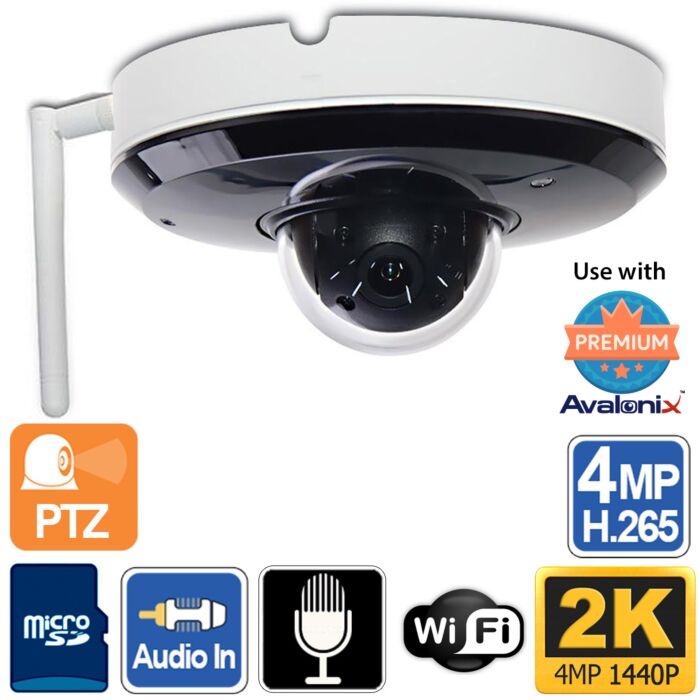
2K 4MP WiFi Mini PTZ camera with night vision and built-in microphone
The IPD3X4MWIFI is a compact WiFi PTZ security camera designed for locations where running a network cable is not practical. It delivers crisp 2K video using a 4MP image sensor and allows operators to pan, tilt, and zoom over the network for active monitoring.
This model is well suited for indoor and outdoor environments that need flexible camera placement, audio recording, nighttime visibility, and PTZ control, such as offices, retail stores, medical facilities, warehouses, parking areas, garages, and residential properties. Its small form factor makes it easier to install discreetly compared to larger PTZ cameras.
- 2K clarity: 4MP resolution at up to 30fps
- True PTZ control: remotely pan, tilt, and zoom with presets and tours
- 4X motorized optical zoom: 2.8-12mm lens for wide views or tighter detail
- Infrared night vision: up to 66 ft in complete darkness
- Built-in microphone: listen in up to approximately 30 ft in quiet environments
- Wireless connectivity: 802.11 b/g/n WiFi with 2.4GHz and 5.8GHz support
- 12V DC powered: this WiFi model requires a local power adapter and does not support PoE
- Local recording: microSD slot up to 256GB (card not included) or use with a compatible NVR
WiFi setup and recommended network configuration
The IPD3X4MWIFI connects to your network using WiFi and is powered by a 12V DC power adapter. This is a wireless network camera, not a wire-free battery camera. It still requires power at the installation location.
For best performance, the camera should be connected to a dedicated WiFi router or a compatible WiFi NVR rather than a heavily congested household network. A strong WiFi signal is important for smooth live viewing, responsive PTZ control, and reliable recording.
The camera includes a built-in WiFi signal strength meter to help evaluate nearby wireless networks. For stable video and PTZ response, we recommend a signal strength of approximately 90% or higher. Weak signal, long distance from the router, thick walls, interference, or crowded WiFi channels may cause video lag, reduced image quality, or delayed PTZ movement.
This camera pairs well with the
Avalonix Premium Series WiFi NVR,
which operates on a dedicated wireless network for improved reliability. Mesh WiFi systems are not recommended unless they use wired backhaul and operate on a single subnet.
Ways to view the camera
You can watch live video using the built-in web interface on a computer without needing a plugin on modern browsers such as Edge, Chrome, or Firefox. You can also view and control the camera using our free PC/Mac software, a compatible NVR interface, or the iPhone and Android apps for remote access.
Note: HTML5 browsers limit some features available in the web interface, such as playback, video download, and two-way talk where available. Installation of a Windows plugin allows access to all features available in the web interface of the camera.
Real-world video demos: audio, zoom, day, and night performance
The videos below show real footage and audio tests from the Avalonix Mini PTZ camera platform. The PoE and WiFi versions share the same core camera performance for video, zoom, microphone pickup, night vision, and PTZ movement. The main difference is the network and power connection: the WiFi model uses wireless networking and 12V DC power, while the PoE model uses Ethernet for both network and power.
Built-in microphone test: indoor and outdoor audio pickup
This demo focuses on one of the most practical reasons to choose this WiFi mini PTZ camera: the built-in microphone. The video shows how the camera captures real-world audio indoors and outdoors so you can better understand what to expect from a security camera with audio recording.
- Shows real audio pickup from the built-in microphone
- Compares indoor and outdoor listening conditions
- Helps customers understand realistic microphone range
- Applies to both the PoE and WiFi versions because the microphone performance is the same
Read video summary and transcript
Summary: In this video, Ray from CCTV Camera World demonstrates the built-in microphone on the Avalonix 4MP Mini PTZ camera. The video includes an indoor audio test from about 25 ft away and an outdoor audio test from about 25 to 30 ft away in a noisy urban environment. Ray also explains the PoE and WiFi versions of the camera, mounting options, the audio line-in connection for an optional external microphone, microSD recording, and how the camera can be used with an Avalonix NVR or as a standalone IP camera.
Transcript:
00:00 - Security camera with good audio pickup
Are you looking for a security camera with good audio pickup? Well, then I have the right product for you. My name is Ray, and I'm the manager at CCTV Camera World. In this video, I'll be showcasing the audio capabilities of our Avalonix line of cameras. I'll be using this Mini PTZ camera, which is a 4 megapixel 4X zoom camera.
00:17 - Avalonix Mini PTZ camera overview
It's pretty small in size. You can ceiling mount it, and there are optional wall mounts available as well. It is an outdoor weatherproof rated camera.
00:25 - Camera size, mounting options, and outdoor rating
The lens is inside and has a small zoom lens as well. It can rotate up to 355 degrees, and it has pan and tilt. Usually, you would mount it like this, or I'm going to be showcasing it just sitting on a desktop and testing out the audio on it.
00:41 - Built-in microphone location and night vision overview
It has a built-in microphone that's right here. There is an IR sensor here, a light sensor, and there are infrared LEDs built in. So, this has night vision so you can see in complete darkness. You can check this out at CCTV Camera World. I'll put the model number below so you can search it on the website, and there will be a link in the video description as well. If you're watching this video on CCTV Camera World, you can just keep on watching.
01:04 - What this audio test will show
Let me get started with how to set up this camera pretty quickly, and I'll be showcasing mainly the audio and video detail of this camera. I'm going to do a test at about 25 ft away in an indoor office environment and about 30 ft away in an outdoor noisy urban environment as well. It is a PoE camera. It has a PoE pigtail on it where you just connect one cable to get video and power.
01:28 - PoE connection and camera pigtail overview
It also has a 12V DC connector. You don't really need to use this. It's always there on every professional camera we sell. There is an audio line-in connection. So, if your internal microphone doesn't suit your needs, you can always tie in an external microphone along with it.
01:44 - Audio input for optional external microphone
I'll be showing that to you as well later in this video, or perhaps in a later video.
01:49 - PoE and WiFi versions available
There's also a surprise that I have for you. Not only do we carry this in a wired PoE version, we also have a WiFi version. So, this has a built-in antenna that comes in it and a power jack. You only need the Ethernet connector to set it up, but once you're done, you can disconnect the Ethernet cable, power it with 12V DC, and have its antenna talk back to your WiFi router or one of our WiFi NVRs using WiFi 2.4GHz or 5.8GHz.
02:18 - Indoor and outdoor use cases
These are pretty versatile PTZ cameras, most commonly used in both indoor and outdoor environments. I've had one of these outside for about five years, facing a very sunny side of our building, and it's been ticking along perfectly fine in hot and cold weather here in Virginia.
02:36 - Why microphone performance matters
Now to begin, let me first show you what the audio and video clip looks like from both of these cameras. The microphone is the same, so the performance you see will be identical for both the wired PoE and WiFi camera. Another thing I'd like to mention is the microphone performance of these cameras is unlike most cameras you buy on the market. We love the Avalonix Premium Series because they have the best internal microphone and the best audio encoding capabilities. You can go up to AAC 64 kHz for encoding, and you can always tie in an external mic, depending on the camera model, if you want a louder audio pickup device. This is true for all the Avalonix Premium Series cameras we carry at CCTV Camera World. So, let's look at the audio video sample.
03:24 - Indoor audio test at about 25 feet
This is an audio test of our Avalonix Premium Series Mini PTZ camera. This is using its built-in microphone. The camera is mounted about 10 ft in the air on our ceiling, and I'm approximately 25 ft away from the camera. You may only hear some background noise from our AC. Otherwise, you should be hearing clear audio from me, again 25 ft away with the camera 10 ft in the air. This is our Avalonix Premium Series Mini PTZ camera that also has a line-in connection if the built-in microphone is not adequate for your needs or where you're placing the camera.
04:15 - Outdoor audio test at about 25 to 30 feet
In case you're wondering what it sounds like outside, I'm standing about 25 ft to 30 ft away from the camera outdoors. It's pretty noisy. There is ambient noise from birds and trucks going around the plaza. This is what it sounds like when you have the camera mounted outside and you're using the built-in mic to do the audio pickup. I'm talking in a normal conversational tone, nothing too loud, but I can go a lot louder and you can hear me much more clearly, I bet.
04:40 - Connecting the camera to your network or NVR
Let's go into the next part of the video. No overview video would be complete if I don't show you how to connect it to your network. You can use this camera alone or with an NVR recorder. It is ONVIF compliant, but it works best if you want to use the analytics these cameras have to offer by using an Avalonix NVR.
05:00 - PoE setup using NVR, PoE switch, or injector
Connection is pretty simple for the PoE. All you do is connect an Ethernet cable going back to your NVR, PoE switch, or PoE injector. If you don't know what those terms are, you can look them up in our PoE beginner's guide at CCTV Camera World. Be sure to check the link in the video description.
05:13 - Ceiling mount and mounting plate overview
The camera is meant to be ceiling mounted or used with its optional wall mount. For the ceiling mount, both the WiFi and wired versions come with this mounting plate that basically locks in. You first screw this into, let's say, your ceiling tile, and then you put the camera on there and it locks sort of like a smoke detector using these screws and bolts on the top. Then you can tighten the camera and secure it to the mounting mechanism using this lock and screw right there.
05:43 - MicroSD card slot and recording option
There is a microSD slot also on the camera if you want to use your own microSD card. That is definitely possible. We recommend you purchase the microSD card from us because the slot is fragile, and sometimes when placing the microSD card, I've seen customers break them. We also use a high-speed compatible microSD card.
06:00 - Viewing the camera on an Avalonix recorder
This camera is booted up. I can actually sense it moving in my hands. Here's the lens assembly, and I've already pre-added it to my NVR. Let's see what we see going on on the monitor. I'm using a coax DVR from Avalonix. It's a hybrid DVR. It lets me tap into any of the Avalonix IP cameras, or an ONVIF compliant camera over the network, and I can display it along with my analog cameras on the recorder itself.
06:29 - 4MP video quality and plug-and-play setup
Here I have a good, beautiful feed from the camera. Like I said, this is a 4 megapixel camera. This is how easy it is to deploy one of our cameras. If you're buying it with an NVR, it's plug-and-play. If you're buying it as a standalone, it's also plug-and-play. We basically set it to DHCP. All you have to do is scan the QR code or enter its serial number into our PC software, and you can get connected to it from anywhere in the world as long as you supply it a PoE injector and a viable internet connection.
06:53 - Weather grommet, junction box, and outdoor mounting advice
Also in the box, there is a cutout for mounting to make your life easier. There is a weather grommet as well if you're not using a junction box, but we do recommend if you're putting it outside, get a junction box or the wall mount.
07:10 - Preview of external microphone setup
In part two of this video, I'll show you how to tie in the external microphone that we sell into this two-line audio-in connection on this camera, or any other Avalonix camera that we have.
07:24 - Final thoughts and where to buy
Thank you for watching this video. If you did like this video, please like it and subscribe to our channel. Be sure to contact us at CCTV Camera World if you have any questions. You can find all these products. Again, they're part of the Avalonix line or series at CCTV Camera World.
Outdoor PTZ performance review: daytime, nighttime, and zoom control
This outdoor demo shows the same 4MP mini PTZ camera platform used for live monitoring outside our office. It demonstrates 4X optical zoom, pan and tilt control, daytime parking lot coverage, and nighttime behavior. The video performance shown is useful for the WiFi model, but the wiring and network setup shown may reference the wired PoE version.
- Shows outdoor video from the 4MP Avalonix Mini PTZ camera platform
- Demonstrates optical and digital zoom behavior
- Shows daytime and nighttime footage
- Shows that parked plates may be readable in daytime conditions, while moving plates and nighttime plate capture require a dedicated license plate camera
Read video summary and transcript
Summary: This video reviews the Avalonix 4MP 2K Mini PTZ camera in an outdoor setting. Ray demonstrates live viewing through a web browser, pan tilt zoom control, 4X optical zoom, digital zoom in SmartPSS software, daytime detail, parking lot coverage, and nighttime performance. The video also explains an important limitation: this camera can show parked license plates in daytime when the angle and distance are favorable, but moving vehicles and nighttime license plate capture require a dedicated license plate camera.
Transcript:
00:04 - Outdoor video overview
This video is an overview of our 4 megapixel Mini Pan Tilt Zoom camera. This is a video of the outdoor video you can expect from the camera. Here's the camera on our website. We have it in two forms. Notice that it says 2K in the resolution. There is a wireless version and a wired version. The model number is IPSDIR3X4M. You can find it by searching on the website.
00:26 - PoE and wireless versions
There is a 2 megapixel version that is an older model, which is PoE only. You can find the 4 megapixel 2K version that I'm going to review here in both a PoE version and a wireless version. The wireless version is powered by 12V DC. The PoE version in this case has a 12V connection, but of course it is PoE as well, and it is wired.
00:44 - Product page and older indoor demo
You can find the product description here. We'll be adding this video to the description. Right now, at the present time, the page has an older video demo that we did of what to expect from this camera when used in an indoor environment. You can go through that video to learn more if you are going to be using this camera inside of an office and what level of detail you can expect as far as faces go.
01:08 - Browser live view and PTZ control
I'm logged into my PoE Pan Tilt Zoom camera. It's a security camera that works over the network. It's an IP camera, and you can also call it a PoE camera. It's a security camera in the end. Right now I'm using it with a browser. I'm logged in over my local network using its IP address, and I can watch it live and also control it.
01:31 - Pan, tilt, and zoom functions
What Pan Tilt Zoom cameras allow you to do is move them around. You can pan, which means going left and right. You can tilt, which means moving up and down. Then there is the zoom function.
02:04 - Stream settings and network speed
The speed at which the camera moves depends on the model of the camera, the internet speed you have, and other factors. Depending on your internet speed, you can change the camera's streams to accommodate your internet connection. You can move around faster if you are viewing the sub stream, which is a lower resolution mobile stream, and then switch back to the main stream.
02:27 - Viewing locally or over the internet
If your internet connection is not the best and you are trying to view this over the internet, you can certainly use the sub stream. Otherwise, if you're on a hardwired local network connection and not on WiFi, you can use the main stream and move the camera around. I am on WiFi, so I'm going to take advantage of the sub stream to make the camera movement more responsive, and then switch back to the main stream.
02:43 - Fully zoomed daytime license plate detail
When I'm fully zoomed in, this is 4X zoom. I can make out the license plates with no problem. Keep in mind that when you're viewing using a web browser, depending on which version it is, you're not going to have all the functions. Pan tilt zoom and viewing will work, and playback will work, but sometimes audio and two-way audio do not work.
02:58 - Web browser feature limitations
You need to have Windows with the Edge plugin installed to get the full benefit of the web interface experience this camera has to offer. Otherwise, use the NVR or use the SmartPSS software.
03:14 - Main stream image quality
Right now I'm zoomed in all the way, and I can see the license plates with no problem. I'm going to maximize my window to show you how great the image quality is. You can make out these license plates without having to use any kind of digital zoom.
03:28 - Wide view parking lot coverage
A lot of times people buy these cameras from us to mount them on an office building or home, so they can see a wide angle while also getting some details. Since this is a 2K 4MP camera, this video is meant to give you an idea of what to expect if you purchase it or are considering purchasing it.
03:46 - Daytime viewing distance example
Here we can see about eight parking spaces across with no issues, and I can still make out the license plates. The camera is mounted about 25 ft high, and these cars are about 40 ft away.
04:08 - Using SmartPSS software
Now I'm going to show you how this camera works when using it with our SmartPSS software, how to use the digital zoom feature, and how you can manage it with other cameras.
04:17 - Important note about license plates
Keep in mind that when cars are still, security cameras in daytime can pick up license plates with no issue. But if the car is moving fast, it's a different scenario. It's a good idea to understand that if you get a Pan Tilt Zoom camera and you're trying to pick up a license plate of cars going by on the road, no regular security camera will be able to do that.
04:33 - When a license plate camera is needed
If you wanted a license plate camera to capture plates of cars moving here, you would have to put the license plate camera somewhere facing the direction of the approaching vehicles or exiting vehicles. That's the only way. The reason you can see license plates with this camera is because the cars are parked and you're looking straight at them. If they're at a large angle, you're not going to be able to make the plates out.
04:57 - SmartPSS digital zoom demo
Now I'm in my SmartPSS software. I'm going to pull up the Pan Tilt Zoom camera. Here I can view it, and I can use some of the features provided in this software to digitally zoom. For example, I'm able to digitally zoom in and look at the license plates in more detail. I can move around and pick out some digital detail using the digital zoom feature.
05:15 - Digital zoom versus optical zoom
This is digital zoom. It's not optical zoom. A lot of people don't understand the difference. They believe that because the camera says it can capture a face about 100 ft away, they should be able to record at about a 100 degree angle of view and still see that detail. But at a 100 degree angle of view, 2K maxes out at about 40 ft for facial detail or license plate detail.
05:40 - Zoomed-in view for detail
If you want that detail, you want to make sure you set your PTZ camera at a zoomed-in view. Otherwise, you're not going to be able to capture that detail. This is a zoomed-in view, and now you can actually see that detail much better. If you're trying to capture plates, make sure you keep your camera at the angle of view you want before you walk away from it.
06:04 - Nighttime video sample
This camera does have infrared, and I will show you some nighttime examples. Here's a video sample from this camera of an event it picked up at nighttime. It was based on motion. This camera does have Starlight. It is very low light. We have security lights outside, so it's able to see in color and not even switch into black and white mode.
06:25 - Nighttime picture quality
If you're looking for the camera to be in IR mode, it does have a certain amount of IR as stated in the product description. But as you can see, it provides a great, beautiful picture at nighttime and provides lots of detail.
06:34 - Why regular cameras struggle with plates at night
One thing I did want to pick up on is customers trying to pick up license plate numbers with Pan Tilt Zoom cameras or regular security cameras. This is a perfect example of why you can't use anything except a proper license plate camera to pick up a license plate at nighttime. As you can see, the plate appears completely white, and that's expected because the camera does not have the correct shutter rate to adjust at nighttime to get that plate number.
07:05 - Lighting, reflection, and shutter speed
When you have light or infrared light, it will bounce off the plate into a regular security camera's image sensor, and the plate will appear white. In daytime, like I showed you before, the license plates appeared clearly. How do you go from that to this? It's all about lighting and the camera's shutter rate. At nighttime, they behave differently, and that's why you need to spend the correct amount of money to get a proper license plate camera.
07:32 - Finding dedicated license plate cameras
If you are looking for a proper license plate camera, you should go to Security Cameras on our website and then click on License Plate Cameras. You can browse the cameras we have to offer. Our variety of cameras changes from time to time, but this is the true day and night license plate camera at this time that can capture a plate both day and night.
07:56 - Recap of outdoor performance
Thank you for watching this video. Again, for a recap of our 4 megapixel Pan Tilt Zoom camera, this is the camera that we're reviewing. We'll add this video to the page. Please find it in the description.
08:10 - Expected detail distances
To recap, what can you expect from this camera? Facial detail up to about 70 to 80 ft away, and license plate detail up to about 50 to 60 ft away when you're zoomed in all the way. When you're zoomed out, you can expect license plate detail up to about 40 ft away and facial detail up to about 40 ft away as well.
08:28 - Final thoughts
Here's a great, pretty picture in broad daylight from this camera. Thanks for watching. If you're watching on YouTube, don't forget to like, comment, and subscribe.
Indoor 4X zoom demo: what to expect in an office or small business
This indoor demo shows the camera platform in an office environment with overhead LED lighting. It is useful for understanding how much detail the 4X optical zoom provides at shorter indoor distances. The demo shows browser viewing through an NVR, which is also useful for customers using the WiFi camera with a compatible recorder.
- Shows indoor PTZ control and zoom behavior
- Demonstrates a subject roughly 25 ft from the camera
- Helps set expectations for facial detail in indoor scenes
- Shows why a compact PTZ can be useful in offices, retail stores, and lobbies
Read video summary and transcript
Summary: This video shows how easy it is to view the Avalonix 4MP Mini PTZ camera through an NVR using a web browser. Ray demonstrates live view, switching from sub stream to main stream, PTZ controls, 4X optical zoom, and digital zoom from a Mac browser. The demo helps customers understand the difference between the wide 2.8mm view and the tighter 12mm zoomed-in view, and what level of facial detail to expect from a compact 4X PTZ camera in an indoor office setting.
Transcript:
00:00 - Viewing a PoE camera system from a browser
In this quick video, I'm going to show you how easy it is to use our PoE camera systems to log in and view your cameras, and what to expect from a 4X PTZ zoom camera.
00:07 - Logging into the NVR
Right now, I am logged in to my NVR's IP address on the local network. If you would like a system that you can view easily using Chrome, I'm on a Mac here, and I'm going to log into my NVR using the username and password that I've assigned to it.
00:28 - Opening live view
I'm going to go into live view. I have several cameras here, so what I'm going to click on is the first camera. It will pull up over the web, and the camera is connected directly into the back of the NVR.
00:37 - Enlarging the camera view
Now I'm going to double click on the screen, or the quadrant of the camera, and enlarge it. Automatically, the web interface serves what's called a sub stream. I'm going to select the main stream, which is clearer, to give you an idea of the capability of this camera that I'm using.
00:54 - What PTZ means
This is our 4MP PTZ camera. A PTZ camera means that it can pan, tilt, and zoom. This is called tilting, and left and right is called panning. Obviously, you can go much farther than I'm showing. It's just for privacy reasons that I'm not going too far.
01:18 - What to expect from 4X zoom
The main thing is what you should expect out of four times zoom from a 4X PTZ camera. What I'm going to do is click on the zoom icon, and once I zoom in all the way, this is what you can expect out of facial detail when you're fully zoomed in with a 4X PTZ. This is the most it can do.
01:35 - Browser viewing without a plugin
Basically, what I've shown you here is that you can pull up our systems in any Chromium-based browser, or even Safari, and not need a plugin. If you want to digitally zoom in and you're using a Mac, with my MacBook I'm able to pinch out and zoom in as easy as that. Then I can move up and down and look at the video.
02:00 - Digital zoom on Windows
If you're using Windows, I would suggest using Edge with IE mode so you can get more options. There will basically be an icon for digital zoom on the camera, so you can zoom in.
02:09 - Wide view versus zoomed-in detail
This is what you should expect out of a Pan Tilt Zoom camera that is four times zoom. This is the clarity you should expect. This is about 2.8mm, and this is 12mm. The 2.8mm view gives you a wide angle view. When you go to 12mm, it reduces the field of view, but you can see more detail farther away.
02:24 - Digital zoom from the wider view
Let me go back to the wider view and then digitally zoom in. That's what you can expect. You can still see those numbers there, but the facial clarity is not as great.
02:33 - Final thoughts
I hope this gives you more detail into what you can expect from our 4X zoom PTZ cameras and our PoE-based camera systems. Having a camera connected to an NVR allows you to navigate several cameras easily through one browser. Thanks for watching. If you're watching on YouTube, don't forget to like, comment, and subscribe.
Zoom performance and usable detail
The built-in motor allows the camera to pan up to 355 degrees and tilt up to 90 degrees, making it possible to monitor large areas with a single compact camera. The 4X optical zoom provides usable facial detail at distances of up to approximately 90 ft when fully zoomed, depending on lighting and scene conditions.
PTZ functions can be controlled from a compatible NVR, PC or Mac software, or mobile apps for iOS and Android, allowing operators to move the camera during live viewing or call preset positions instantly.
Low-light performance and night vision
This WiFi mini PTZ camera uses Starlight technology to maintain color video in very low-light environments when ambient light is available. In complete darkness, built-in infrared LEDs automatically activate, providing night vision illumination up to 66 ft.
This makes the IPD3X4MWIFI a strong choice for 24/7 monitoring when you need flexible wireless placement, nighttime visibility, and a compact PTZ form factor.
Built-in audio and two-way communication
A built-in microphone allows the camera to capture audio up to approximately 30 ft in quiet environments. For two-way communication, the camera includes audio input and output connections and can be paired with an optional
two-way audio kit
to add an external speaker.
The camera also supports audio detection, allowing it to react when sound above a set level is detected. This can be useful for recording or reviewing events where noise happens before or during visible activity, such as voices near an entrance, activity in a lobby, or unusual sounds around a building after hours. Audio detection sensitivity should be adjusted during setup to match the environment, since wind, traffic, machinery, and other background noise can affect when an alert is triggered.
Smart detection analytics (on-camera)
The IPD3X4MWIFI includes on-camera video analytics designed to reduce false alerts compared to basic motion detection.
- Tripwire detection
- Intrusion detection
- Loitering detection
- Abandoned or missing object detection
- Parking detection
- People gathering detection
- Face detection
- Human and vehicle alarm classification
- Smart Motion Detection
Important note: Video analytics events are processed on the camera and transmitted to compatible NVRs for recording and alerts. Analytics performance depends on scene setup, lighting conditions, and wireless network stability.
Why choose this WiFi Mini PTZ camera?
The IPD3X4MWIFI is a strong choice when you need a compact PTZ camera with night vision, audio, and flexible placement but cannot run Ethernet cabling to the installation point. It gives you the same core camera performance as the wired PoE version while using WiFi for network connectivity and 12V DC for power.
If your installation allows for Ethernet cabling and you prefer the most reliable connection, the wired PoE version is usually the better fit. If you need a compact PTZ camera in an area where Ethernet is difficult to run, this WiFi version is the more practical option. For a broader comparison of PTZ camera types, zoom levels, and use cases, see our
guide to choosing the best PTZ camera
or browse our full selection of
PTZ security cameras.
Related mini PTZ camera options
Features
- Mini WiFi Pan Tilt Zoom security camera
- 4MP image sensor with crisp 2K resolution
- Starlight technology for color video in low light
- H.265+ and H.264+ video encoding
- 4X optical zoom (2.8 to 12mm motorized lens)
- 66ft infrared night vision
- Built-in microphone
- Audio detection for sound-triggered recording or alerts when supported by the recording setup
- Audio input and output for external microphone or speaker
- Use with the two-way audio kit for security cameras for 2-way talk
- Dual-band WiFi: 802.11 b/g/n with 2.4GHz and 5.8GHz support
- Designed for use with a dedicated WiFi router or compatible WiFi NVR
- Smart Detection Video Analytics
- MicroSD slot supports up to 256GB
- IK08 vandal resistant
- IP66 weather resistant
- Suitable for indoor or outdoor use
- Usable with CCTV Camera World NVR, PC, or mobile applications
- 12V DC powered (PoE not supported)
What's included?
- (1) WiFi Mini PTZ with Night Vision, 2K, Built-in Microphone, 4X Optical Zoom

Specifications
| Image Sensor |
1/2.8" 4MP Sony Starvis CMOS |
| Effective Pixels |
2560 (H) x 1440 (V) |
| Electronic Shutter Speed |
Auto/Manual, 1/1- 1/30000s |
| Minimum Illumination |
0.005 Lux F1.8 (Color), 0.0005 Lux F1.8(B/W), 0 Lux IR On |
| S/N Ratio |
More than 50dB |
| IR Distance |
Up to 66ft |
| IR On/Off Control |
Auto, Manual |
| IR LEDs |
3 IR LED |
| Lens Type |
Motorized Zoom |
| Focal Length |
2.8mm - 12mm |
| Max Aperture |
F1.8 – F2.7 |
| Angle of View |
Horizontal: 96.9° – 31.6°; Vertical: 51.4° - 17.8° |
| Close Focus Distance |
7.9 inches at Wide View, 19.7 inches at Tele View |
| Focus Control |
Auto, Manual |
| Max Distances* at 4X Zoom |
| Detect |
Recognize |
Identify |
| 482ft |
180ft |
90ft |
|
| Compression |
H.265+, H.265, H.264+, H.264 |
| Pan Tilt Range |
Pan: 0° - 355°, Tilt: 5° - 90° |
| Manual Control Speed |
Pan: 0.1° - 70° /s; Tilt: 0.1° - 30° /s |
| Preset Speed |
Pan: 80° /s; Tilt: 40° /s |
| Presets |
300, 8 Tours |
| Power Up State |
Auto restore to previous PTZ and lens status after power failure |
| Idle State |
Continue Preset/Tour if there is no command in the specified period |
| Auto Tracking |
No |
| Video Analytics |
Tripwire, Intrusion, Abandoned and Missing Object Detection, People Counting, Face Detection, Parking detection, People gathering detection, Loitering detection, Human Body and Vehicle Specific Motion Detection |
| Streaming Capability |
3 Streams (Main Stream, Sub Stream 1, Sub Stream 2) |
| Resolution |
4MP (2560 x 1440), 1080P (1920x1080), 720P (1280x720), D1 (704x480), VGA (640x480), CIF (342x240) |
| Frame Rate |
Main Stream: 4MP / 1080P / 720P (1-30fps), Sub Stream 1: D1 / CIF (1-30fps), Sub Stream 2: 720P / D1 / CIF (1-30fps) |
| Bit Rate Control |
CBR, VBR |
| Bit Rate |
H.265 or H264: 3Kbps - 20480 Kbps |
| Day/Night |
Auto (ICR), Color, B/W |
| BLC Mode |
BLC, HLC, WDR 120db |
| White Balance |
Auto, ATW, Indoor, Outdoor, Manual |
| Gain Control |
Auto, Manual |
| Noise Reduction |
Ultra DNR (2D/3D) |
| Motion Detection |
Off / On (4 Zone, Rectangle) |
| Region of Interest |
Off / On (4 Zone) |
| Smart IR |
Yes |
| Digital Zoom |
16X |
| Defog |
Yes, electronic |
| Flip |
180° |
| Mirror |
Off / On |
| Privacy Masking |
Off / On (24 Area, Rectangle) |
| Audio Input |
Built-in Mic, Audio Line-In and Out |
| Audio Compression |
G.711a/G.711Mu/G.726/AAC/MPEG2-Layer2/G.722.1/G.729/G.723 |
| Alarm |
None |
| Ethernet |
RJ-45 100Mbps, WiFi 802.11b/g/n (2.4GHz and 5.8GHz), mesh networks not recommended |
| Protocols |
HTTP, HTTPs, TCP, RTSP, RTMP, RTP, UDP, SMTP, FTP, DHCP, DNS, DDNS, PPPOE, IPv4/v6, QoS, UPnP, NTP, Bonjour, 802.1x, Multicast, ICMP, IGMP, SNMP |
| Interoperability |
ONVIF Profile S, G, T |
| Streaming Method |
Unicast / Multicast |
| Max. User Access |
20 Users |
| Recording Method |
NVR, NAS, Local PC, Optional MicroSD card 256GB |
| Web Viewer |
Edge, Chrome, Firefox** |
| Smart Phone |
iOS or Android |
| Power Supply |
12V 2A DC |
| Power Consumption |
3W (IR off), 8.5W (IR on) |
| Operating Conditions |
-22°F – +140°F, Less than 95% RH |
| Weather Protection |
IP66 |
| Vandal Resistance |
IK08 |
| Casing |
Metal |
| Dimensions |
5.1" x 2.6"(diameter x height) |
| Net Weight |
1.1 lbs |
*Distance is calculated based on sensor specifications and lab test results set at full optical zoom. Identification means positive ID of a face. Recognize means ability to tell the likeness of an individual already known. Detect means ability to detect an intruder at a distance without identification.
**Plugin-free live viewing is available in Edge, Chrome, and Firefox browsers on PC or Mac. HTML5 browsers limit features such as playback, video download, and two-way talk. Installing the Windows plugin enables access to all camera features.