We receive many requests for wireless camera streaming for security and other unrelated applications such as monitoring manufacturing processes or placing cameras on UAVs. Until 2012, the options available were limited to analog D1 resolution wireless video transmitters of 2.4GHz and 5.8GHz frequencies such as the one found in this outdoor wireless security camera. These RF […]
Our 2.4GHz wireless access point radio is a great product to use for long range wireless video transmission, especially in cases where your camera’s built-in wireless radio or wireless router are just not strong enough to provide a stable video signal. If you currently have a wireless IP camera and noticed your camera is frequently dropping […]
Cloud storage has become increasing popular the last few years for storage solution needs that arise in companies. It has also become very popular as a solution for off-site storage and backup of footage from IP cameras and IP camera systems that need lots of storage space, as recording in HD resolution is very memory […]
In order to view your cameras while you’re out shopping, at work, on vacation, or anywhere but home you’ll need to forward the ports on your router’s firewall to stop the packets being sent from being filtered by your router. What does this mean? Our DVRs and NVRs are always open to communications and are […]
If you want to view your cameras remotely and are not familiar with networking, then you might be stuck wondering why you time out all of the time. Don’t worry, you’re not alone. This is due to ports on your network being closed and unavailable for network packets to travel through on layer 4 of […]
In order to view your surveillance system remotely there are a few things that have to be configured on your network. First, you will have to create port forwarding rules in your router in order for the data that’s put out by your DVR/NVR to pass through the firewall within the router on your network. Second, […]
Sometimes a single configuration can mess with your entire surveillance system’s functionality. Zeroing down the exact cause can be very time-consuming. If you have a misconfigured NVR or DVR recorder and want to correct it, but don’t know what setting is the culprit, you can use the “DEFAULT” feature to reset the digital video recorder […]
In order to install a PTZ camera and have its features work generally you will need to connect two additional leads for RS485 Serial Data. RS485 will control the Pan/Tilt/Zoom functions on your PTZ. With HDCVI there is an alternative, you can send video and PTZ controls over the same line with this technology. Today […]
Port forwarding is essential to viewing your surveillance system remotely. Without redirecting your packets you’ll be stuck timing out every time you try to view your feed from a remote network. We try to make this process as simple for our end users as possible. I remember the first time I attempted to forward ports […]
Installing an analog Pan Tilt Zoom Camera (PTZ Camera) has a little more complexity to it than a regular camera alone. There are 2 RS485 leads that also need to be wired to the DVR or PTZ Controller. Using Video/Power/Data Cable can be costly. However there is an alternative. If you use a pair of […]
Here at CCTV Camera World, we customize our products to fit our customer’s needs. A ton of time goes into developing new innovative ways to use our products. Today we discovered a new way to use our cameras, and we’re going to share it with you. I’m telling you, the possibilities are endless.
Want to change the order of PoE IP cameras connected to your PoE NVR, then this is a must watch video for the quick trick needed to reset the camera settings on the NVR. First, make sure you connect the cameras to the numbered PoE ports on the back of your NVR recorder. Disregard the […]
So you’re having trouble viewing your surveillance system remotely, and you’ve already read our articles on forwarding your ports. Unless you pay your internet service provider for a static IP address you will need to set up Dynamic DNS (DDNS) in order to access your home network remotely. This article will explain what is DDNS, […]
This How To guide discusses the steps necessary to setup a wireless camera system for long range transmission that can be used indoors or outdoors. We show how our wireless security cameras with built-in WiFi radios can be used with professional 2.4GHz WiFi access points to establish reliable signals for transmission up to 300ft. Clear […]
If you are looking to set up one IP camera as a wireless web cam for your home or business that is also accessible from anywhere in the world, then this guide is for you! In this setup we will discuss how to make your wired IP security camera in to a wireless camera so […]
Let’s say you know very little about IP security cameras and you just purchased one. You have it in your hands, and you are wondering how to view the darn thing. If you’ve purchased one of CCTV Camera World’s IP cameras then it’s easy to view your camera on your computer. The guide below is […]
Whether you are trying to find the IP address of a new Ubiquiti access point or one that you just simply forgot what you set its IP to, this quick guide will show you how to find the device on your network.
With the advent, and rampant popularity of the digital camera and then the rise of the smart phone it seems that almost everyone is an amateur aspiring photographer with a least one zoom lens and photo under their belt. It is an enjoyable and rewarding hobby, as you are able to commemorate special moments in […]
All of the DVR and NVR video recorders offered by CCTV Camera World have video based motion detection and email alert notifications as standard features. Although setting up motion detection based video recording is easy, integration of your email account and configuring email alerts can be challenging for the user unfamiliar with our DVR interface. […]
This article will take you step by step through the process of enabling motion activated recording in your DVR or NVR recorder that you have purchased from CCTV Camera World. This is a very straightforward and simple process that should be very similar regardless of your unit and firmware. When you have your cameras set […]



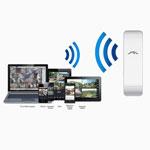 We receive many requests for wireless camera streaming for security and other unrelated applications such as monitoring manufacturing processes or placing cameras on UAVs. Until 2012, the options available were limited to analog D1 resolution wireless video transmitters of 2.4GHz and 5.8GHz frequencies such as the one found in this outdoor wireless security camera. These RF […]
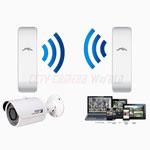 Our 2.4GHz wireless access point radio is a great product to use for long range wireless video transmission, especially in cases where your camera’s built-in wireless radio or wireless router are just not strong enough to provide a stable video signal. If you currently have a wireless IP camera and noticed your camera is frequently dropping […]
 Cloud storage has become increasing popular the last few years for storage solution needs that arise in companies. It has also become very popular as a solution for off-site storage and backup of footage from IP cameras and IP camera systems that need lots of storage space, as recording in HD resolution is very memory […]
 In order to view your cameras while you’re out shopping, at work, on vacation, or anywhere but home you’ll need to forward the ports on your router’s firewall to stop the packets being sent from being filtered by your router. What does this mean? Our DVRs and NVRs are always open to communications and are […]
 If you want to view your cameras remotely and are not familiar with networking, then you might be stuck wondering why you time out all of the time. Don’t worry, you’re not alone. This is due to ports on your network being closed and unavailable for network packets to travel through on layer 4 of […]
 In order to view your surveillance system remotely there are a few things that have to be configured on your network. First, you will have to create port forwarding rules in your router in order for the data that’s put out by your DVR/NVR to pass through the firewall within the router on your network. Second, […]
 Sometimes a single configuration can mess with your entire surveillance system’s functionality. Zeroing down the exact cause can be very time-consuming. If you have a misconfigured NVR or DVR recorder and want to correct it, but don’t know what setting is the culprit, you can use the “DEFAULT” feature to reset the digital video recorder […]
 In order to install a PTZ camera and have its features work generally you will need to connect two additional leads for RS485 Serial Data. RS485 will control the Pan/Tilt/Zoom functions on your PTZ. With HDCVI there is an alternative, you can send video and PTZ controls over the same line with this technology. Today […]
 Port forwarding is essential to viewing your surveillance system remotely. Without redirecting your packets you’ll be stuck timing out every time you try to view your feed from a remote network. We try to make this process as simple for our end users as possible. I remember the first time I attempted to forward ports […]
 Here at CCTV Camera World, we customize our products to fit our customer’s needs. A ton of time goes into developing new innovative ways to use our products. Today we discovered a new way to use our cameras, and we’re going to share it with you. I’m telling you, the possibilities are endless.
 Want to change the order of PoE IP cameras connected to your PoE NVR, then this is a must watch video for the quick trick needed to reset the camera settings on the NVR. First, make sure you connect the cameras to the numbered PoE ports on the back of your NVR recorder. Disregard the […]
 So you’re having trouble viewing your surveillance system remotely, and you’ve already read our articles on forwarding your ports. Unless you pay your internet service provider for a static IP address you will need to set up Dynamic DNS (DDNS) in order to access your home network remotely. This article will explain what is DDNS, […]
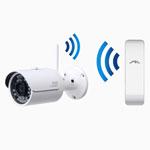 This How To guide discusses the steps necessary to setup a wireless camera system for long range transmission that can be used indoors or outdoors. We show how our wireless security cameras with built-in WiFi radios can be used with professional 2.4GHz WiFi access points to establish reliable signals for transmission up to 300ft. Clear […]
 Whether you are trying to find the IP address of a new Ubiquiti access point or one that you just simply forgot what you set its IP to, this quick guide will show you how to find the device on your network.
 With the advent, and rampant popularity of the digital camera and then the rise of the smart phone it seems that almost everyone is an amateur aspiring photographer with a least one zoom lens and photo under their belt. It is an enjoyable and rewarding hobby, as you are able to commemorate special moments in […]
 All of the DVR and NVR video recorders offered by CCTV Camera World have video based motion detection and email alert notifications as standard features. Although setting up motion detection based video recording is easy, integration of your email account and configuring email alerts can be challenging for the user unfamiliar with our DVR interface. […]
 This article will take you step by step through the process of enabling motion activated recording in your DVR or NVR recorder that you have purchased from CCTV Camera World. This is a very straightforward and simple process that should be very similar regardless of your unit and firmware. When you have your cameras set […]