


How to Replace a Q-SEE DVR or NVR

If you are trying to replace a Q-See DVR or NVR, the model number matters more than the Q-See name on the front. Q-See sold several generations of recorders sourced from different manufacturers, so the right replacement depends on whether you have a coax DVR or an IP-camera NVR, which series you own, and which cameras are already installed.
This guide is meant to help you sort that out. If you already know what you have and are ready to shop, our dedicated Q-See replacement category brings the DVR, NVR, camera, and complete-system options together in one place.
Important: CCTV Camera World is not affiliated with Q-See and there are no free Q-See replacements. If you want us to help identify a compatible replacement, please use our technical support form and include the model numbers and pictures described below.
How Do I Know Whether I Have a Q-See DVR or NVR?
Start by looking at the back of the recorder.
- Round BNC camera inputs: You have a DVR or XVR that uses coax cameras.
- Ethernet / RJ45 camera ports: You have an NVR designed for IP or PoE cameras.
This distinction matters because a traditional BNC DVR and an NVR do not use the same type of cameras. If you are still unsure, send us a clear picture of the back of the recorder with the cables connected.
Find the Q-See Recorder Model Number First
The model number is usually printed on the front, bottom, or side of the recorder. Having the exact model saves a lot of guesswork because two recorders that look similar may support different camera types or resolutions.
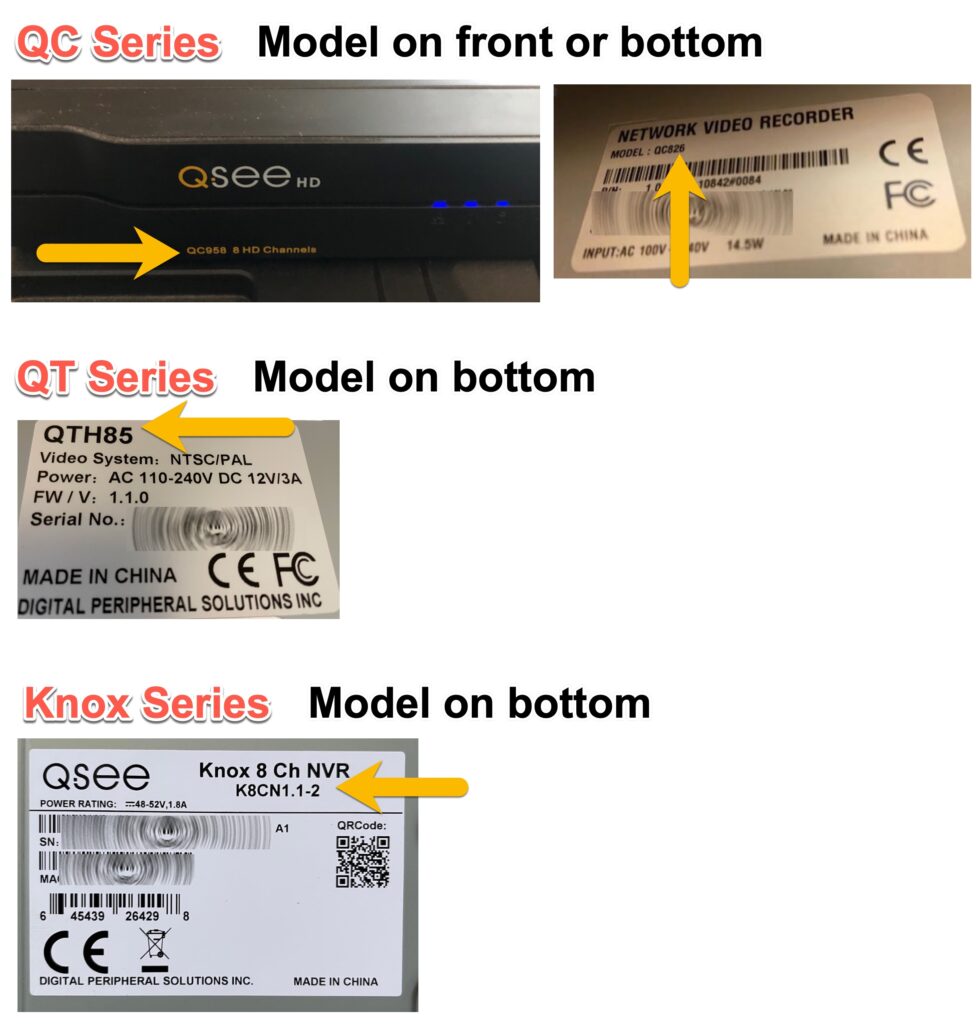
When asking us to identify a replacement, send as much of the following as you can:
- The Q-See DVR or NVR model number.
- A clear picture of the back of the recorder with the cables connected.
- A picture of the recorder's main menu or system-information screen.
- For NVR systems, tell us whether you have any external PoE or network switches.
- For DVR systems, include a picture of the camera power supply if you are unsure how the cameras are powered.
Q-See Recorder Series: QC, QT, and Knox
Q-See used several product lines over the years. The series name gives us a starting point, but the exact recorder model is still the best way to confirm a replacement.
QC Series
The QC Series included both analog DVRs and IP-camera NVRs. Before choosing a replacement, first confirm whether your QC recorder has BNC camera inputs or Ethernet/PoE camera ports.
For QC NVR systems, our Avalonix Premium Series NVRs are our preferred replacement path and work with most QC and QT camera models. Camera resolution still matters, so check the recorder and camera model numbers before ordering.
QT Series
QT Series recorders are more complicated because Q-See sourced them from multiple manufacturers. Camera support can vary substantially from one QT model to another, so we do not recommend picking a replacement based on the QT name alone.
Send us the QT recorder model and the camera model numbers. We can usually tell you which of our DVRs or NVRs makes sense without having you buy equipment just to find out whether it works.
Knox / Presidio Series
Knox Series recorders were IP-based NVR systems used with Q-See Presidio IP cameras. Our NDAA compliant security cameras and compatible NVRs are the usual replacement path for these systems, but we still recommend confirming the recorder and camera models first.
How to Replace a Q-See DVR
If your cameras connect with round BNC connectors, replacing the DVR is often the easiest way to keep the existing cameras and coax wiring in service.

Which Q-See BNC Camera Formats Can a Replacement DVR Support?
Avalonix multi-format DVRs and XVRs support the major coaxial camera signal types that Q-See used over the years:
- CVBS / standard analog CCTV
- AHD
- HD-TVI
- HD-CVI
HD-SDI is the important exception. If your cameras are marked HD-SDI, do not assume that a current multi-format DVR will support them.
Resolution also matters. Q-See sold cameras ranging from older standard-definition analog models through HD and 4K generations. Check the maximum camera resolution supported by the replacement DVR before buying.
Can I Keep the Existing Coax Wiring?
In most Q-See DVR replacements, yes. Existing BNC-terminated coax cable can usually stay in place if it is in good condition and you are keeping similar-resolution cameras.
The main caveat is a 4K camera upgrade. Many Q-See systems were installed with thin pre-made copper-clad aluminum cable. That cable may work with older cameras but cannot reliably carry a 4K signal over longer distances. For 4K over coax, solid copper cable pulled from a roll is the preferred wiring.
What Do Current DVRs Add Compared With an Older Q-See Recorder?
- Multi-format coax support: One recorder can support CVBS, AHD, HD-TVI, and HD-CVI cameras within the recorder's resolution limits.
- IP camera support on compatible XVR models: IP cameras can be added over the local network, normally through a PoE switch.
- Free mobile viewing: Current systems include remote viewing apps for iPhone and Android.
- Desktop viewing: Windows and Mac software is available for live view and playback.
- No monthly fee: Local recorder-based surveillance does not require a subscription for normal remote viewing.
You can browse our current Avalonix DVR and XVR recorders, or use the Q-See replacement category if you want the broader replacement options in one place.
How to Replace a Q-See NVR
If your Q-See cameras use Ethernet cables, replacing the NVR requires more attention to camera compatibility than replacing a coax DVR. The recorder and camera need to communicate over the network, and the camera username and password also matter.

Will Existing Q-See IP Cameras Work With a New NVR?
The answer depends on the camera model and the Q-See series it came from. Many Q-See IP cameras can be reused with a compatible Avalonix NVR, but it is not safe to assume that every Q-See camera will work simply because both products use Ethernet.
ONVIF compatibility is useful, but model-specific compatibility still matters when you want more than a basic video stream. If you want us to check a camera, send the NVR model, camera model, and a picture of the camera-registration screen from the old recorder when possible.
Do I Need the Old Q-See Camera Password?
Often, yes. IP cameras are usually assigned credentials when they are first configured. When an existing Q-See camera is connected to a new NVR, you may see an “invalid username or password” message until the correct camera password is entered.
In many cases, the camera password is the admin password used on the old NVR or the camera's original default password. Our separate guide shows the process for connecting Q-See QC Series IP cameras to an Avalonix NVR.
Can I Keep the Existing Ethernet Wiring?
Usually. Properly terminated CAT5e or CAT6 Ethernet cabling used for an existing IP-camera system can normally be reused with a replacement NVR. If the old system uses an external PoE switch, tell us how it is connected so we can recommend the correct network layout for the replacement recorder.
Browse our Avalonix NVR recorders for current options.
Q-See DVR & NVR Replacement FAQ
Are all Q-See cameras compatible with Avalonix DVRs?
No. Most Q-See BNC cameras using CVBS, AHD, HD-TVI, or HD-CVI can be supported by the appropriate multi-format Avalonix DVR, but HD-SDI cameras are not supported. The replacement recorder must also support the camera's resolution.
Can I use my existing Q-See coax cable?
In most cases, yes. Existing coax can usually be reused for a DVR replacement. If you are also upgrading to 4K cameras, cable quality becomes much more important and older pre-made copper-clad aluminum cable may need to be replaced.
How do I know if my Q-See recorder is a DVR or NVR?
Look at the camera connections on the back. Round BNC ports indicate a coax DVR or XVR. Ethernet/RJ45 camera ports indicate an IP-camera NVR.
Will a replacement recorder restore remote viewing?
Yes. Current CCTV Camera World DVRs and NVRs include free mobile remote viewing and desktop software. After replacing the old recorder, you set up the app and remote access for the new system rather than relying on the discontinued Q-See software.
Do I need the password from my old Q-See NVR?
You may. Existing IP cameras can retain the credentials assigned when they were first configured. If the new NVR reports an invalid username or password, the old NVR admin password or the camera's factory credentials are the first places to check.
What should I send CCTV Camera World before asking for a replacement recommendation?
Send the recorder model number, a picture of the back of the recorder with the cables connected, and a picture of the main menu or system-information screen. For NVR systems, also include camera model numbers and details about any external PoE switches.